


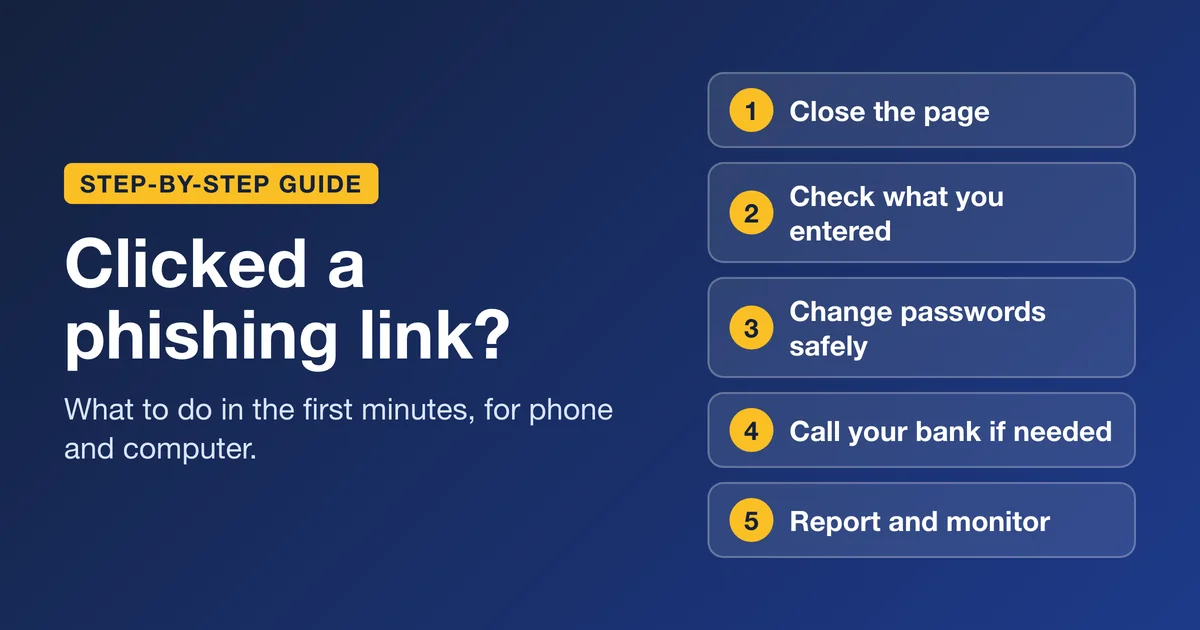
Clicking a phishing link does not mean you have been hacked. A phishing page usually tries to get you to do one of two things: type something in (a password, card or bank details) or download something. So a click alone isn’t always an emergency. IMO, what you do in the next few minutes determines your fate.
Quick answer: the first 5 actions
Do these in order.
- Stop and close the page. Don’t tap, type, call or reply to anything it showed you.
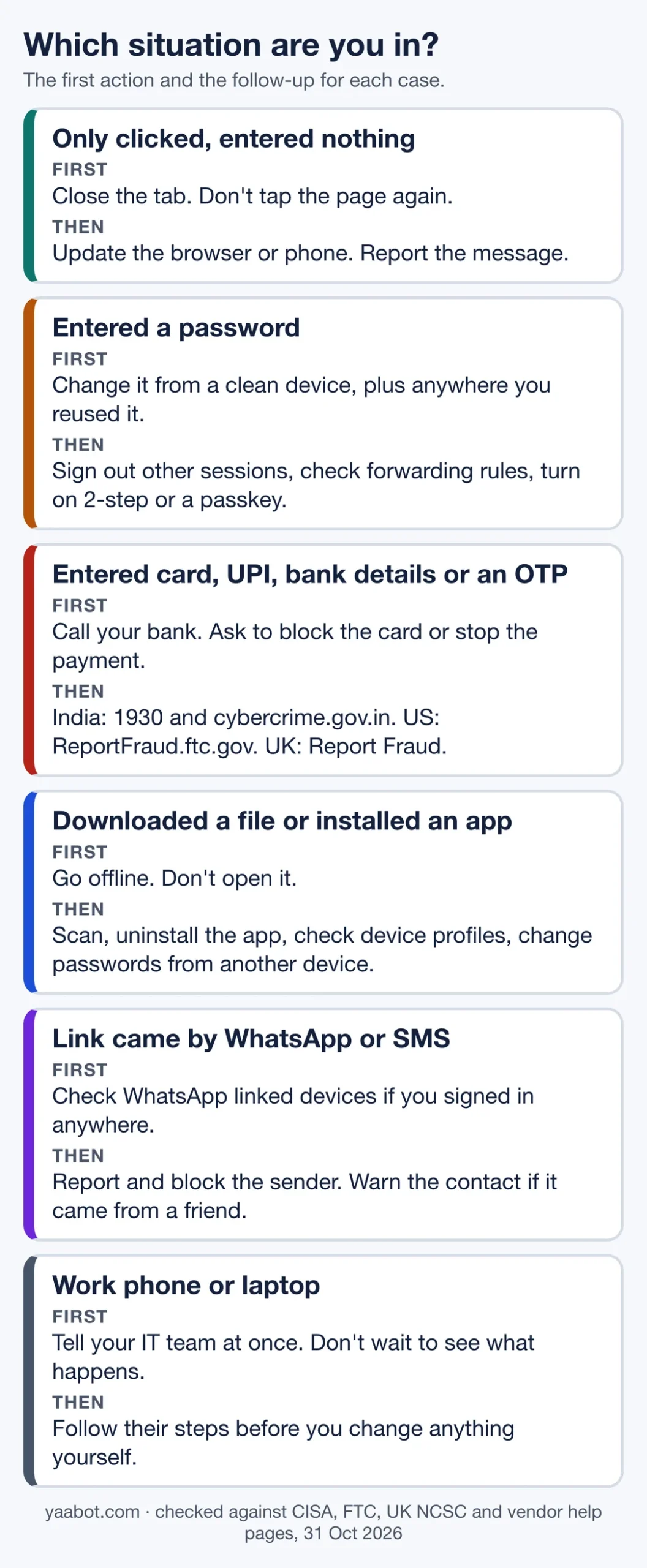
- Work out what the page could have taken: nothing, a password, card or bank details, or a download. The table below matches each case to an action.
- If you entered a password, change it from a device you trust, sign out other sessions, and turn on two-step verification or a passkey.
- If you entered card, UPI or bank details, or shared an OTP, call your bank now. In India, also call 1930.
- If you downloaded a file or app, go offline and scan the device. Then report the message and watch your accounts and statements.
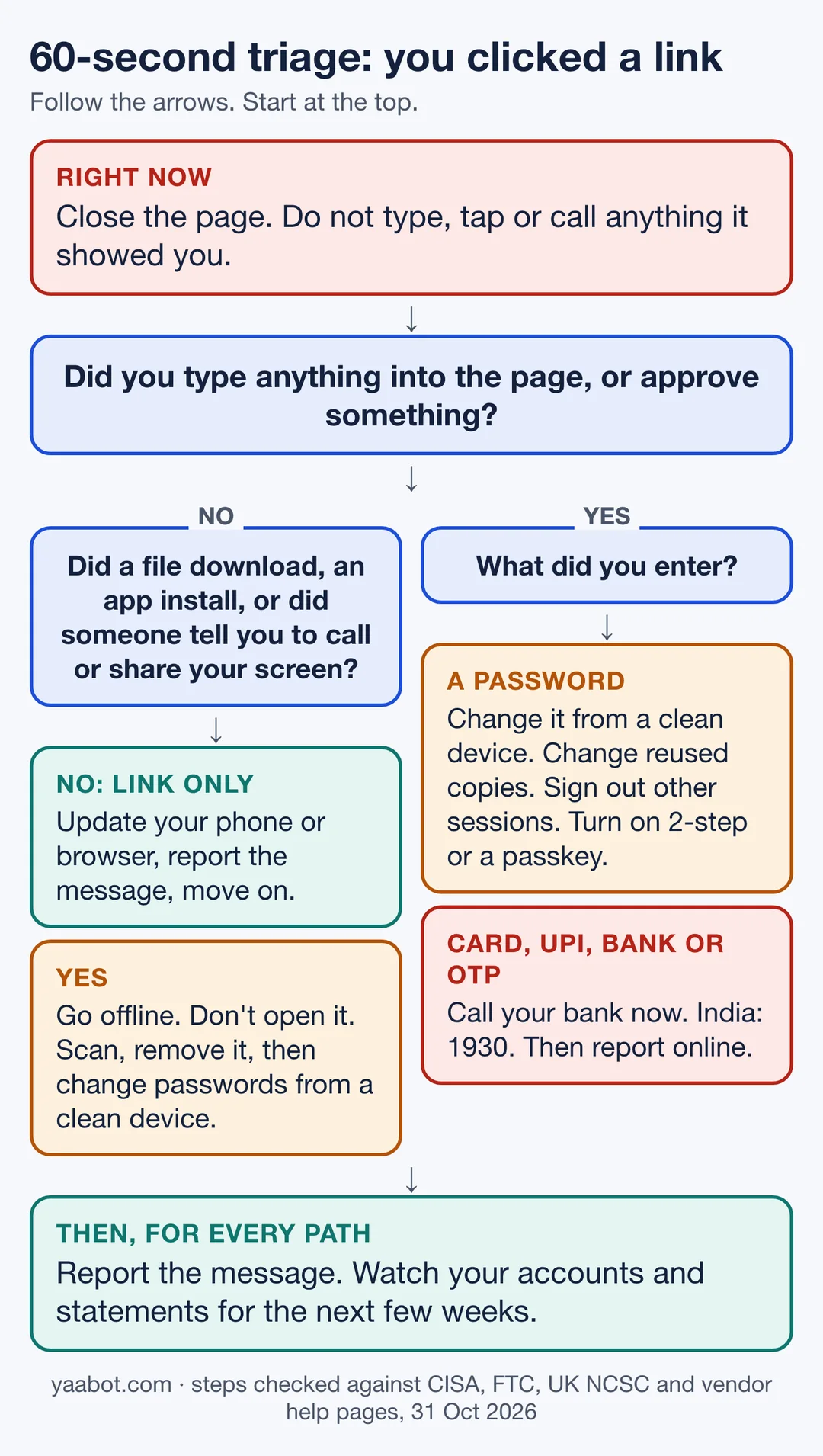
60-second check: which path are you on?
I’d say start at the top of the chart and follow the branch that matches what you did. If more than one applies, do the most urgent one first: money, then passwords, then the device.
What happens if you click on a phishing link?
Usually, you land on a web page and nothing else happens until you act. The UK’s National Cyber Security Centre (NCSC) describes the aim of a phishing message as getting you to visit a website that may download a virus onto your device or steal bank details and other personal information. The US Federal Trade Commission (FTC) gives the same warning: a link in a scam message can lead to malware, and a fake login or payment page can capture what you type.
I’m not saying a click is entirely risk free. Flaws in software can give criminals access to files or accounts, which is why CISA asks people not to delay updates. So the safe assumption is: the click alone is low risk, an up-to-date device lowers it further, and anything you typed or downloaded needs action.
What the page could have taken, and what to do
| What you did | What the page could have taken, and what to do |
|---|---|
| Clicked, then closed the page | Could have taken: Nothing you typed, because you typed nothing. Do this: Update your browser and phone or computer, report the message, delete it. |
| Entered a password | Could have taken: Access to that account, and to any other account that uses the same password. Do this: Change it from a trusted device, change it anywhere you reused it, turn on two-step verification, review sign-ins. |
| Entered card, UPI or bank details, or shared an OTP | Could have taken: Money, or the ability to approve payments. Do this: Call your bank now. India: 1930 and cybercrime.gov.in. Block or replace the card. |
| Entered ID numbers (for example a US Social Security number) | Could have taken: Your identity, for opening accounts in your name. Do this: US: IdentityTheft.gov and a free credit freeze. |
| Downloaded a file or installed an app | Could have taken: Possibly malware that runs on your device. Do this: Go offline, don’t open the file, scan, uninstall what you don’t recognise, then change passwords from another device. |
| Followed a caller’s or page’s instructions to share your screen or install a tool | Could have taken: Control of your phone or computer. Do this: FTC steps: update security software, run a scan, delete what it flags, change passwords and turn on two-factor authentication. |
Steps for each situation
Scenario 1: You clicked, but entered nothing
- Close the tab, or the in-app browser if the link opened inside a messaging or email app.
- Install any pending updates for your browser and your phone or computer. CISA’s advice is not to delay them.
- If the message claimed to be from a company you use, ignore every link and number in it. Open the company’s app or type its address yourself. The FTC’s test is simple: do you have an account with that company, or know the sender?
- Report the message, then delete it (see how to report it).
- Keep an eye on sign-in alerts and statements over the next few weeks.
If the page only loaded and your device behaves normally, there is nothing more to clean up.
Scenario 2: You entered a password
- Use a device you trust. If the phone or computer you clicked on might also be infected (you downloaded something, or it is acting strangely), use a different device. Microsoft’s own advice for a hacked account is to scan the PC first and change the password afterwards.
- Change the password for that account. If you use the same password anywhere else, change it there too (the FTC says exactly this). A password manager makes unique passwords easy.
- Turn on two-step verification. Where an account offers a passkey, the NCSC suggests using one instead of relying on the password alone. Our explainer on passkeys covers how they work.
- Review recent sign-ins and sign out other devices using the table below.
- Check for forwarding rules and changed recovery details. Attackers sometimes add a forwarding address so they keep seeing your mail. Check mail forwarding and filters, then confirm your recovery email and phone number are yours (steps below).
- If you can’t sign in, use the provider’s account recovery page rather than the link in the message.
Scenario 3: How to check recent sign-ins and sign out other sessions
| Account | Where to look, then what to do |
|---|---|
| Where: Google Account, then Security & sign-in. Open “Review security events” and “Your devices”, then “Manage devices”. Then: Mark activity you don’t recognise as “No, it wasn’t me”, and remove devices you don’t recognise. Google also tells you to change the password on any site that shares it. Check that your recovery phone number and recovery email are still yours. | |
| Gmail forwarding | Where: Gmail on a computer: Settings, See all settings, then the Forwarding and POP/IMAP tab. Also review filters. Then: Click Disable forwarding if you didn’t set it up, then Save Changes. |
| Apple Account | Where: account.apple.com, then Devices. Then: Remove devices you don’t recognise, and fix any personal or security details you don’t recognise. Check each Apple device under Settings by tapping your name. Ask your mobile carrier to confirm SMS forwarding isn’t set up on your number. |
| Microsoft account | Where: The Recent activity page in your Microsoft account (it shows the last 30 days). Then: Choose “This wasn’t me” on unusual activity, change the password, remove trusted devices, and check connected accounts, forwarding and automatic replies. |
| Where: Password and security settings, then “Where you’re logged in”. Then: Select the sessions you don’t recognise (or Select all) and log out. | |
| Where: More, then Settings, then Meta Account, then Login and security, then “Where you’re logged in”. Then: Open Active login, then log out of locations or devices you don’t recognise. | |
| Where: Android: tap the three-dot menu, then Linked devices. iPhone: Settings or your profile picture, then Linked devices. Then: Tap a device you don’t recognise, then Log out. Also turn on two-step verification (Settings, Account, Two-step verification on Android; You, Account on iPhone). |
A WhatsApp-specific point: if you gave away the 6-digit registration code, re-registering the account with a new code logs out every other device, according to WhatsApp’s help page. WhatsApp also says never to share that code with anyone, including friends and family.
Scenario 4: You entered card, UPI or bank details, or shared an OTP
- Call your bank or card issuer now. Use the number on the back of your card or on the bank’s official app or website, not a number from the message. Ask them to block the card, stop pending payments and reverse anything unauthorised. The FTC says to report it to your bank or credit union immediately and ask for a reversal.
- India: call the national cybercrime helpline 1930 and file a complaint at cybercrime.gov.in. The portal says any victim of financial cyber fraud can dial 1930.
- Don’t share another OTP with anyone who calls or messages afterwards, even if they claim to be from the bank or from the police.
- Turn on transaction alerts and check statements for the next few weeks. RBI’s customer-protection rules tell customers to report an unauthorised transaction to the bank at the earliest, and say the longer the delay, the higher the risk of loss. Banks must offer 24×7 ways to report it. Ask your bank which RBI rule applies to your account type, because the time limits depend on the product.
- US: report at ReportFraud.ftc.gov, and at the FBI-run Internet Crime Complaint Center (IC3). If you typed a Social Security number, start at IdentityTheft.gov.
- UK: tell your bank, then report to Report Fraud (details in the table below).
Scenario 5: You downloaded a file or installed an app
- Don’t open the file. But if you already opened it or installed the app, turn on airplane mode or disconnect from the network. CISA’s older home-user guidance on viruses says to call IT support first if you have one, then disconnect from the internet, which cuts off any intruder’s access.
- Update your security software, run a full scan, and remove what it finds. On Windows – go with Windows Security, Virus and threat protection, Scan options, Full scan, Scan now. Our guide to antivirus software and VPNs explains what each does.
- Uninstall apps you don’t recognise or didn’t get from an official store. Phone steps are in the iPhone and Android sections below.
- Change passwords from a different device after the scan, not before.
- If the scan can’t clear it, a reset may be needed. Google says you might have to reset an Android device or ask its maker for help. CISA’s older guidance says reinstalling the operating system is the only sure way to remove a deeply hidden infection, at the cost of your files, so back up first.
If a caller or an on-screen message talked you into installing a remote-access or screen-sharing tool, treat it as someone having had control of the device. Follow the FTC steps above, and read our piece on voice-cloning phone scams for how those calls are pitched.
Scenario 6: You clicked a phishing link on an iPhone
- Close the Safari tab. Optionally clear history and website data: Settings, Apps, Safari, Clear History and Website Data. Apple says this doesn’t change your AutoFill information. It signs you out of websites, so it is a convenience step, not a malware fix.
- Check for profiles you didn’t install: Settings, General, VPN & Device Management. Apple says deleting a profile also deletes the settings, apps and data tied to it. A profile from your employer or school may be needed, so check with them before deleting it.
- If you typed your Apple Account password, change it and remove unknown devices at account.apple.com. Apple lists warning signs: sign-in alerts for unfamiliar devices, two-factor codes you didn’t request, and a password that stops working.
- Open the Passwords app and tap Security to see weak or compromised passwords flagged, then change them on the site or app.
- Apple says it will never ask you for your password or verification codes. Treat any caller or message claiming otherwise as another scam.
Scenario 7: You clicked a phishing link on an Android phone or Samsung Galaxy
- Open the Play Store, tap your profile icon, tap Play Protect settings, and make sure “Scan apps with Play Protect” is on. Google says Play Protect checks apps from other sources too and may warn you, deactivate or remove harmful apps.
- Uninstall anything you don’t trust or didn’t get from Google Play: Settings, Apps (on some phones, Apps & notifications, then See all apps), tap the app, then Uninstall.
- On a Samsung Galaxy, go to Settings, Battery and device care, Device protection, then Scan phone. Samsung recommends keeping Device protection turned on. If you can’t uninstall a bad app, Samsung describes a Safe mode route that disables third-party apps so you can remove it.
- Install pending updates: Settings, Security & privacy, System & updates, then Security update and Google Play system update. Our guide to checking whether your phone still gets security updates helps if the phone is old.
- On the phone’s browser, go to myaccount.google.com/security-checkup and fix what it flags.
Google’s malware page lists signs to watch for: pop-ups that won’t go away, a slow device, an antivirus that stops working, less free storage than before, or contacts getting messages you didn’t send. If these continue after the steps above, Google says to reset the device or contact its maker.
Scenario 8: You clicked a phishing link from WhatsApp, SMS or social media
- Don’t reply, and don’t forward the link, even to warn people.
- Report it. In the UK and US, forward scam texts to 7726. In India, the government’s Chakshu tool on the Sanchar Saathi portal takes reports of suspected fraud communications by call, SMS or WhatsApp.
- If you signed in anywhere from that link, or scanned a QR code or entered a code from WhatsApp, check Linked devices in WhatsApp and log out anything unknown (see the sign-in table above).
- If the message came from a friend’s account, tell them by another route. Their account may be taken over, and the same link may be going to everyone they know.
- Chakshu is for reporting the message. If you lost money, use 1930 and cybercrime.gov.in; the Sanchar Saathi site says Chakshu is not for reporting financial fraud cases.
Scenario 9: You clicked a phishing link on a work phone or laptop
- Tell your IT or security team straight away. The NCSC’s guidance for organisations says staff who click should not be punished for reporting, because fear of blame makes people stay quiet. Don’t wait to see if anything happens.
- Do what IT tells you before you try to clean the device or change work passwords yourself.
- If you typed personal passwords on a work device, change them afterwards from a different device.
Signs that something went wrong
Alone, these aren’t necessarily an issue. But together with a click on a suspicious link, you have reason to be worried if you experience these:
- A sign-in alert, two-factor code or password-reset email you didn’t request.
- Your password suddenly stops working, or account details changed that you didn’t change.
- Contacts say they got messages or spam from you.
- Pop-ups or new browser tabs that won’t go away, a changed browser homepage or search engine, or extensions you didn’t install.
- An antivirus that stopped working, or a device that is unusually slow or short of storage.
- Charges, transfers or card alerts you don’t recognise.
Where to report if money moved or your identity was used
| Country | Start here | Then report to |
|---|---|---|
| India | Your bank or card issuer, then helpline 1930. | cybercrime.gov.in (National Cyber Crime Reporting Portal). |
| United States | Your bank, card issuer or payment app. | ReportFraud.ftc.gov; IdentityTheft.gov if ID numbers were exposed; IC3 (FBI) for cyber-enabled crime. A credit freeze is free and doesn’t affect your credit score (FTC). |
| United Kingdom | Your bank. | England, Wales and Northern Ireland: Report Fraud or 0300 123 2040. Scotland: Police Scotland on 101. |
| Pakistan, Philippines | Your bank or e-wallet provider. | We could not verify the current contact details for Pakistan’s national cybercrime agency or the Philippines’ Cybercrime Investigation and Coordinating Center; both sites blocked our check. Look up the number on the agency’s own site rather than trusting one from a message. |
How to report the phishing message itself
Reporting takes a second and helps block the sender for other people. Use the “report phishing” or “report spam” option in your mail or messaging app first. CISA says it is usually near the sender’s name or in the toolbar. Then delete the message without clicking anything in it, including “unsubscribe”.
- United States, email: forward it to [email protected] (the Anti-Phishing Working Group, per the FTC), and report it at ReportFraud.ftc.gov. Text: forward it to 7726 (SPAM).
- United Kingdom, email: forward it to [email protected] (NCSC). Text: forward it to 7726. The NCSC says your provider can then investigate and block the sender.
- India, email: use your mail app’s report option. Texts, calls and WhatsApp messages: report them with Chakshu on sancharsaathi.gov.in.
- Message pretending to be Apple: forward emails to [email protected], and email a screenshot of a text to the same address.
If your mail is cluttered with this kind of message, the email filters guide shows how to catch more of it. Our Gmail security alerts explainer covers the warnings Google sends.
How to spot the next one
- Urgent or emotional language that threatens consequences if you don’t respond straight away.
- Requests for personal or financial information by link, text or email. Legit companies don’t email or text a link to update your payment details.
- Shortened links, or addresses that are slightly off, such as amazan.com.
- Don’t rely on bad spelling. CISA warns that AI tools mean phishing messages can now have perfect grammar.
- Go in by the front door. If a message might be real, open the company’s app or type its address yourself, or call a number from its official site. CISA’s advice for a message that could be genuine is to look up another way to contact the sender.
Unique passwords from a password manager, two-step verification and passkeys limit the damage when one slips through. For the wider picture of attack types, see our overview of cyberattacks to watch out for.
When to get help
- You can’t sign in to an account that matters (email, bank, Apple or Google account) and the provider’s recovery page isn’t working.
- Money left your account, or someone opened accounts in your name.
- It happened on a work or school device.
- Someone had remote access to your phone or computer.
- The signs of malware continue after a scan and an update. Google suggests resetting the device or asking its maker for help.
- Someone contacts you afterwards demanding payment or threatening to leak data. Stop replying and report it using the channels above.
Remember:
- This is general guidance, not advice for your exact device or situation, and we did not test it by clicking phishing links ourselves. The steps come from the government and vendor pages linked throughout this guide.
- Nothing can recall a password or card number you already typed. The steps I mentioned reduce what a criminal can do with it.
- Menu names change between iOS, Android, Samsung One UI and app versions. If a menu looks different, use the vendor’s help page linked in that step.
- Going offline and scanning are precautions, not guarantees that a device is clean. A device that keeps misbehaving may need a reset.
- Yaabot is a technology publication, not a bank, law-enforcement agency or security firm. Your bank and the reporting channels above can act on your accounts. We can’t.
Frequently asked questions
Usually you only land on a web page. The risk comes from what the page gets you to do: type a password or payment details, or download a file. If you did neither, close the page, update your devices, report the message and move on.
In most cases, yes. Close the page, install pending updates, report and delete the message, and keep an eye on sign-in alerts for a few weeks. If a file downloaded or the device starts behaving oddly, follow the download steps above.
It is possible. Phishing pages mainly work by getting you to type something or install something, but CISA notes that software flaws can give criminals access, which is why keeping your browser and phone or computer updated matters.
Close the tab, check Settings, General, VPN & Device Management for profiles you didn’t install, and change your Apple Account password at account.apple.com if you typed it. If you entered card or bank details, call your bank.
Make sure Play Protect scanning is on, uninstall apps you don’t trust, install security updates, and run the Google security checkup. On a Samsung Galaxy you can also use Settings, Battery and device care, Device protection, Scan phone.
Tell your IT or security team straight away and follow their instructions before you clean the device or change work passwords yourself. Don’t wait to see whether anything happens.
Not by default. A reset is for cases where a scan and uninstalling suspicious apps don’t stop the problems, or where you installed something you can’t remove. Google says to reset the device or contact its maker if malware signs continue.
If you can’t tell, treat any unexpected message asking you to log in, pay or update details as suspect. Check the sender and the link address, and open the company’s real app or site instead. Afterwards, look for sign-in alerts you didn’t expect, charges you don’t recognise, and pop-ups that won’t go away.
