



FTP as a concept is almost as old as the internet itself. Short for File Transfer Protocol, it mainly runs on two machines: a server that stores the files and a client that connects to it. According to stats, the global FTP client software market size is expected to reach USD 2.19 billion by 2033.
The client is the program you use to browse folders, drag files, and click upload. FTP dates back to the early 1970s, which makes it one of the oldest protocols still running on the internet. Its clients used to be command-line only. Most people now use graphical apps like FileZilla or Cyberduck, both free and cross-platform, though web-based clients and browser extensions can help too.
Key Takeaways
- An FTP client connects to a remote server and moves files. The server stores them; the client requests the transfer.
- FTP uses two channels: one for commands, one for the actual file data.
- Passive mode is more common than active mode because it works with firewalls instead of against them.
- Plain FTP sends credentials and file content unencrypted. Skip it for anything sensitive.
- FTPS bolts SSL/TLS onto FTP. SFTP runs over SSH on one port and supports key-based login.
- For most modern use, choose SFTP or FTPS over FTP.
How FTP Moves Files?
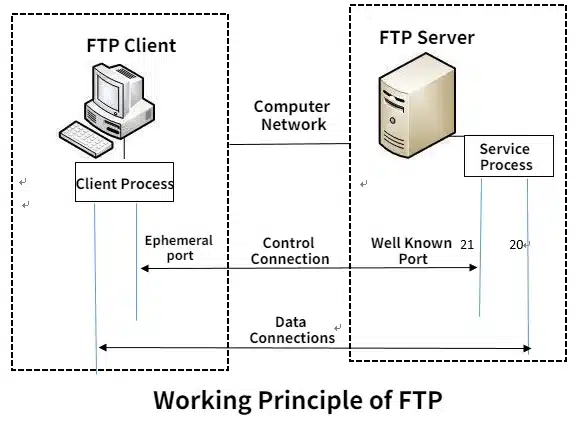
FTP splits its work across two separate connections instead of one.
- The control connection opens first, usually on port 21. It carries commands and responses such as logging in, listing a directory, and telling the server what to do next. It stays open for the whole session but never carries file data itself.
- The data connection opens separately, one per transfer, and it’s where the bytes move. Once a file finishes uploading or downloading, that connection automatically closes. The control connection stays open in case you want to do something else.
- A session runs like this- the client opens the control connection, sends your username and password (or connects anonymously if the server allows it), you browse the directory, a data connection opens for each transfer, and the whole thing closes once you’re done.
Active Mode vs Passive Mode
Who opens the data connection in an FTP setup?
In active mode, the client opens a port and waits, and the server connects to it. In passive mode, the server opens the port, and the client connects instead.
Passive mode wins for a practical reason.
Active mode needs the client to accept an inbound connection, and most home routers and office firewalls block that by default. Passive mode avoids the problem because it’s the client who always initiates.
What FTP Clients Do for You
The core job is moving files, but most clients add a handful of practical extras, including drag-and-drop transfers, folder sync that flags what’s out of date, a transfer queue you can pause and resume, resumable transfers so a dropped connection doesn’t force a restart, scheduled transfers for recurring backups, and bulk transfers for entire folder trees instead of one file at a time- features also common across modern FTP client software.
What Is the Problem with FTP: No Encryption
Standard FTP sends everything as plain text: your username, your password, the file contents, all of it.
Let’s face it, that wasn’t a concern in the 1970s. It’s a real one now. Anyone intercepting traffic on an open network, say, public Wi-Fi at a coffee shop, can read those credentials; that’s a concern. That’s why FTP has fallen out of use for anything sensitive.
FTPS and SFTP: The Secure Options
Two protocols have largely replaced FTP.
- FTPS adds SSL/TLS encryption to standard FTP, the same layer HTTPS adds to HTTP. It keeps FTP’s two-channel structure and needs an SSL certificate. It comes in two versions: explicit, where the client connects normally and then upgrades to encryption, and implicit, where the connection is encrypted from the first handshake.
- SFTP is a different protocol, though it has a similar name. It runs over SSH, uses a single port (usually 22) for everything, and encrypts both commands and data. Because it runs over SSH, it also supports login with an SSH key instead of just a password, which FTPS can’t do. That’s the main reason people rank SFTP as more secure.
| FTP | FTPS | SFTP | |
| Encryption | None | SSL/TLS | SSH |
| Ports used | 21 plus a data port | 21 or 990 plus a data port | 22 (one port) |
| Auth methods | Username and password | Username and password | Password or SSH key |
| Underlying protocol | FTP | FTP | SSH |
Why Is FTP Still Used?
Web hosts, software vendors, and backup systems still depend on FTP and its secure versions because nearly every server and operating system supports it without any extra setup. Moving files rarely need more than a hostname, a username, and a password. That said, not every host still relies on it: traditional free web hosting providers like InfinityFree and AwardSpace still give you FTP access by default, while newer platforms such as Cloudflare Pages, Netlify, and Vercel skip FTP altogether and deploy straight from a Git repository.
The Bottom Line
If you’re setting up file transfers today, FTP is rarely the right default. It still works, and plenty of servers still run it, but sending a password in plain text is a bad trade for something that’s just as easy to secure.
Check whether your host supports SFTP first. If it only offers FTPS, that’s still a real improvement over unencrypted FTP. The client software barely changes either way. FileZilla and Cyberduck both handle FTP, FTPS, and SFTP from the same interface, so the harder decision is on the server side, not which app you click into.
For more information on AI, tech, Science, Futurism, and more, check Yaabot.
FAQs
Yes, mostly for web hosting, software distribution, and backups, because almost every server supports it without extra configuration. Use FTPS or SFTP instead of FTP where security matters.
FTP is the protocol, the rules for moving files between two computers. An FTP client is the software you use to follow those rules, like FileZilla or Cyberduck.
Not for sensitive data. It sends everything unencrypted, so anyone watching the network can read your credentials and files. Use FTPS or SFTP if that matters.
FTPS adds SSL/TLS encryption on top of standard FTP and keeps its two-channel structure. SFTP is a separate protocol built on SSH, uses one port, and supports login with an SSH key, which is why some consider it slightly more secure.
In active mode, the client opens a port, and the server connects to it. In passive mode, the server opens the port, and the client connects. Passive mode works better behind firewalls, which is why most clients use it by default.
No. Modern FTP clients are graphical. You browse and drag files without typing a single FTP command.
