


Visuals are often the first impression a brand or artist makes to ensure that it lasts. Whether it’s in advertising, packaging, social media, or brand messaging, how an image looks and what it conveys can shape our perception as the audience, trigger sentiments, and even influence buying decisions.
While static images have their own strength, printing techniques that simulate depth can instantly draw more attention. Lenticular printing is one such approach that’s finding its way into everything from promotional displays and movie posters to personal photo gifts.
So, what is it exactly, and how does it create the illusion of moving images? In this post, I’ll discuss everything from the basics to the use cases of lenticular photo printing.
Key Learnings
- Lenticular printing combines interlaced images and optics to create illusion effects on static images.
- The tech behind lenticular printers has evolved over the years, with better software and lens options now supporting smoother transitions and sharper depth.
- From customized lenticular photo printing to brand displays, its applications span marketing, art, retail, and more.
What is Lenticular Printing?
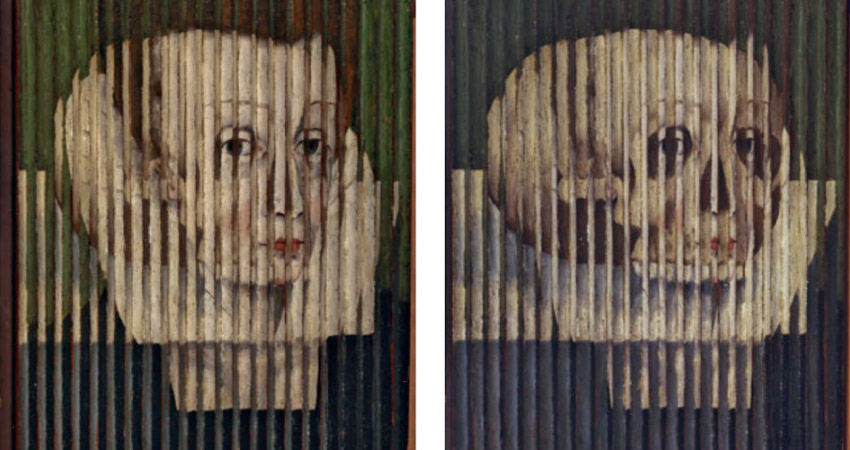
The concept of lenticular printing traces back to the 16th century with “tabula scalata” – a basic flip or turning picture made using slotted barriers and interlaced images. The commercial side of this printing began around the early 1900s, with “Photochange Post Cards.” Over time, the lens tech improved, leading to 3D version of it and more refined effects like morphs and zooms.
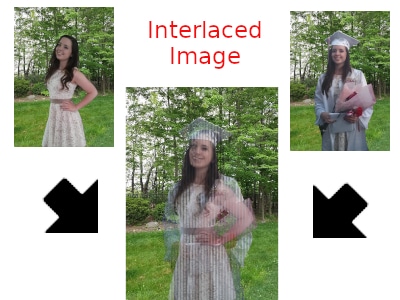
For the uninitiated – this is a method that creates the illusion of moving images, depth, or change between images on a flat surface – no screens, no batteries, just clever optics. It uses a special lens, called a lenticular lens, layered over printed images. When you tilt the print or move your head, the visual shifts show motion images.
This technique combines print design with precise lens alignment and refraction, adding a dynamic twist to still images. Today, lenticular photo printing is big in advertising, art, and packaging. Companies like Tracer Imaging and DPLenticular are famous for lenticular printing for both commercial and creative use.
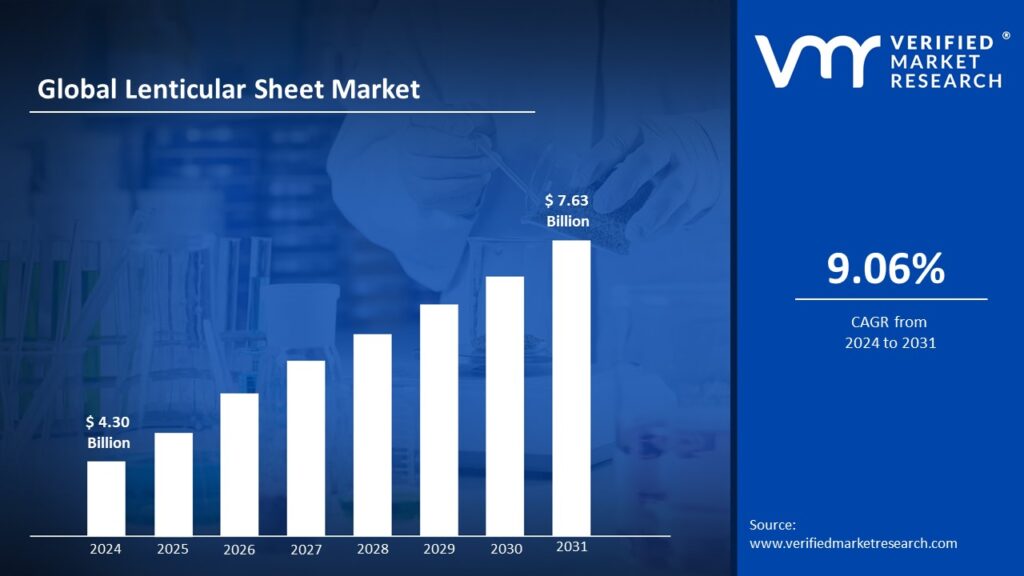
Given its growing popularity, it’s no surprise that the global lenticular sheet market was valued at around $4 billion in 2024 and might reach over $7.5 billion by 2031, growing annually at the rate of 9% during this forecast period.
Types of Effects in Lenticular Photo Printing
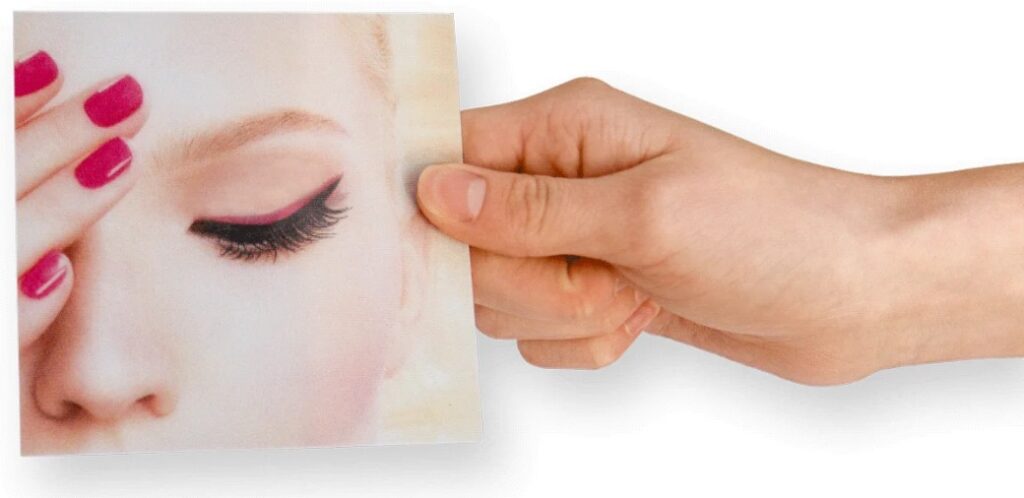
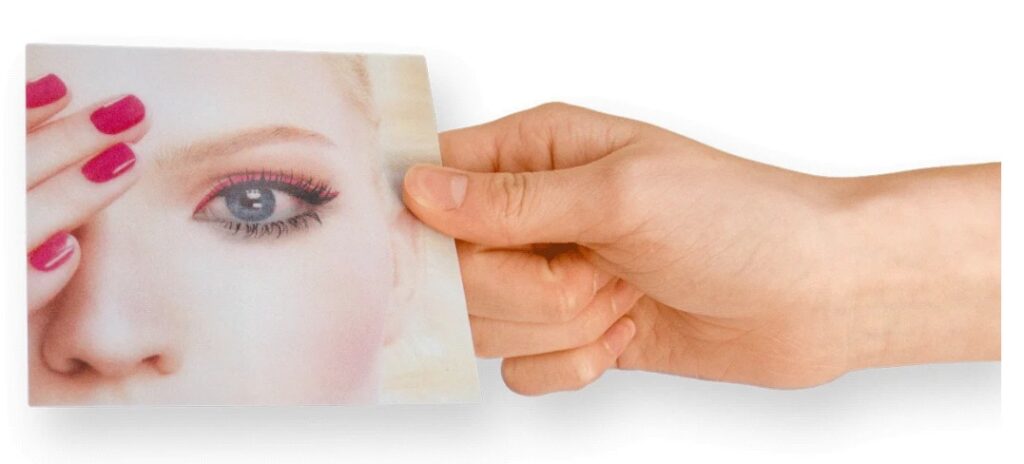
There are multiple effects we can create in lenticular prints, like:
- 3D lenticular printing: It creates the illusion of depth, making parts of the image appear to pop out or recede.
(Note: 3D lenticular printing should not be confused with 3D printing or 3D bioprinting).
- Basic flip: The most common one that alternates between two distinct images when viewed from different angles.
- 3-flip: It displays three alternating images instead of just two for added variation.
- Animation: It shows a motion sequence, like a short video or GIF, through multiple frames.
- Zoom: It creates a zoom-in or zoom-out effect as the image changes with viewing angle.
- Morph: In this, the images smoothly transition from one visual into another to show a gradual transformation.
How Lenticular Printing Works
Lenticular printing combines image interlacing with a specially designed plastic lens sheet to create the illusion of a motion image, image flips, or 3D depth depending on the viewing angle.
Let’s understand a bit more about how lenticular printing works:
- Image interlacing: To begin, multiple source images like frames of a flip animation or various angles for 3D lenticular printing, are sliced into thin vertical strips. These strips are woven together into one single file. For example, in a flip animation, the interlaced file alternates strips from two different images.
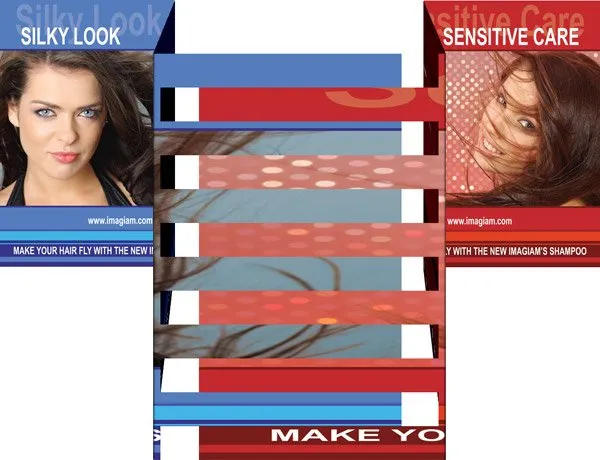
- Lens sheet placement: The interlaced image is printed either directly onto the back of a lenticular lens sheet using a lenticular printer. It can also be printed separately and laminated behind the lens using clear adhesive. Accurate alignment is important – each lens must fit perfectly over its matching strip.

- Lenticular lens array: The lens sheet is made up of tiny vertical cylindrical lenses (often acrylic or PETG) that sit on top of the image. These lenses bend light in specific directions, sending different strips to each eye or each viewing angle.
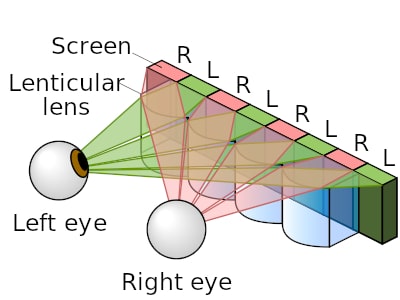
- Viewpoint and visual effect: As the angle of view changes or when you move your head, the lenses reveal different image strips, creating the illusion of a moving image. The lens naturally directs light in such a way that each eye sees a different view.

- Print and resolution requirements: The image must be printed at extremely high resolution, to match precisely to the lens pitch (lenticules per inch). Even slight misalignments can blur the effect.
Equipment Needed in Lenticular Photo Printing
Creating quality lenticular prints takes more than just an idea – it requires the right tools, from lenticular printing machines to software tools.
Lenticular printing machine
Lenticular printers are available from entry-grade units suitable for short runs to high-end industrial machines built for large-scale output. Low-end machines are cheaper than professional systems and can reach up to $100,000. Output resolution often ranges from 1200 to 2400 DPI (dots per inch), for clean lens-to-image alignment.
Ink
In the lenticular printer, you must use high-quality UV-curable inks and a UV drying system. Beginners can start with 75 LPI sheets and test files to gain experience before scaling up. Proper ink and setup are critical for sharp, aligned prints.
Software
Specialized software is required to interlace images correctly. Popular tools like 3DMasterKit and Imagiam’s software allow precise control over frame slicing, image sequencing, and alignment based on the LPI of the lens sheet.
Lens sheet
Integral to the lenticular photo printing is the lens sheet, which comes in different types and LPIs. Common LPIs include 40, 60, and 100, chosen based on print size and viewing distance. Sheets can be made from acrylic, PETG (Polyethylene Terephthalate Glycol), or APET (Amorphous Polyethylene Terephthalate).
Lenticular Photo Printing Use Cases

Here are some use cases of lenticular photo printing:
- Product packaging: Lenticular packaging creates eye-catching visual effects like flip, zoom, or 3D depth that make products stand out on crowded shelves. It’s especially effective for cosmetics, beverages, and toys where visual appeal drives purchase decisions.
- Event tickets and passes: Lenticular printer is also used to print event tickets and entry passes, turning them into memorable collectibles. Effects like 3D depth or animation add value and encourage sales.
- Outdoor advertising: To enhance marketing strategies, famous brands Adidas, Bloomindales, and Regatta Great Outdoors use lenticular printing to flip between product shots and lifestyle imagery, effectively telling a story in one display.
- Decorative art and displays: Many artists and designers use lenticular photo printing to create dynamic, engaging pieces of art to make displays in homes and galleries more interactive and modern.
- Collectibles and entertainment: Lenticular printing adds visual appeal and value to movie promos, CD/DVD covers, and fan merchandise.
Innovation in Lenticular Photo Printing
With the ongoing tech advancements, lenticular photo printing is also evolving:
- Advancements in lens materials and high-resolution printers are delivering more precise depth and animation, enhancing the illusion of the moving images.
- Combining lenticular prints with augmented reality and digital elements like QR codes could open doors to hybrid physical-digital experiences – ideal for marketing, education, and ad events.
- Eco-friendly inks and recyclable lenses are making lenticular printing greener and more sustainable.
Common Challenges and Tips to Consider
Here are some common challenges to consider in lenticular photo printing:
- Misalignment between the lens and interlaced image can throw off the entire moving image effect into vain. That’s why they’re accurately aligned for better results.
- When frame elements overlap too much, unwanted images may ruin the end results, which is why you need to maintain consistent tones and contrast to reduce overlapping.
- Fine lines or too many frames can affect the image clarity, for which you can use bolder graphics and pick the right frame count for the effect you’re looking for.
Final Thoughts
Lenticular printing offers a creative way to make visuals stand out with the illusion of moving images in the form of animation, zoom, flips, or 3D effects. It’s more accessible than ever, with options ranging from industry-grade setups to home-based tools. If you’re experimenting or producing at a large scale, lenticular adds more positive visual impact to your work. You can start by exploring various lenticular printers and software to get going.
Want to learn more about such evolving tech? We’ve got you covered with all the latest tech updates and solutions. At Yaabot, we pride ourselves on being your ultimate stop for all things related to online technology, software, applications, AI, science, health tech, and more.
Frequently Asked Questions (FAQs)
No, they’re completely different. 3D printing creates physical objects layer by layer, while 3D lenticular printing creates the illusion of depth or motion in static images using a special lens and ink.
Woodblock printing is considered to be the oldest form of printing, which first originated in China around 200 AD. It involved carving images or text into wooden blocks, inking them, and pressing them onto fabric or paper.
You can begin with high-resolution images, bold contrast, and simple designs that suit your goals. With a lens sheet, a lenticular printer, and interlacing software, you’ll be able to manage the printing process.
Ideally, 2 or 3 images are preferred for better results. However, you can use 10 or more images, but you may need to rethink and adjust your resolution goals and go for a high-end lenticular printer for better output.
