



The first real customers of spatial computing didn’t pre-order a headset. They clocked in for a warehouse shift.
That’s the part of this story that keeps getting buried under Vision Pro headlines and metaverse think-pieces. While the consumer press has spent three years speculating about which XR devices might “go mainstream,” hundreds of thousands of workers have already been wearing spatial computing hardware every day, often without choosing to.
In April 2026, Amazon rolled out its smart glasses across the US and Canada. Its job is to cover the warehouse logistics, server infrastructure, and remote maintenance teams. That’s the largest mass deployment of always-on AR cameras, quietly happening in fulfillment centers.
Spatial computing is no longer in the “coming soon” category. It has arrived, just not where the press conferences said it would.
Key Takeaways
- Spatial computing integrates digital content with physical space using XR devices, sensors, and real-time AI.
- The spatial computing market is being driven by enterprise adoption, not consumer demand.
- Mixed reality headsets like Apple Vision Pro 2 and Meta Orion serve fundamentally different use cases.
- Proven spatial computing applications include surgical training, remote expert support, and construction review.
- The biggest barriers to adoption remain hardware cost, software fragmentation, and integration complexity.
- AI is the engine underneath spatial computing: without real-time processing, none of the core functionality works.
What Is Spatial Computing?
Spatial computing is a technology that blends digital content with the physical world using XR devices, sensors, and real-time AI. It allows users to interact with 3D digital elements anchored to real environments.
To be precise, spatial computing isn’t just VR or AR, though both are part of it. It’s basically the broader capability. It’s the system that maps your environment, understands where objects are, and renders persistent digital content anchored to physical locations.
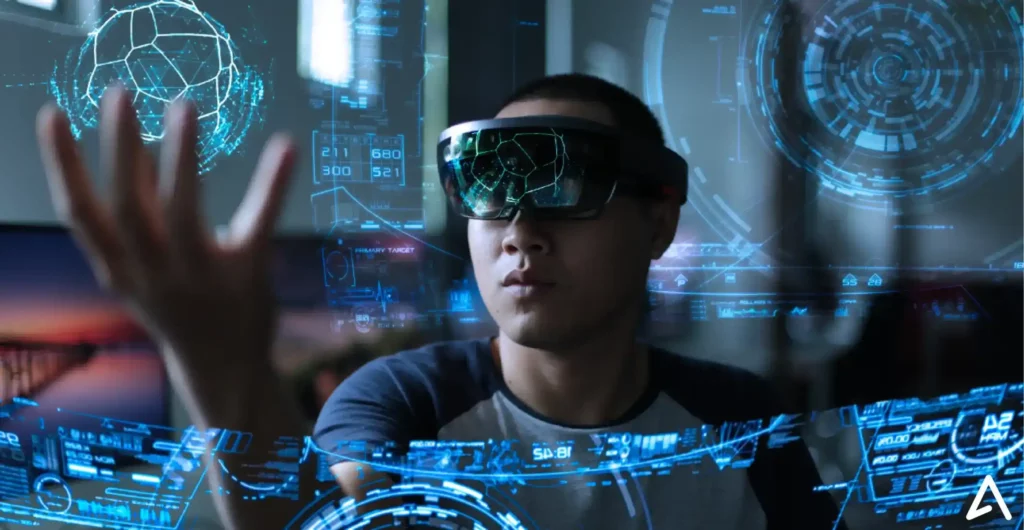
The term gained mainstream traction after Apple used it to describe the Vision Pro experience in 2023. But the underlying concept predates that by decades. What’s changed is that the hardware is finally good enough to make it practical.
Think of it this way. Traditional computing treats your screen as the world. Spatial computing treats the world as your screen.
How Spatial Computing Works: The Technology Stack Explained
XR devices and sensors
XR devices are the hardware layer: headsets, smart glasses, and AR overlays that capture and display spatial content. Modern XR devices pack an extraordinary amount of sensing hardware into a small form factor.
The current generation of mixed reality headsets generally includes:
- Outward-facing cameras for passthrough videography and environment mapping.
- Depth sensors for measuring physical geometry.
- Eye-tracking cameras for gaze-based interaction.
- Inertial measurement units (IMUs) for head pose tracking.
- Microphones for spatial audio and voice commands.
All of this runs simultaneously, which is why on-device processing power matters so much.
Spatial mapping and environment understanding
Before any digital content can be placed in a room, the device has to understand that room. Spatial mapping builds a real-time 3D model of the environment using depth sensor data and camera feeds. This is the foundation of XR. Without accurate spatial mapping, objects clip through walls, anchors drift, and the illusion falls apart.
Modern systems do this well enough that a placed object stays exactly where you left it when you take the headset off and put it back on. That persistence is what separates 2026-era spatial computing from the early “floating window” experiences of 2020.
AI and real-time processing
AI isn’t an additional feature of spatial computing. It’s a core feature. It’s what makes spatial computing work. Real-time AI handles object recognition, scene understanding, hand tracking, and NLP.
Apple Vision Pro 2’s M5 chip runs approximately 38 TOPS of AI inference on-device without streaming to a server. That’s more than double the original Vision Pro, and it’s what allows complex spatial computing applications to run locally rather than depending on cloud latency.
Software and interfaces
The software layer is where spatial computing applications actually live. visionOS 26’s spatial scenes API is a good example of where this is heading. Apps can now persist across sessions, react to the room layout, share state across multiple headsets in real time, and layer AI inference directly onto physical objects in the scene.
This is genuinely different from anything that existed before. The interface isn’t a window floating in space. It’s a layer of information that understands where it is.
In short, Spatial computing works by combining XR devices, sensors, and AI to map physical environments and place interactive digital content within them in real time.
XR Hardware Powering Spatial Computing in 2026
Mixed reality headsets
Two devices are defining the high end of spatial computing hardware right now.
Apple Vision Pro 2
Apple Vision Pro 2 launched in February 2026 with the M5 chip, dropping in price from $3,499 to $2,499 and reducing weight from 650g to 480g. Battery life improved to 3.5 hours. Hand tracking latency dropped to roughly 6 ms. For enterprise users, Vision Pro 2 is the clearest example of spatial computing as a personal workstation: capable of running a Mac workflow inside the headset, equivalent to working with two 5K monitors.
Meta Orion
Meta Orion took the opposite approach. The developer edition ships at 85g in a standard glasses form factor, with a 70-degree field of view holographic display and EMG-based neural wristband input. Battery life is four hours. You lose the immersive fidelity of Vision Pro in exchange for something you can actually wear all day.
The two leading spatial computing devices in 2026 take very different approaches. The table below compares Apple Vision Pro 2 and Meta Orion across key specifications, use cases, and form factors.
| Specification | Apple Vision Pro 2 | Meta Orion (Dev) |
| Form factor | Headset | Glasses |
| Weight | 480g | 85g |
| Battery life | 3.5 hours | 4 hours |
| Price | $2,499 (unconfirmed) | TBD |
| Primary use | Workstation/collaboration | All-day AR overlay |
| Input method | Eye + hand tracking | Neural wristband (EMG) |
| Best suited for | Design, training, collaboration | Field work, logistics |
NVIDIA CloudXR 4.0 sits behind both platforms. It streams rendered spatial content from cloud or edge servers to lightweight XR devices with sub-20ms motion-to-photon latency on 5G networks, at per-session billing starting at $0.85 per hour. A $2,499 Vision Pro 2 paired with CloudXR can run workloads that would otherwise require a $15,000 workstation.
Enterprise vs. consumer devices
The market has been divided into two distinct segments. Enterprise programs are deploying XR as managed device fleets through platforms like Microsoft Intune and Samsung Knox. These aren’t demo units. They’re managed hardware running standardized applications at scale.
Consumer devices, on the other hand, are still looking for a killer app. The high-end mixed reality headset remains a session device for most consumers. It’s useful in specific contexts, but war is something that people will wear for hours.
Current limitations
There are several downsides of XR devices. Here are some of them,
- Battery life stands for around 3.5 hours for premium headsets, limiting full-day usage.
- Passthrough video quality has dramatically improved, but still contains enough latency and distortion to cause discomfort for some users.
- The social stigma of wearing a headset in office spaces is a real adoption barrier that hardware improvements alone won’t be able to fix.
- The software ecosystem is fragmented. An app built for visionOS won’t run on a Quest without significant porting work.
Spatial Computing Applications in the Workplace
This is where the ROI data starts to get interesting.
Training and simulation
Spatial computing applications in training show some of the clearest returns on investment. Cleveland Clinic and Johns Hopkins have deployed Vision Pro-based surgical training that uses AI-generated 3D anatomical models from patient CT and MRI scans. The results: cost per trainee session dropped from $4,200 to $380, and time to competency for complex procedures fell from 14 months to 8 months.
Beyond healthcare, spatial computing use cases in training include hazardous environment simulations. Like equipment operation training on virtual machinery, and customer interaction roleplay with AI-generated avatars. A Forrester TEI study commissioned by Meta reported 219% ROI for mixed reality learning and training programs.
There’s a pattern that keeps showing up. It’s that spatial computing wins when the skill is high-stakes, or hard to practice safely in real life.
Remote collaboration
When a field technician wearing smart glasses connects to a remote expert, the expert can see what the technician sees. He can draw spatial annotations that stick to physical objects and guide procedures step by step without the technician putting down their tools.
What makes 2026 different from previous video solutions: the annotations don’t drift. An arrow pointing to a specific valve stays anchored to that valve even as the technician moves around.
Early deployments of this approach reduced expert travel costs from $2.3 million to $410,000 annually and improved first-visit fix rates from 62% to 87%. Average resolution time dropped from 4.2 hours to 1.8 hours.
Design and engineering
Architecture and construction firms are using spatial computing to review BIM models anchored to actual construction sites. An AI overlay compares the as-built state with the design model in real time and flags discrepancies automatically.
Design review cycle time dropped from 3 weeks to 4 days in early deployments. This allowed the average rework costs to drop from $420,000 to $95,000 per project. For any construction project over $5 million, the hardware cost pays for itself on reduced change orders alone.
Industrial use cases
Spatial digital twins let operators walk through a virtual replica of a manufacturing plant overlaid on the physical space. This is done with the help of sensors floating above the equipment it monitors. Simulation scenarios let workers practice emergency procedures in photorealistic environments without physical risk.
Why Enterprises Are Adopting Spatial Computing in the Workplace
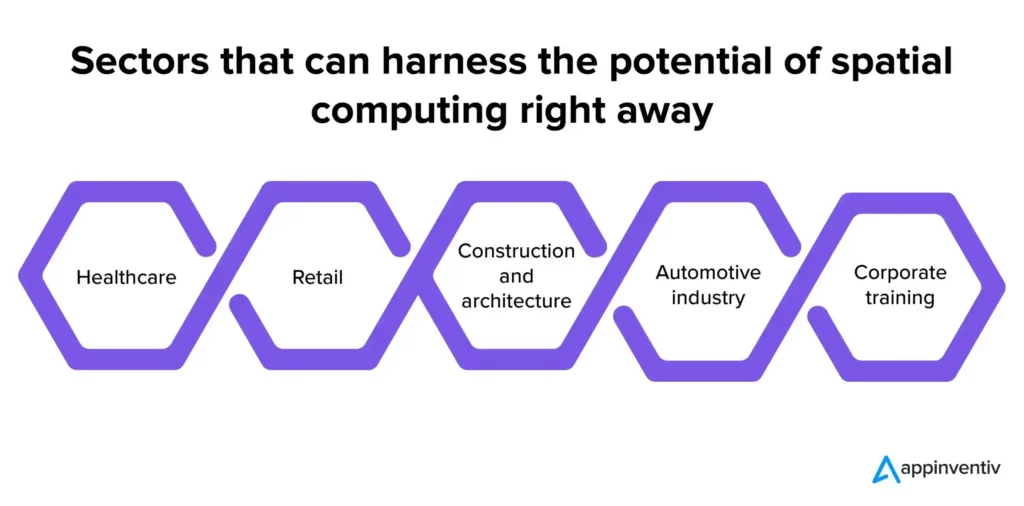
Spatial computing enterprise adoption is strongest in industries where real-time visualization, training, and remote assistance directly impact efficiency and cost. Sectors like manufacturing, healthcare, and construction are leading this shift because spatial computing applications solve immediate operational problems rather than experimental ones.
First, it closes the gap between information and action. A field technician doesn’t have to stop, look at a tablet, and then look back at the equipment. The information is already there, attached to the object they’re looking at.
Second, it makes complex 3D information actually understandable. A 3D model of a patient’s heart on a flat screen is a diagram. The same model in spatial computing is a structure you can walk around and examine from any angle.
Third, it scales training without scaling cost. Once a simulation is built, you can run it thousands of times, with variations, without additional cost per session.
In short, spatial computing delivers the most value in environments where hands-on tasks, training, or real-time guidance can reduce errors and improve efficiency.
Spatial Computing vs. Traditional Computing
Spatial computing differs from traditional computing in how users interact with digital content, process information, and collaborate in real-world environments. The table below compares the key differences across the interface, interaction, and use cases.
| Dimension | Traditional Computing | Spatial Computing |
| Interface | Flat screen | 3D environment |
| Interaction | Keyboard, mouse, touch | Gaze, gesture, voice |
| Content persistence | Bound to the device | Anchored to a physical location |
| Collaboration | Screen share | Shared spatial presence |
| Learning curve | Moderate | High initially |
| Hardware cost | Low | High ($500–$2,500+) |
| Best for | Document work, data, and communication | Training, design, field operations |
Spatial Computing Market in 2026
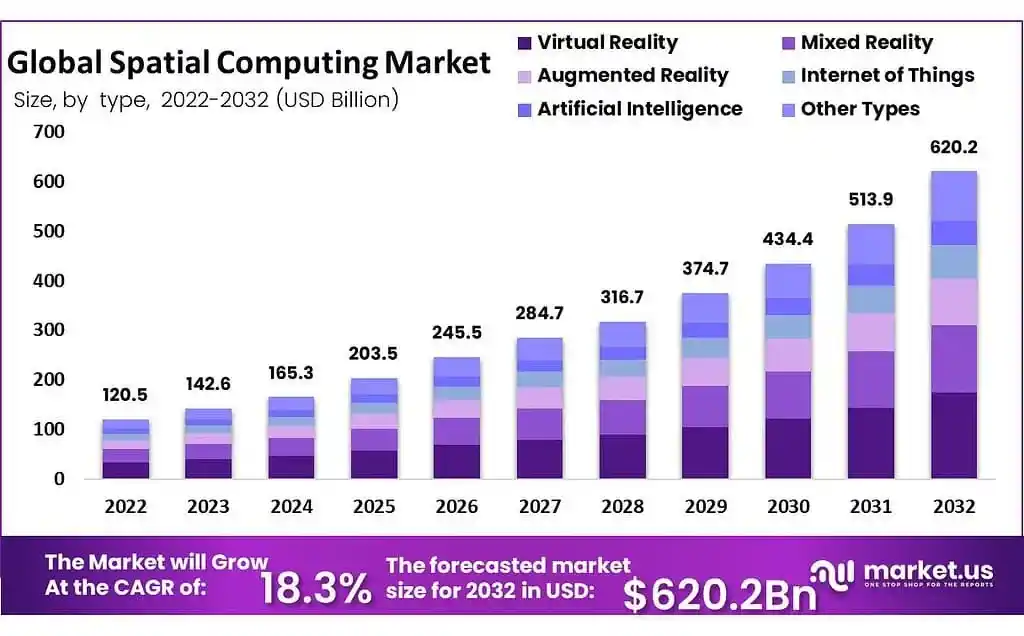
The spatial computing market is growing, but the growth pattern matters. Enterprise deployment is outpacing consumer adoption by a significant margin. The Amazon-Vuzix rollout alone represents one of the largest single deployments of XR devices in history. Google’s April 2026 Android XR update extended Android Enterprise support to XR headsets with MDM management through Microsoft Intune, Samsung Knox, and Omnissa Workspace ONE, which signals that major platform companies are treating enterprise XR as a serious product category.
The immersive technology industry is converging on a practical segmentation: high-fidelity headsets for complex workstation and collaboration use cases, lightweight smart glasses for logistics and field operations, and cloud streaming infrastructure (like CloudXR 4.0) to close the gap between the two.
Challenges Slowing Down Adoption
Hardware cost and accessibility
At $2,499 for Apple Vision Pro 2 and enterprise pricing for Meta Orion, which hasn’t fully landed yet, XR devices are still a line item that requires a CFO sign-off. Meta Quest 3 sits at a more accessible $499, but it’s a different class of device for a different class of spatial computing application.
Limited software ecosystem
The software ecosystem for spatial computing is a bit fragmented. Apps built for visionOS don’t run on HorizonOS. And enterprise deployment requires custom development or heavy integration.
User experience and comfort
A 480g device on your face for 4 hours isn’t comfortable. Passthrough latency and visual field-of-view constraints still cause disorientation for some users. Headsets that require external battery packs limit mobility. These are engineering problems the industry is actively solving, but “actively solving” and “solved” are different things.
Integration with existing systems
Spatial computing applications need to talk to the rest of an enterprise’s software stack. Starting from ERP systems to identity management systems. That integration work is often underestimated in pilot planning and becomes the real barrier at the deployment stage.
The Role of AI in Spatial Computing
AI and spatial computing are not separate trends. They’re the same trend, running on the same hardware.
Real-time object recognition tells the device what it’s looking at. Scene understanding keeps digital content from clipping through physical objects. Hand tracking interprets gesture input at 6-millisecond latency. On-device language models let you talk to the interface in natural language. All of this runs simultaneously, continuously, on the M5 chip in Vision Pro 2 or via cloud streaming through CloudXR.
The shift that matters most is AI in XR devices. It has moved from a cloud-dependent to an on-device feature. That changes the possibility in environments with limited connectivity, and it changes the latency math for real-time interaction.
What’s Next for Spatial Computing
Three things are likely to accelerate in 2027.
The first is comfort and startup speed. Apple is already optimizing Vision Pro to reduce re-setup time between sessions, saving eye and hand calibration data. This kind of improvement turns spatial computing into a habit.
The second is XR plus adaptive AI. The next generation combines XR environments with AI that varies the scenario, responds to learner behavior, and provides dynamic coaching rather.
The third is enterprise resilience against platform changes. Expect organizations to build cross-device content pipelines and invest more in analytics infrastructure that isn’t locked to a single headset OS.
Final Thoughts
Spatial computing in 2026 isn’t the category that people expected. It arrived in warehouses before living rooms, in surgical training suites before gaming lounges, and in construction sites before coffee shops.
The technology works. The ROI data is real. The limitations are also real, and ignoring either side of that picture leads to bad decisions in both directions.
What I’d push back on is the framing that enterprise XR is a stepping stone to consumer XR. The workforce applications of spatial computing and the immersive technology use cases for personal use are diverging, not converging. They share hardware roots but serve fundamentally different needs.
If you’re evaluating spatial computing for your organization in 2026, the question isn’t whether it works. It’s whether your specific workflow is one where spatial awareness gets you an advantage over a tablet or a laptop. In the right context, the answer is unambiguously yes. In the wrong context, you’re paying a lot for a floating window.
FAQs
The main XR devices in 2026 are Apple Vision Pro 2, Meta Quest 3, and enterprise smart glasses like the Vuzix M400.
Spatial computing is used for training, remote assistance, design, and simulation, especially in healthcare, manufacturing, and construction where 3D visualization improves accuracy and efficiency.
The clearest enterprise use cases in 2026 are surgical and professional training, and spatial digital twins for manufacturing and logistics operations.
No, spatial computing is broader. It includes AR and VR but adds environment mapping, object recognition, and persistent digital content anchored to real-world spaces.
Industries using spatial computing include healthcare, manufacturing, construction, retail, and logistics, where real-time visualization, training, and remote collaboration improve productivity and reduce operational errors.
