


Slow Wi-Fi doesn’t always mean you need a new router, no? A WiFi analyzer app for Android can show nearby networks, signal strength, and channel use, which helps you narrow down the cause.
In this guide, I’m going to compare seven apps, from simple scanners to tools with speed tests and more detailed network diagnostics.
Key takeaways
- Ubiquiti WiFiman is the easiest free choice for general use, Analiti goes deepest on interference data, and WiFi Analyzer by VREM asks for the fewest permissions and works offline.
- Checking signal bars takes any app here under a minute; diagnosing why full bars still feel slow needs channel and interference data, which only some apps provide.
- WiFi Analyzer by farproc was pulled from the Play Store years ago. Every app on this list has been updated within the last year.
- These apps read Wi-Fi networks and channels, not the full radio spectrum, so non-Wi-Fi interference like microwaves or baby monitors won’t show up without dedicated hardware.
What Does a WiFi Analyzer App Do?
A WiFi analyzer app scans the wireless networks your Android phone can detect and displays details such as signal strength, frequency band, and channel. This can help you see whether your connection is weak in one spot or competing with nearby networks on a crowded channel.
Some apps also include speed tests, connected-device lists, or heatmaps that show coverage around a home or office. The available tools vary by app, and a phone-based Wi-Fi scan does not detect every kind of wireless interference.
The comparison below shows what each app offers.
Comparison Between the 7 Best WiFi Analyzer Apps
| App | Price | Ads | Bands | Scan Type | Works Offline | Best For |
| Ubiquiti WiFiman | Free | No | 2.4/5/6 GHz | Passive + active | Yes | Ubiquiti gear owners, general use |
| Network Analyzer Pro | $4.99 | No | 2.4/5/6 GHz | Passive + active | Yes | Techs who also need ping/traceroute |
| NetSpot | Freemium | No | 2.4/5/6 GHz | Passive + active | Yes | Heatmap surveys |
| WiFi Analyzer (olgor.com) | Free | Yes | 2.4/5/6 GHz | Passive | Yes | First-time users, simplicity |
| WiFi Monitor | Free | Yes | 2.4/5/6 GHz | Passive | Yes | Basic diagnostics |
| Wifi Analyzer — Network Tools | Free | Yes | 2.4/5/6 GHz | Passive + active | Yes | People who want one app for everything |
| analiti | Freemium | Yes | 2.4/5/6/7 GHz | Passive + active | Partial (speed tests need data) | Power users, ISP techs |
There’s one basic job every app will do for you – list nearby networks, show which channel they are on, and tell you your signal strength in dBm. The differences are mainly related to what else they include, and what they ask permission for before they’ll do it.
How These Apps Were Ranked
Mainly, 4 aspects need to be considered here, based on current Play Store ratings, review counts, and listed permissions:
- Rating and review volume: A 4.5-star app with 300,000 reviews carries more weight than a 4.8-star app with 200 reviews.
- Features beyond signal bars: Channel overlap detection, band support (2.4 GHz alone is no longer enough), and extras like speed testing or LAN scanning.
- Permissions requested: A Wi-Fi scanner that asks you for contacts or camera access is a red flag, not a feature.
- Recent updates: You can find several older “WiFi Analyzer” apps still ranking in search results, but a lot of them were last updated years ago. The list I am going to provide has been updated within the last year.
The 7 Best WiFi Analyzer Apps for Android
1. Ubiquiti WiFiman
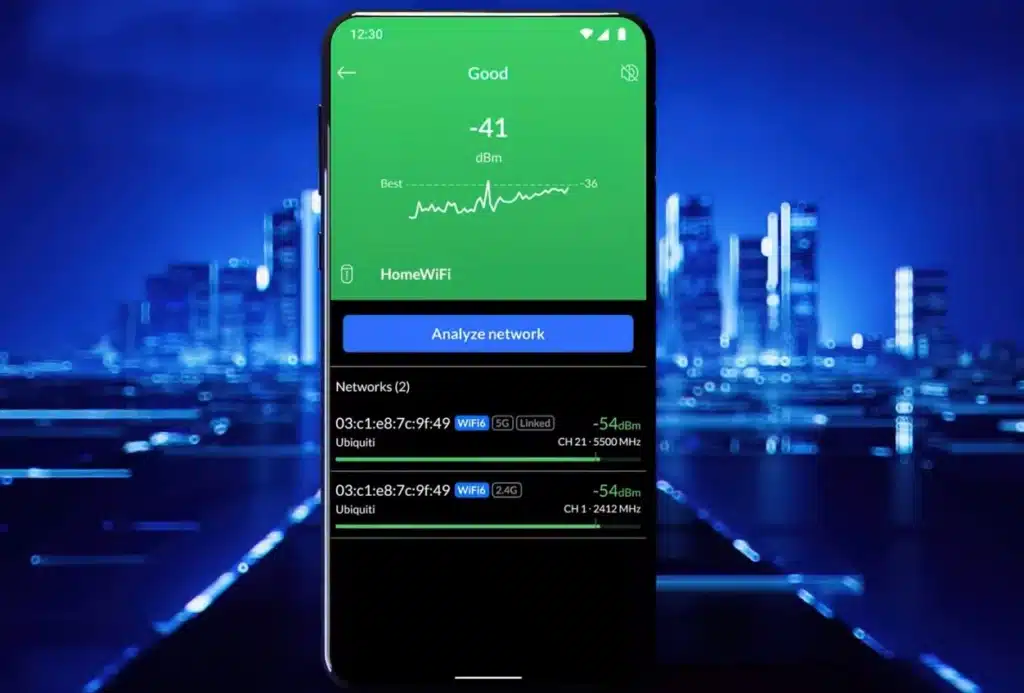
WiFiman is free, doesn’t flood you with ads, and doesn’t require a Ubiquiti account or hardware. It scans nearby networks, tests internet speed and latency, discovers devices on your network, scans subnets, and picks up nearby Bluetooth Low Energy devices. If you own UniFi gear, the analyzer will talk to it directly; if you don’t, it still works as a standalone analyzer.
- Standout feature: The BLE device scan makes it stand out amidst the other apps.
- Rating: 4.5 stars, 50L+ downloads, 3.16L reviews
- Limitation: Several menu items are exclusively for Ubiquiti’s own routers and access points, so they will remain unused if you’re using a different brand.
2. Network Analyzer Pro
Network Analyzer Pro is a network diagnostics toolkit with built-in Wi-Fi scanning. This WiFi analyzer app for Android shows graphical and text-based views of nearby networks across all three bands, along with LAN discovery, ping, traceroute, port scanning, and DNS/WHOIS lookups.
- Standout feature: The combination of Wi-Fi scanning and full network diagnostics in a single paid app with no subscription required later will blow your mind.
- Rating: 4.6, 1L+ downloads, 19.2K reviews
- Cost: $4.99.
- Limitation: The price will feel a little expensive if all you want is signal bars. The free apps listed below will serve the purpose; you don’t have to go through a pocket pinch for this much.
3. NetSpot WiFi Analyzer
The NetSpot WiFi Analyzer app for Android is different from the other apps on this list, they have a thing called heatmaps.
Just keep the app open on your device and walk around your home/workspace; the heatmap will give you a visual representation of where the coverage is better and where it is dropping. The app relies on active scanning across 2.4/5/6 GHz along with passive scanning.
- Standout feature: Floorplan-based heatmapping is definitely the standout feature that makes this app worth it. It is useful when you’re trying to show someone (a client, a technician) exactly where the dead zone is instead of describing it verbally.
- Rating: 3.6 stars, 10L+ downloads, 6.37K reviews
- Free with in-app purchases.
- Limitation: Heatmap tools ask a lot of questions (can be a little irritating at times) compared to a simple channel scanner, and that is something people are still talking about.
4. WiFi Analyzer by olgor.com
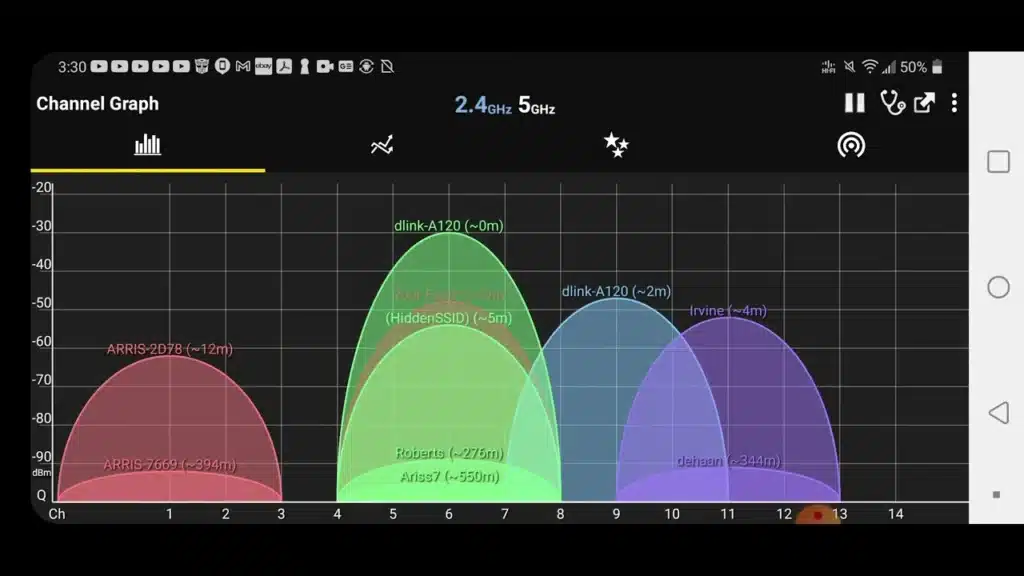
With over 10 million downloads, this is one of the best WiFi analyzer apps for Android; most people already have it installed (the funny part: they don’t even know the name). It shows nearby access points, signal history over time, channel overlap, approximate distance to the router, security type, and activity across all three bands. You can also enjoy a channel recommendation feature that suggests the least crowded option.
- Standout feature: The huge download count means it’s been tested against more phone models and Android versions than almost anything else here.
- Rating: 4.6 stars, 10cr+ downloads, 3.01L reviews
- Free with ads and in-app purchases.
- Limitation: Ads, for sure. Some features require a subscription.
5. WiFi Monitor: Network Analyzer
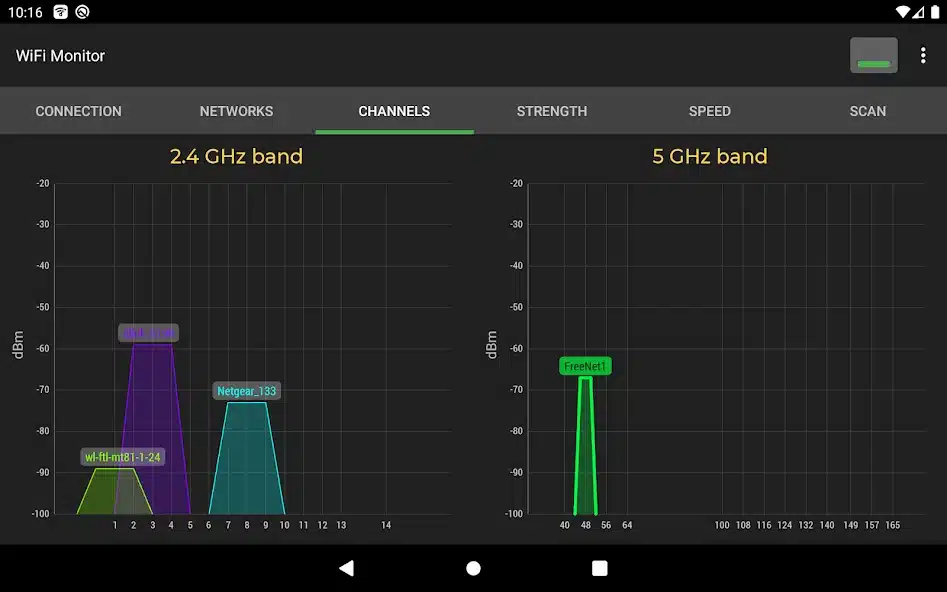
WiFi Monitor sticks to the fundamentals: SSID, BSSID, manufacturer, signal level, channel, frequency, connection speed, security type, gateway, and DNS configuration for the network you’re connected to. Other than that, you will find charts comparing nearby networks by channel and signal strength over time.
- Standout feature: The signal-strength-over-time chart, which makes intermittent drops easier to spot.
- Rating: 4.3 stars, 10L+ downloads, 44.4K reviews
- Free with ads.
- Limitation: The app doesn’t have any active survey or heatmap mode, so it’s better for quick checks, not a full site assessment.
6. Wifi Analyzer: Network Tools
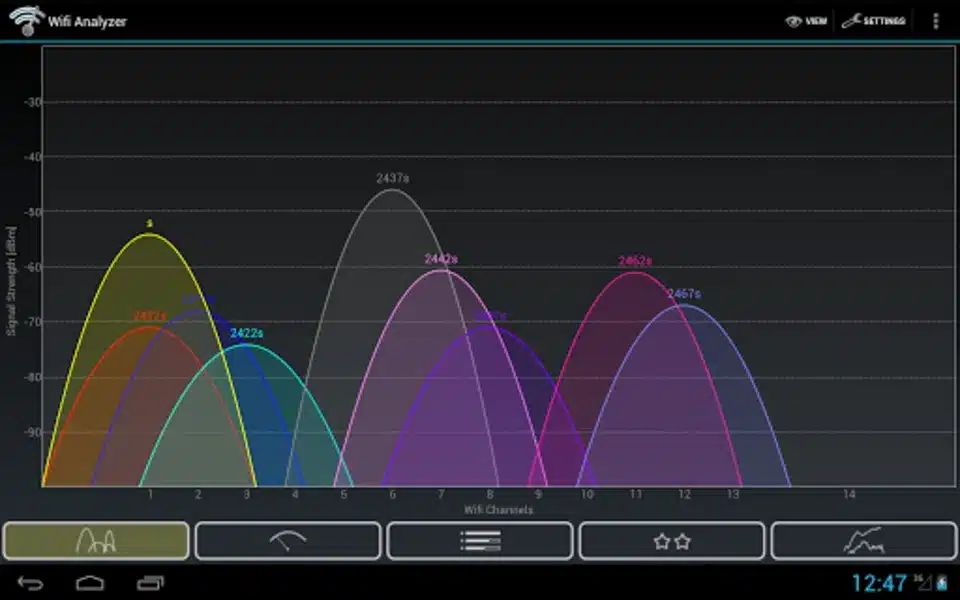
If you are looking for a one-stop option, WiFi Analyzer will look like a blessing to you. It supports interactive signal graphs, channel-overlap analysis, channel recommendations, signal history, three-band support, internet and local speed tests, LAN discovery, ping, traceroute, DNS tools, port scanning, and floorplan heat mapping.
- Standout feature: Floorplan heatmapping in a free app, a feature that costs money in NetSpot.
- Rating: 4.2 stars, 10L+ downloads, 22.5K reviews
- Free with ads.
- Limitation: Too many tools in an app/interface make it busy. You will probably experience a short learning curve before you find what you need.
7. Analiti: Speed & WiFi
Analiti performs to a whole new level. Its channel analyzer reports co-channel and adjacent-channel interference, overlapping basic service sets, estimated client activity, and airtime utilization, on top of the usual signal and channel data. It also runs iPerf3 tests, measures bufferbloat, scans the LAN, captures packets, and reports Wi-Fi 6, 6E, and 7 capability.
- Standout feature: Airtime utilization and bufferbloat measurement are something ISP technicians care about and consumer-grade apps rarely include.
- Rating: 4.4 stars, 10L+ downloads, 9.98K reviews
- This WiFi analyzer app for Android is free with ads and in-app purchases.
- Limitation: The chunk of data on screen can feel overwhelming for someone who just wants to know “is my Wi-Fi bad?” This app is for someone who already knows what a BSS is.
WiFi Analyzer vs. WiFi Signal Strength Test App: What’s the Difference
A signal strength test app will inform you about how strong the connection is right now; it will give you a dBm number or a bar count. A full WiFi analyzer answers more than one question: which channel is crowded, which nearby network is competing for the same frequency, whether the problem is coverage or congestion, and sometimes how the signal changes as you walk through a space.
Every app on this list does signal strength testing; that’s a very basic feature. Only some of them (NetSpot, Wifi Analyzer: Network Tools, Analiti) go further into active surveys and interference analysis. If your only question is “how strong is my signal in this room,” any app here will answer it for you in a minute. If the question is “why does my Wi-Fi feel slow even with full bars,” you need channel and interference data, which narrows the list to the tools built for that.
Which One Should You Use?
- Just want signal bars and nothing else to think about: WiFi Analyzer by olgor.com.
- Don’t want an app asking for extra permissions or sending data anywhere: WiFi Analyzer by VREM.
- Already running Ubiquiti access points, or want speed testing for free: Ubiquiti WiFiman.
- Doing IT support work or diagnosing a bufferbloat complaint: Analiti.
- Need to show someone a visual map of dead zones in a house: NetSpot or Wifi Analyzer: Network Tools.
- Want ping, traceroute, and port scanning alongside Wi-Fi data, and don’t mind paying $4.99 once: Network Analyzer Pro.
What Are the Limitations of Phone-based WiFi Analyzers for Android
These apps will not replace a dedicated spectrum analyzer. Most mobile “Wi-Fi analysis” apps are Wi-Fi scanners and channel analyzers; they can see and chart Wi-Fi networks and channel usage, but they generally can’t detect non-Wi-Fi interference from microwave ovens, wireless cameras, Bluetooth devices, or baby monitors without dedicated spectrum-analysis hardware, as ChannelPro Network’s technician-focused review notes.
This is a heads-up before you spend an hour chasing a “weak signal” that’s actually a microwave interfering with your 2.4 GHz band every time someone reheats lunch. If channel and signal data from these apps don’t explain what you’re seeing, the next step is dedicated spectrum-analysis hardware, not a different free app.
If you’re troubleshooting a router placement problem specifically, pair this list with this guide to fixing Wi-Fi dead zones before assuming you need new hardware. And if the scan results show your neighbor’s network stacked on the same channel as yours, this piece on choosing the right Wi-Fi channel covers what you must choose.
Also Read: High-Speed Internet Guide: Tips to Boost Speed
The Bottom Line
These 7 best WiFi analyzer apps for Android tell you what’s actually happening on your Wi-Fi instead of leaving you to guess from bars on a status icon. They will not fix a bad router placement or a dead 2.4 GHz channel by themselves. They just show you where to look before you spend money on new hardware.
Don’t rely on a single scan. A one-time reading can mistake a temporary dip for a permanent dead zone. Run olgor.com’s WiFi Analyzer or VREM for an immediate first pass, then confirm with WiFiman’s speed test or Analyti’s interference data before you touch a router setting or buy a mesh extender you might not need.
For more information on AI, Tech, Science, Futurism, and more, check Yaabot.
FAQs
No. The farproc app is no longer on Google Play. Check the developer and update date before installing similarly named apps.
No. These apps use Android’s standard Wi-Fi scanning and network permissions, so a stock, unrooted phone is enough for the features described here.
Some apps can list devices connected to your network, but they may show only IP or MAC addresses. Change your router password if you find an unknown device.
For a simple scan, WiFi Analyzer by olgor.com is a straightforward option. Choose Ubiquiti WiFiman if you also want speed tests and device discovery.
iPhone apps generally have less access to scan nearby Wi-Fi networks, so they often focus on the network currently connected. Android supports broader scanning features.