



Curious about the best VFX softwares?
Every year, I see creators pushing the limits of visual effects (VFX) on screen – and the last few years have felt like a big leap forward. The blend of animation, design, and AI tech has made visual effects more accessible than ever. As we approach 2026, the line between real and rendered continues to blur as AI-assisted tools, real-time rendering, and smarter 3D compositing are reshaping how artists build entire worlds from a laptop.
What once needed a full studio can now be done on a computer system with the right tools. With AI now integrating into animation and real-time rendering, new VFX software continues to enhance the creative flow for everyone involved.
Whether you’re a filmmaker shaping scenes, a 3D artist experimenting with textures, or a YouTube creator adding some corrections to your videos, picking the best VFX software is no small decision.
The right digital visual effects software shapes how smoothly you bring your ideas to life. In this guide, I’ll discuss the best VFX softwares, how you can choose the right tools for your projects, and what the future of VFX looks like.
Key Takeaways
- Visual Effects (VFX) is a mix of creative and technical work that adds visuals in films, videos, and animations. It blends real footage with computer-generated visual elements using some of the best VFX softwares.
- VFX software like Adobe After Effects, Blender, Apple Motion, and Runway ML lets you design everything from explosions to full 3D worlds.
- The biggest benefit of using digital visual effects software is flexibility – you can create anything, anywhere. The challenge, however, lies in knowledge, skill, and system performance.
- With AI in VFX reshaping workflows, the line between traditional editing and smart automation keeps getting thinner.
What is a Visual Effects (VFX) Software?
VFX is the process of creating visuals that can’t be captured directly on camera. It’s what helps bring impossible scenes to life – from flying cars and alien creatures to subtle background tweaks that make a shot feel seamless.
Think of the breathtaking worlds in Avatar or the action-packed scenes in Avengers – both rely heavily on visual effects software to blend live action with digital artistry so smoothly that you forget what’s real and what’s not.
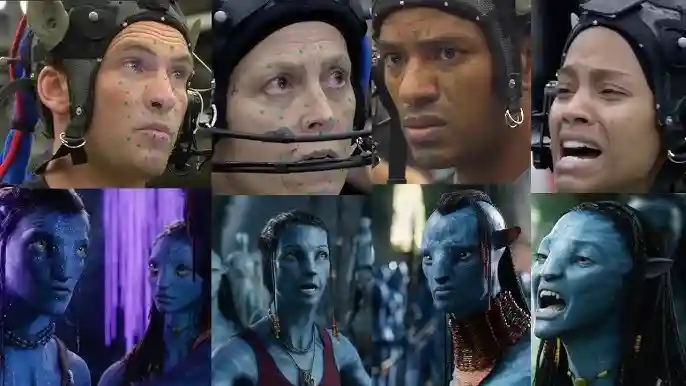
The best VFX softwares acts as a creative bridge between imagination and reality. Depending on what you’re working on, you might use VFX video editing software for post-production tweaks, animations, or special effects software to simulate explosions, smoke, or lighting effects – that would otherwise be too costly or unrealistic to shoot live.
Most of the effects you see in movies, ads, or video games are created using VFX effects like computer-generated imagery (CGI), compositing, and motion capture using software.
How we spotted the best VFX softwares
I didn’t just list popular names for the sake of it – every VFX software mentioned here has been tested for real-world use by creators and in some famous projects. My review process included insights from reputable sources like TechRadar and the Boston Institute of Analytics.
The goal was simple – to shortlist the best VFX softwares that delivers value for both beginners and professionals in the modern world.
The Best VFX Softwares Tools in 2026
Here are the best VFX softwares that you can explore in 2026:
1. Adobe After Effects – Best for Motion Graphics and Compositing
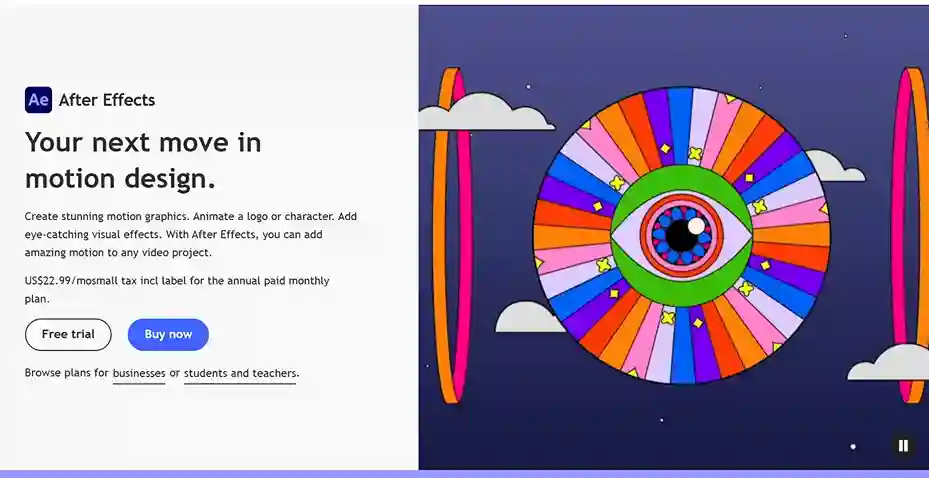
Adobe’s After Effects is among the best VFX softwares for motion graphics and visual compositing. It blends 2D and 3D elements, offers a wide range of effects, and is part of the Adobe Creative Cloud ecosystem.
Key features:
- AI-powered object extraction with Roto Brush and masking tools speed up tasks.
- Advanced motion tracking, stabilizing, and new animation presets are available.
- Properties panel for streamlined access to text/shape settings without expanding all layers.
Pros:
- Strong plugin ecosystem and community support.
- Great for motion graphics and light compositing.
- Frequent updates with new AI tools and workflow improvements
Cons:
- Difficult to navigate for beginners without prior knowledge.
- Requires relatively strong hardware (especially for 3D or 4K work).
- Subscription-based pricing models may seem expensive for some.
Integration highlights:
- Integration with Adobe Premiere Pro.
- Uses Creative Cloud Libraries for asset sharing across Adobe apps.
- Supports plugins, scripts, and third-party tools to expand functionality.
2. Blackmagic Fusion – Node-Based Compositing Powerhouse
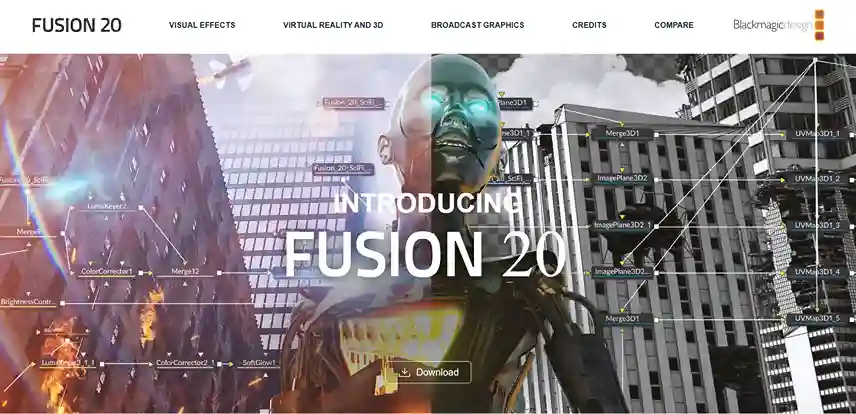
For industrial-grade compositing power, Blackmagic Fusion is the key. Built into DaVinci Resolve (and also available as a standalone), Fusion offers node-based compositing for creating advanced effects with live-action footage, 3D models, VR, and stereoscopic workflows. If you’ve seen blockbusters like Hunger Games and Terminator Genisys, you’ve already seen what Fusion can do.
Key features:
- Hundreds of 2D/3D tools available – rotoscoping, keying, camera tracking, particles, and more.
- Node-based workflow, letting you visually connect effects in a flexible graph.
- Deep compositing, 180° VR support, GPU-accelerated resolve FX, and stereoscopic 3D tools in Fusion 20.
Pros:
- The free version offers serious VFX capabilities without cost.
- Node-based setup gives a lot of control and flexibility.
- Highly capable toolset for 3D compositing, VR, and complex effects.
Cons:
- News users might need proper training before using the tool.
- Some advanced features require the paid “Studio” version.
Integration highlights:
- Fusion’s tools are built into DaVinci Resolve via the Fusion page, letting you switch between editing, color, and effects in one app.
- In the standalone Fusion Studio version, you get extra features like unlimited network rendering and collaboration servers.
3. Houdini – Industry Standard for Simulations
Houdini by SideFX is the undisputed king of complex simulations. If you’re working with particle effects, fire, smoke, water, or destruction, Houdini gives you a procedural, node-based workflow that’s both flexible and incredibly powerful.
Key features:
- Procedural modeling, dynamics, particle systems, fluids, destruction, and crowd simulation.
- Houdini Engine lets you embed procedural assets into Maya, Unreal, Unity, etc.
- New version – Copernicus – Houdini’s 2D and 3D GPU image processing framework, which creates stunning visuals for films, ads, and video games.
Pros:
- Industry standard for simulations – fire, fluid, smoke, rigid bodies, and more.
- Procedural workflows speed up iteration.
- Widely used in films like Avengers, Frozen 2, and Dune.
Cons
- Steep learning curve if you’re new to node-based systems.
- Some features are only in full or higher tiers of the software.
- Requires high computing power.
Integration highlights:
- Connects smoothly with Unreal Engine, Unity, and Maya using Houdini Engine for direct procedural asset import.
- Supports Python scripting to streamline data exchange and automate repetitive VFX workflows.
4. Blender – Free & Full-Featured 3D Suite
Blender, as one of the best VFX softwares, gives you a full 3D suite for free. It supports everything from modeling, animation, sculpting, simulation, rendering, compositing, motion tracking, and even video editing and game assets. Its open-source approach means the community can create add-ons and push new features, which then often get folded into official releases.
Key features:
- Render engines – Cycles for path-tracing, and EEVEE for real-time preview quality.
- Python API scripting lets users build custom tools and plugins.
- Blender 5.0’s Beta version brings UI refinements, support for massive geometry, and improvements in Grease Pencil motion blur.
Pros:
- 100% free and open-source VFX software.
- Strong community and plugin ecosystem.
- Built-in compositor and motion tracker.
- Constantly updated with new features (Cycles, Modeling and UV, Geometry Nodes, and more).
Cons:
- It can feel overwhelming to beginners.
- Some advanced rendering or simulation tasks demand powerful hardware.
Integration highlights:
- Because of its scripting API, Blender works well with external tools and pipelines.
- Plugins exist to connect it with game engines or other 3D/VFX tools.
- Compatible with Windows, Linux, and Mac systems.
5. Nuke by Foundry – Industry-Leading VFX Software for Professional Compositing
You can turn to Nuke (by Foundry) when you need heavy-duty compositing in film or high-end projects. It’s a node-based compositing and visual effects software used by studios worldwide.
For example, Nuke played a key role in bringing blockbuster projects like Thor: Love and Thunder and Squid Game to life. Its powerful 3D compositing and deep image tools helped studios craft complex environments and seamlessly blend CGI with live-action footage.
Key Features
- Over 200 compositing nodes, letting you mix, match, and build custom effect chains.
- 3D workspace, particle system, and advanced tracking and cleanup tools in NukeX.
- Editorial timeline, shot management, and review tools in Nuke Studio.
- Python API for pipeline integration and automation.
Pros
- Industry-standard for compositing, trusted in feature film projects.
- Flexible node-based setup lets you tweak parts of your effect without redoing everything.
- Strong toolset in versions like NukeX for cleanup, tracking, and advanced compositing.
Cons
- If you’re new to node-based VFX, this VFX software might feel challenging.
- The full feature set (Studio edition) comes at a high price.
- Some workflows are better handled in Nuke Studio than just base Nuke.
Integration highlights:
- Offers full pipeline integration with the ability to automate repetitive tasks through Nuke’s Python API and PySide.
- Lets you create custom image processing operations using the C++ SDK or BlinkScript node for deeper creative control.
Best VFX Softwares Comparison Table
| VFX Software | Best for | Platform | Price/Plans | Notable Features |
| After Effects | Motion graphics, compositing, 2D/3d effects | Windows, macOS | ~ US$22.99/month (single app). But with Adobe Creative Cloud Pro, After Effects costs less | Deep plugin ecosystem, integration with Premiere Pro, AI-based object extraction, and tracking tools |
| Blackmagic Fusion | High-end compositing, VR, stereoscopic 3D models | Windows, macOS, Linux | DaVinci Resolve for free. Studio version at $340 per year with advanced features | Node-based compositing, real-time collaboration, built into DaVinci Resolve, 360°/VR compositing |
| Houdini | Procedural effects, industry-grade simulations, complex VFX | Windows, macOS, Linux | Commercial, Indie, and Educational plans available for different Houdini products | Procedural modeling, dynamics, particle systems, Houdini Engine for integration |
| Blender | Full 3D pipeline + VFX | Windows, macOS, Linux | Free and open source | Modeling, animation, simulation, rendering (Cycles & EEVEE), compositing, video editor, Python API |
| Nuke | Film-grade compositing | Windows, macOS, Linux | High-end studio pricing (commercial); Indie/non-commercial versions exist at different rates | Node-based, deep image compositing, 2D & 3D tracker, rotoscoping, multi-channel workflows, and more |
How to Choose the Right VFX Software
Finding the best VFX software comes down to knowing what you need and how you like to work. Every visual effects software has its strengths – some are made for beginners, others for professionals building studio-grade projects.
Here’s what you should know before choosing the right VFX tools:
- Know your goals: Are you creating YouTube edits, short films, or 3D scenes? Your purpose decides whether you need simple VFX video editing software or a full-scale tool.
- Check your skill level: If you’re new, tools like Blender are a friendly start. For advanced work, Adobe After Effects, Nuke, or Blackmagic Fusion give more control.
- Match your platform: Some special effects and VFX video editing software run on both macOS and Windows, while tools like Apple Motion are Mac-only.
- Look at integrations and AI features: Many modern digital visual effects software now include AI in VFX for faster tracking, masking, and compositing – a huge plus if you value speed and automation.
- Compare features and libraries: Larger effects libraries save time. Pick VFX tools that fit your workflow without overwhelming you with features you won’t use.
Read more: Best AI Video Generators To Look Out For.
Market Insights and Emerging VFX Trends To Look Out For
The VFX space is growing fast. By 2033, the AI in the visual effects market is projected to reach nearly $9.6 billion by 2033, up from $2+ billion in 2025, marking a 19.6% annual growth.
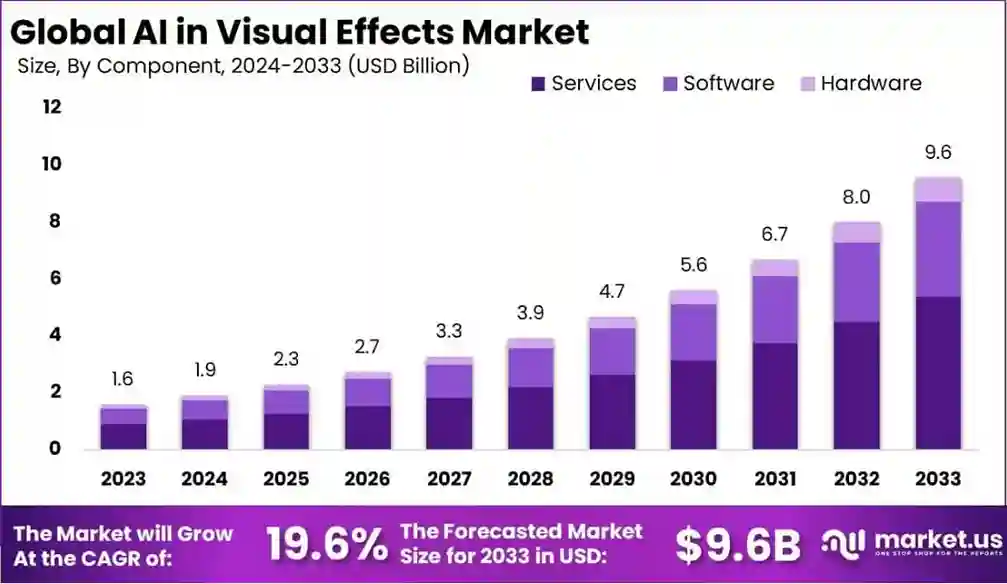
Market Growth Reports also state that with more than 3,000 films and 14,000 games produced using VFX in 2023, it’s clear that digital artistry has become a creative standard, not a far-fetched idea anymore. Around 80% of top-grossing movies now depend heavily on visual effects software, and over 90% of studios already integrate AI in VFX pipelines.
Here are a few trends shaping the next few years:
- Virtual production is booming – global installations have tripled since 2022, cutting costs and significantly improving the sector.
- Real-time rendering is up by 60%, helping teams preview results instantly.
- AI in VFX tools is improving workflows – processing speeds jumped 40%, reducing post-production time.
- Augmented Reality (AR) and Virtual Reality (VR) integrations are pushing hybrid VFX experiences in gaming and advertising, which saw a 38% jump in adoption.
Read more: Top AR and VR Technology Trends To Watch Out.
From indie creators using VFX editing software to studios running full-scale digital visual effects software, the future of storytelling is increasingly shaped by these intelligent and immersive tools.
Final Thoughts
Picking the right VFX tool really depends on what you’re trying to achieve – whether it’s learning compositing basics, building full 3D scenes, or experimenting with AI in VFX. Each of these best VFX softwares offers something unique.
I’d say start small, explore, and see which interface and workflow fit you best. Tools like Blender are free and open-source, making them ideal if you’re just starting out. As you get comfortable, you can try Houdini, Nuke, or After Effects for more advanced projects.
The goal is to create visuals that feel alive, and the right VFX software gives you everything you need to make that happen.
Want to learn more about the tech world and advancements? At Yaabot, we pride ourselves on being your ultimate stop for all things related to online technology, software, applications, AI, science, health tech, and more.
Frequently Asked Questions (FAQs)
1. What’s the difference between VFX and special FX?
VFX (visual effects) are digital effects like CGI spaceships added in post-production, while special FX involve physical effects done on set, like explosions, rain, or prosthetics.
2. What are the challenges and restraints while using the best VFX software?
The main challenges include steep learning curves, hardware requirements, setup cost for industry-grade features, long rendering times, and keeping up with frequent updates in digital visual effects software and AI-based workflows.
3. What type of computer setup is recommended for VFX editing software?
A system with a high-performance GPU, multi-core CPU, and at least 32GB RAM helps you handle VFX video editing software efficiently, especially for 3D rendering or simulation-heavy tasks.
4. Which VFX software is best to get started with?
If you’re new and just starting to explore the VFX world, Blender is often recommended for beginners – it’s free, supports the full 3D and compositing pipeline, and has a large community for learning support.
