



Apple’s latest software version, iOS 26, is here, and so are the tons of iOS 26 features. Announced in June 2025, this iOS update brings tons of updates as usual. This time, the introduction of Liquid Glass in iPhones leads the set of new features in iOS 26.
But with this particular iOS update, there are many interesting things. Like, why is it iOS 26 and not iOS 19? What is this ‘Liquid Glass’ thing? What’s this ‘iOS 26.2 rollout’ that you might be seeing these days? And so much more!
And the thing that might be most useful to you right now is an ultimate blog that covers everything, explains the complexities in simple terms, provides a neutral POV on the technology at hand, and simply… Tell you everything that you need to know!
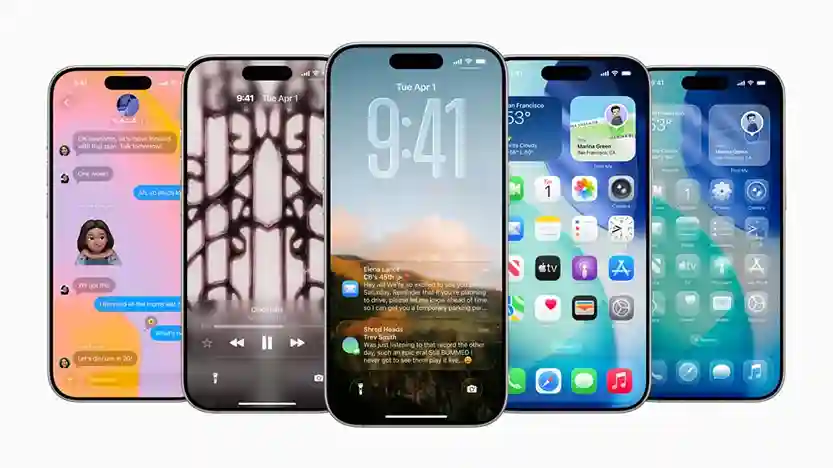
So, in this post, I’ll discuss the background regarding iOS 26, what the new features for iOS 26 are, the associated pros and cons, and more.
Key Learnings
- iOS 26, named after 2026, was announced at WWDC in June 2025 and was released to the general public in September 2025.
- Apart from various app-specific and accessibility features, it most prominently introduces the ‘Liquid Glass’ design language change to give the UI a glass-like effect.
- Supporting all released models from the 11 to the latest 17 series, iOS 26 can be easily installed in just a few steps.
- With reports of bugs and issues, the upgrade to iOS 26 comes with both pros and cons, so think before making the irreversible software update.
Read more: A Comprehensive Guide to Explainable AI (XAI): Techniques, Tools & Use Cases.
Key Insights Into iOS 26 Release
Why iOS 26 and not iOS 19?
Usually, when new software releases are made, the titles are numbered consecutively. This is to maintain continuity and consistency. And while minor skips in this practice have always been seen. The leap from iOS 18 features to iOS 26 begs the question: Why?
Craig Fedrighi at WWDC 2025 explained:
The reasoning behind this change is the move from OS based numbering to year-based numbering. So, for 2026, iOS 26 is the chosen name. And, as per this trend, we can expect the next one to be iOS 27.
And this move applies to all of Apple’s Operating Systems, with them now branded as iPadOS 26, watchOS 26, macOS 26, tvOS 26, and visionOS 26.
iOS 26: A Brief History
The software and new features of iOS 26 were announced at the Worldwide Developers Conference (WWDC) in June 2025. Just like other tech companies, Apple made major announcements about upcoming products and services, including an overview of iOS 26.
Since then, the iPhone 17 series has come pre-installed with the latest iOS 26 features, and in September 2025, it was made available for general usage across the compatible device list. Additionally, iOS 26.1 was released in November 2025. It introduced some features, fixed some of the reported bugs, and was nothing out of the ordinary.
Currently, we are seeing the iOS 26.2 rollout, with beta versions being released, and the final version will be made available soon.
What’s New in iOS 26 Features?
Liquid Glass in iPhone
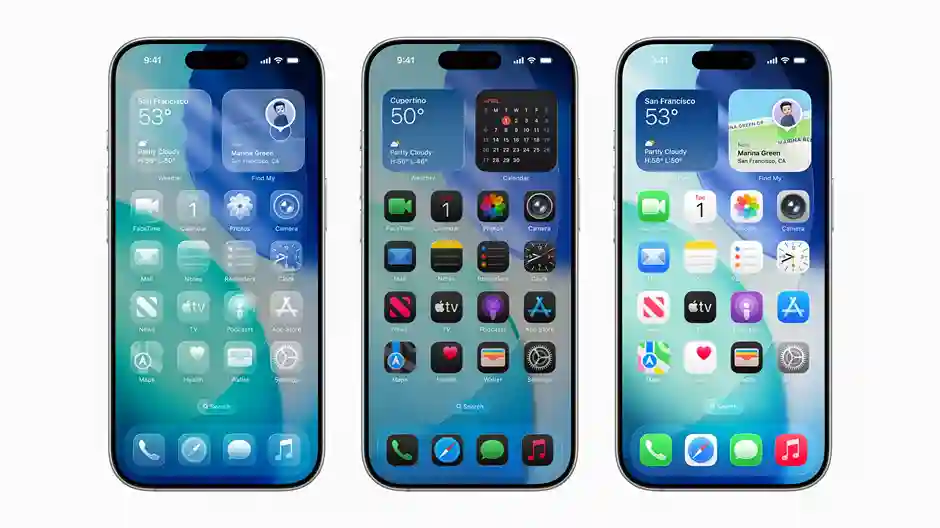
The most notable iOS 26 feature is the addition of Liquid Glass to iPhone models. This is a new thematic change aimed at achieving color symmetry during UI interactions. This is achieved through the translucency of elements and app icons, aided by screen refraction based on the colors displayed.
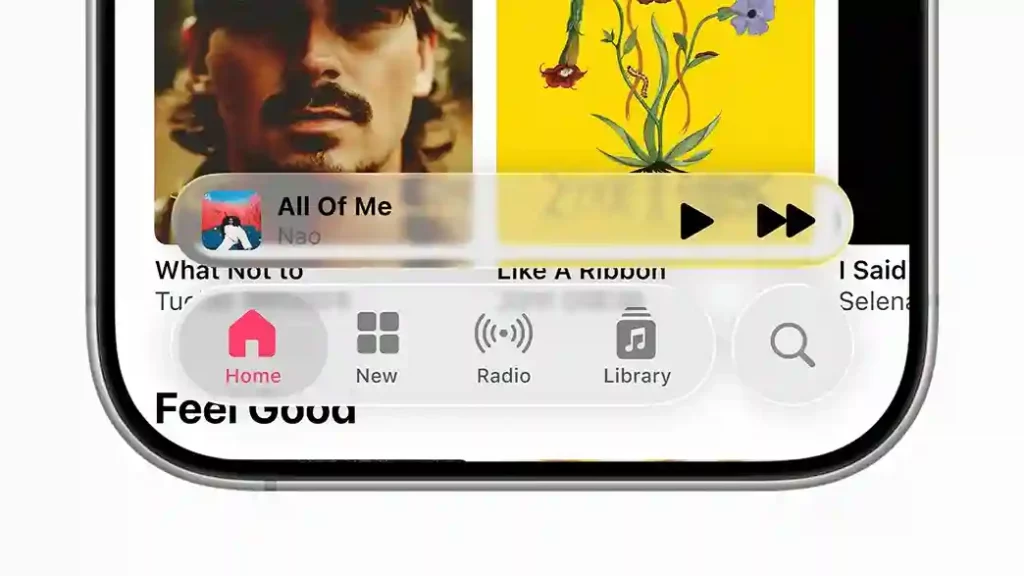
It is a design language addition aimed at shifting the aesthetic to create a glass-like shimmer effect, with UI elements like icons, sidebars, and panels that refract and reflect the colors behind them, giving the effect of glass. Wallpaper changes assist this.
User Interface changes
The Apple UI has undergone many changes, including the Home screen, lock screen widget, and theme controls. Battery controls have also seen changes in level display and color grading. Accessibility has also seen improvements with the introduction of Reader Mode, Braille Access, and Head Tracking.
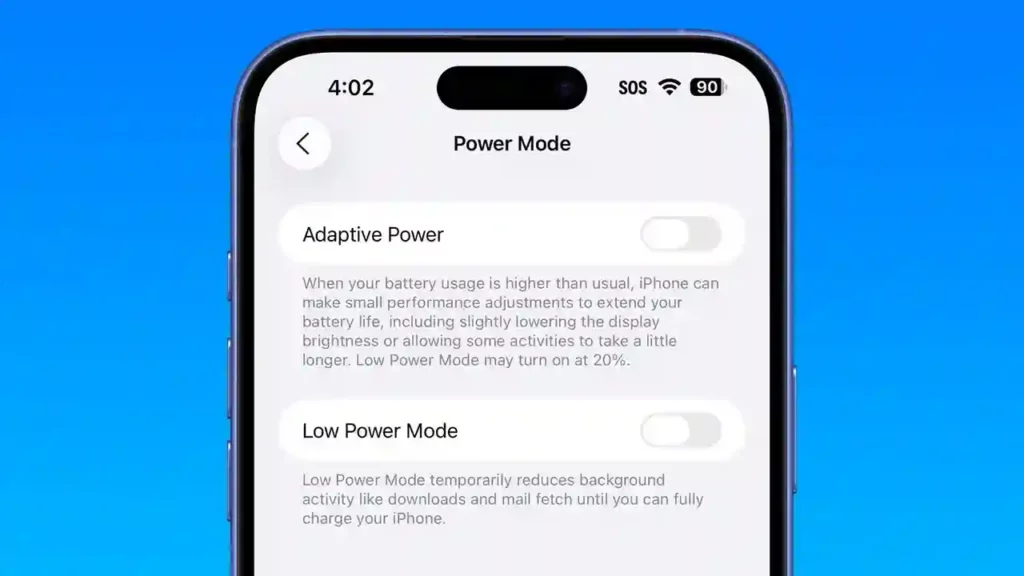
Additionally, Apple Intelligence, assisted by the ChatGPT AI assistant, has seen a rise in overall integration, specifically with the introduction of a power-saving battery mode called Adaptive Power, which automatically adjusts battery usage during intense periods.
App-specific changes
Various applications have also seen respective refinements and introductions. For instance, apart from specific changes to options, the Phone and Messages app has seen major layout and visual changes. The same goes for the Photos app and Camera app, which now feature a simplified layout. Apple Music also saw several refinements.

A new Game app has been added to manage installed games. The Podcasts app’s new Enhance Dialogue feature amplifies the speakers’ voices for clearer understanding. Apple Wallets, Passwords, Clock, and Calculator have also seen minor changes.
Security and Privacy
A new Recovery Assistant allows the iPhone to attempt recovery if it fails to start up successfully automatically. You can also now see the list of your blocked contacts and spam calls in a separate section. A separate permission has now been added to allow or deny access to connected wired accessories.

Other Notable Changes in iOS 26 features:

- Two modes, “Comfort” and “Focus”, for automatic frequency adjustment have been introduced in the Accessibility settings under Audio and Visual Effects.
- Now, you can directly transfer an eSIM between an iPhone and an Android phone without the mobile carrier’s QR code.
- A new feature called Preferred Routes can automatically learn the user’s daily routes and notify them in advance of any delays without manual checking.
- In the Calculator App, equations in 3 variables and 3D graphs are now supported in Math Notes.
- In the Messages app, you can now add custom backgrounds, polls, and the user indicator for typing in group chats.
- Also, for the first time since iOS 17, new ringtones have been introduced.
Which Phones Support iOS 26 Update?
Here’s the list of all devices compatible with the new iOS 26 update and software version:
| iPhone series | Models included | Release Year |
| iPhone 11 series | iPhone 11, iPhone 11 Pro, iPhone 11 Pro Max | 2019 |
| iPhone 12 series | iPhone 12, iPhone 12 mini, iPhone 12 Pro, iPhone 12 Pro Max | 2020 |
| iPhone 13 series | iPhone 13, iPhone 13 mini, iPhone 13 Pro, iPhone 13 Pro Max | 2021 |
| iPhone 14 series | iPhone 14, iPhone 14 Plus, iPhone 14 Pro, iPhone 14 Pro Max | 2022 |
| iPhone 15 series | iPhone 15, iPhone 15 Plus, iPhone 15 Pro, iPhone 15 Pro Max | 2023 |
| iPhone 16 series | iPhone 16, iPhone 16 Plus, iPhone 16 Pro, iPhone 16 Pro Max, iPhone 16e | 2024 |
| iPhone 17 series | iPhone 17, iPhone 17 Pro, iPhone 17 Pro Max | 2025 |
| iPhone Air | iPhone Air | 2025 |
| iPhone SE series | 2nd generation onward models | 2nd gen- 20203rd gen- 2022 |
If your phone is listed here, you can upgrade to iOS 26, too!
How to Upgrade to iOS 26 Features?
To upgrade to iOS 26, follow a simple series of steps:
- Pre-update considerations: Back up your device and ensure it is connected to the Wi-Fi network. Also, check the battery levels and bring them to optimal levels.
- Beginning the update process: Now go to Settings > General > Software Update. You’ll get the update button if the new version is available on your device.
- Post-installation: Once your update has been installed, do not rush to use the new iOS 26 features. Let the device fully refresh, then… enjoy!
That’s it. Wasn’t it simple? Just a few clicks and you are done!
Issues Or Bugs Related To iOS 26 Update
While the new features of iOS 26 are enticing, there have also been reports of bugs and issues with the beta versions.
- Users have seen app crashes, with screens suddenly turning black.
- Battery performance and overheating issues, especially in older models, have also been reported.
- Lags and stuttering while using the overall UI have also been observed.
- Several issues (including frequent Wi-Fi disconnects) with Apple CarPlay and Bluetooth have also been reported.
- App-related issues and freezes in Calendar, Messages, and Camera have been reported.
Apple will likely fix these issues in future updates and new beta version rollouts.
Pros And Cons Of Updating To iOS 26 Features
Pros of iOS 26 features:
- Complete visual redesign: The most notable aspect of iOS 26 is the availability of Liquid Glass in iPhone models, which completely changes the visual appearance. But the other iOS 26 features also help completely transform the interface, providing you with an all-new experience.
- Impactful new features: In addition to the translucent Liquid Glass in iPhone, iOS 26 also introduces several new features, such as Live Translation, Apple Intelligence integration with apps like Reminders, and more.
Cons of iOS 26 features:
- Impact on performance: While updating to the latest software versions is generally recommended, doing so can make your battery life sluggish and slow down device performance. So, if you own an older model, upgrading to iOS 26 might not be a great option.
- Subjective reaction to new visuals: While some iOS 26 features, like the app enhancements, are bound to be useful. The inclusion of Liquid Glass in iPhone models might not be. You may not like it, or other such app icon redesigns.
So, should you update to iOS 26?
Well, that’s the most important question, isn’t it?
If you are looking for a definitive answer, I unfortunately do not have one. And as cliché as it sounds, it all depends on you, your preferences, and your device.
While these new iOS 26 features are great and certainly impactful, they might also bring along device sluggishness. And once upgraded, you cannot just downgrade to iOS 18 features.
So, here’s what you CAN do….
Fully understand what the iOS 26 features are and what you’ll be getting. And know that there is no rush to upgrade to iOS 26, as the current iOS 18.7 is sufficiently competent at handling every task of yours. So, wait and make an informed decision!
What’s The Buzz About iOS 26.2 Rollout?
After the release of iOS 26, we are currently seeing the iOS 26.2 rollout in the form of Beta 3. But what exactly is this?
It’s simply another software update for you. These are smaller updates that do not involve a complete revamp or large-scale improvements, but they improve upon the major software version upgrade. This involves:
- common bug fixes
- minor modifications to newly introduced features
- minor additions or removals of certain features
- refinements in apps and overall system.
To put it into context, the upgrade to iOS 26 was the major update, and the current 26.2 rollout via beta versions includes some minor changes. These beta versions are for developers, and iOS 26 features are constantly being refined.
Final Thoughts
Wrapping it all up, I believe that an upgrade to iOS 26 will bring many enhancements to your iPhone experience and to using any Apple device in general. New features of iOS 26 are too good to ignore, with improvements and introductions across the board.
However, there are also downsides to doing the same, even though the iOS 26 features look enticing. They might not be for everyone either. You might not like the Liquid Design in the iPhone as much as the next guy. And that is normal as well!
So, if you have read this blog, you surely must have understood what it offers and just about everything there is to know about it. And, while it may seem like just another software update, you need to understand that such a process is irreversible.
Lastly, I’ll say the decision is yours, so take your time and proceed only then!
Read more: One UI Explained: The Ultimate Guide to Samsung’s Galaxy User Interface
Want to learn more about the latest tech developments and solutions? At Yaabot, we pride ourselves on being your ultimate stop for all things related to online technology, software, applications, consumer trends, AI, science, health tech, and more.
Frequently Asked Questions
1. Is iOS 26 out?
Yes, it’s available on all compatible devices. It was announced in June 2025 and released worldwide in September 2025, with all the new features of iOS 26. If you still haven’t received it, you can check for the software update on your iPhone and, if compatible, upgrade to iOS 26.
2. Will iOS 26 work on iPhone 14?
Yes, as per the official website. Here, you can see that all the iPhones from the 11 series to the all-new iPhone 17 series are compatible with the new iOS 26 features and updates.
3. How long does the iOS 26 update take?
The answer to that question depends entirely on you and various factors, such as connection speed, whether the device is updated, and other relevant factors. Ideally, it should take somewhere between 30 and 60 minutes to upgrade to iOS 26.
4. When will iOS 26 release?
The latest version of iOS, iOS 26, was made available to the general public in November 2025. You can check your device for the corresponding software update and get all the new features of iOS 26.
5. What’s new in iOS 26?
The most prominent feature of iOS 26 is the introduction of Liquid Glass in iPhones with this iOS version. This feature uses translucent elements to create symmetry in the UI, with their refraction and reflections depending on the color scheme. Additionally, it also introduced tons of Apple Intelligence features, app enhancements, and accessibility and efficiency features.
