



Most Android announcements eventually boil down to Gemini can do more stuff now. But the Android Show on May 12, 2026, was different. Google didn’t announce a Gemini feature; it announced a whole revamp. The Gemini Intelligence platform wraps around the entire OS.
Gemini Intelligence is Google’s cross-device agentic AI platform for Android. It’s the answer to a question nobody knew how to ask, yet what does Android look like when it starts completing tasks for you?
I’ve been going through everything Google published, every security blog post, and the picture is genuinely interesting, though not without real problems. Here’s my honest breakdown.
Key Takeaways
- Gemini Intelligence is a system-level agentic AI platform for Android, not a chatbot upgrade or a Gemini app feature.
- It automates multi-step tasks across apps, Chrome, and services using a hybrid of on-device Gemini Nano and cloud Gemini.
- Qualifying devices need at least 12GB RAM, a flagship chip, and Gemini Nano v3, which excludes the Pixel 9 series and Galaxy Z Fold 7.
- Google’s AI security framework uses pKVM and opt-in per-app controls, keeping sensitive data processed locally on your device.
- Chrome auto-browse launches in June 2026; broader Gemini Intelligence rollout begins summer 2026 on Pixel and select Samsung Galaxy phones.
What Is Gemini Intelligence on Android?
Gemini Intelligence is Google’s system-level agentic AI platform for Android. It lets Gemini carry out multi-step tasks across apps, browsers, and services on your behalf, rather than just answering questions like a chatbot.
This isn’t a Gemini app update. It’s a whole new layer of the OS. Gemini Intelligence acts as Android’s cross-device AI platform, able to carry out agentic tasks within apps and operate with on-screen context.
The practical difference is that instead of asking Gemini what’s a good Italian restaurant near me, you tell it to book a table for two at the best-reviewed Italian place near me, and it handles the search, comparison, and reservation.
That shift from answering to acting is what Google means by agentic AI.
How It Differs from the Regular Gemini Assistant
| Feature | Gemini (Before) | Gemini Intelligence (Now) |
| Role | Chatbot / Q&A | An AI agent that executes tasks |
| Scope | One conversation at a time | Cross-app, cross-browser, cross-device |
| Processing | Mostly cloud-based | Hybrid: on-device Nano + cloud Gemini |
| User action needed | You act on the answer | Gemini acts for you |
| Example | “Here’s a recipe for pasta.” | Adds ingredients to your cart automatically |
Why Google Is Calling This “Agentic AI” and What That Actually Means
The term “agentic AI” is everywhere right now, and most explanations make it more confusing than it needs to be.
This is the 90,500-monthly-search question: What is agentic AI, really? The answer is about autonomy. A standard AI model responds. An agentic AI system plans and acts.
Google is being careful here. Your Gemini assistant starts to automate a task only when you tell it to. Gemini can only access the apps you allow it to work in, and not the rest of your device.
So “agentic” in Google’s framing still means human-initiated. The agent handles execution, not intent.
The difference between a smart assistant and a true AI agent
A smart assistant is reactive. You ask, it responds. Voice-triggered, text-triggered, always waiting.
A true AI agent is proactive by design. You define the goal once. It figures out the path.
A smart assistant is a very good search engine with a voice. An AI agent is closer to having someone on your team who handles the logistics after you explain what you want.
The latter category is where Gemini Intelligence sits. That’s a meaningful upgrade, and also the source of every legitimate privacy concern that comes with it.
How Gemini Intelligence Turns Your Android Phone Into an AI Agent
Gemini Intelligence is designed to make intelligent choices about how it processes your requests. When a simpler on-device Gemini Nano model will suffice, it can just use that, while it knows to reach out to Gemini in the cloud when extra power is needed.
This hybrid architecture is the technical backbone of the whole system. Nano handles the lightweight, sensitive, or offline-eligible tasks locally. Full cloud Gemini handles anything that needs more reasoning power.
Task automation across apps and Chrome
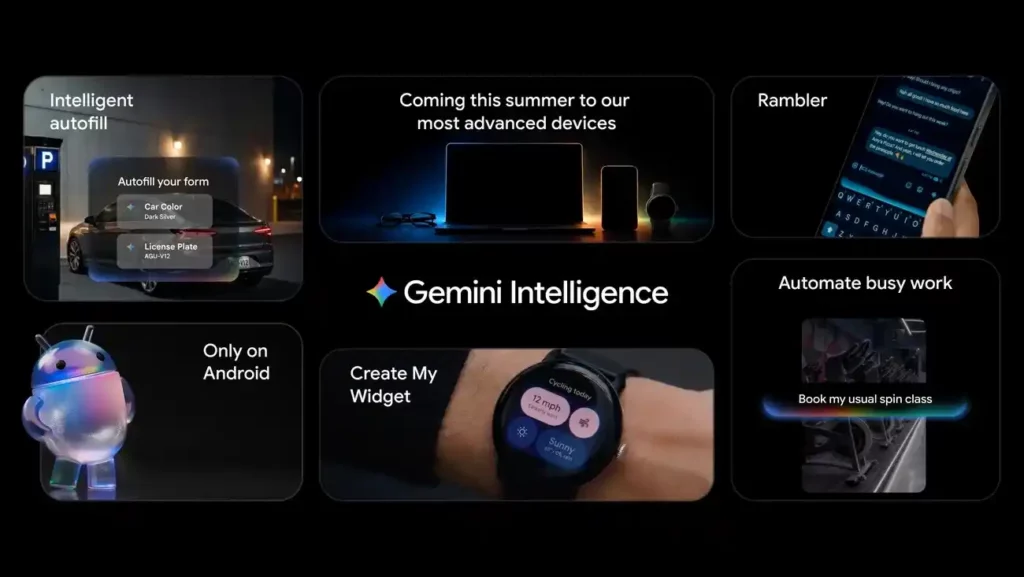
This is the headline capability. Gemini Intelligence wants to be a much more powerful, general-purpose ally. That’s going to include not just tasks, but also control of your Chrome browser. If you can get it done on the web, Gemini wants to be able to automate that.
Form completion is a specific focus. The promise isn’t just autofill on forms you have seen before. Gemini Intelligence promises to complete even complicated forms on your behalf the first time it encounters them.
Some concrete examples of what task automation covers:
- Filling out app signup forms using your stored profile data.
- Browsing and booking services directly in Chrome.
- Completing multi-step web tasks like researching and comparing products.
- App-to-app handoffs without you switching manually.
Chrome auto-browse is the most capable piece of this, and it is also the first to arrive. Chrome auto-browse gets started in June.
Create My Widget and Gboard Rambler
Two Gemini Intelligence tools stood out at the Android Show as genuinely new ideas.
Create My Widget lets you describe what you want on your home screen in plain language, and Gemini builds the widget for you. No app required, no template to wrestle with. You tell it what information you want to see, and it generates the widget.
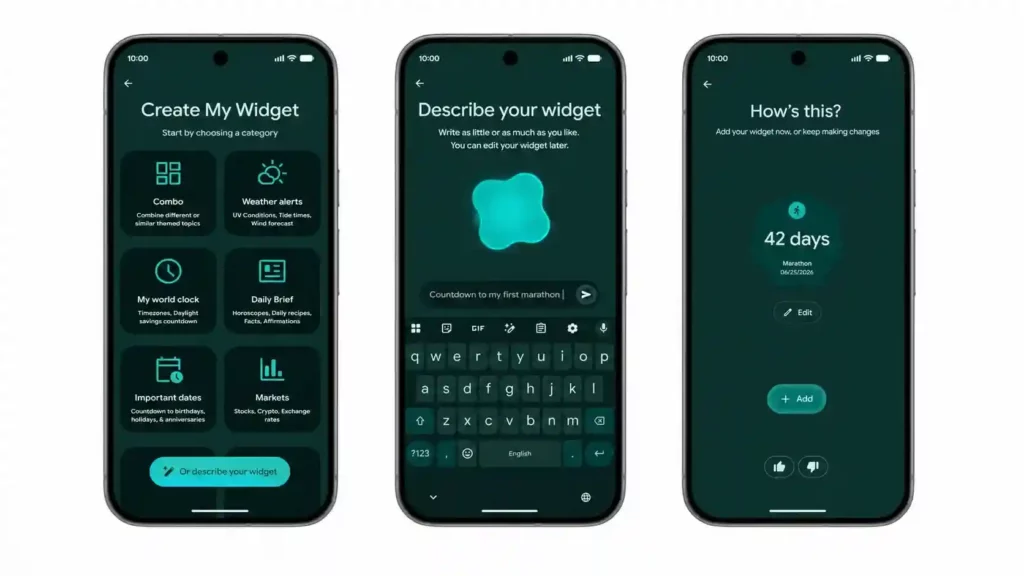
Gboard Rambler is the dictation upgrade that Gboard has needed for years. Rambler handles your messiest dictation full of repeats and revisions, smoothing it all out into nicely polished text. It does not just transcribe. It edits out the verbal tics and false starts that make raw dictation unusable.
Both features arrive wrapped in Google’s new Material Expressive UI, which is a noticeably cleaner visual language than what Gemini currently uses.
Gemini Intelligence in Android Auto
The AI agent integration doesn’t stop at your phone. You’ll also see Gemini Intelligence in your car when connecting to Android Auto on a supported phone.
This matters for the AI ecosystem story Google is building. Gemini Intelligence isn’t a phone feature that also works in other places. It is a platform that runs across devices, with Android Auto being one of its first cross-platform expressions. Googlebooks, the new AI-native laptops Google announced alongside, will also run under the same Gemini Intelligence platform.
Cross-App AI Integration: What the Gemini AI Ecosystem Actually Looks Like
While the world awaits Apple’s Siri AI revival, Gemini is being woven directly into Android instead of as another bolted-on feature.
This is the key structural difference from how AI has been added to phones previously. Most AI features on Android up to this point have been feature-level additions, things bolted onto existing apps. Gemini Intelligence is being built into the OS layer itself, which means it has access to context across the device rather than within a single app silo.
It can read on-screen content, interact across apps, and auto-fill forms using data pulled from Gmail and other connected services.
For comparison, Apple Intelligence on iOS also integrates at the OS level, but Apple has taken a narrower approach, tying most features to specific Apple apps. Gemini Intelligence is explicitly designed for general-purpose cross-app operation, including third-party apps you allow into the system.
Which Android devices will support Gemini Intelligence?
This is where the story gets uncomfortable for a lot of current Android users.
The minimum bar is 12GB of RAM, a top-tier chip, support for Gemini Nano v3, spatial audio, HDR, plus a software support commitment of at least five Android OS updates and six years of security patches.
Here is the full requirement list:
| Requirement | Specs |
| On-device AI | AICore + Gemini Nano v3 or higher |
| RAM | 12GB minimum |
| Chipset | Flagship SoC |
| Media | Spatial audio, low-light camera, HDR |
| OS support | 5 Android OS upgrades |
| Security patches | 6 years, quarterly minimum |
| Crash quality | Must meet Google’s SLO thresholds |
| Virtualization | pKVM (protected KVM) |
The spec that is actually cutting out the most phones is not RAM. The real story is requirement one. Most premium Android phones from before 2026 actually have 12GB of RAM and a flagship chip. The Pixel 9 Pro has 16GB. The Galaxy S25 Ultra has 12GB. The Galaxy Z Fold 7 has 12GB. RAM and silicon are not stopping them. What is stopping them is Gemini Nano v3.
The Pixel 9 series doesn’t have Gemini Nano v3. Neither does the Galaxy Z Fold 7, the OnePlus 13, or a long list of premium flagships from 2025. If you bought one of those phones expecting to run Android 17’s headline feature this summer, the current answer from Google’s own documentation is: not yet, and possibly not at all.
Devices confirmed to qualify:
| Device | Status |
| Google Pixel 10 series | Confirmed |
| Samsung Galaxy S26 series | Confirmed |
| OnePlus 15 / 15R | Confirmed |
| Motorola Signature | Confirmed |
| Honor Magic 8 Pro | Confirmed |
| Oppo Find X9 / X9 Pro | Confirmed |
| Samsung Galaxy Z Fold 8 | Launching with GI pre-installed (July 2026) |
Devices that do NOT qualify (currently):
| Device | Reason |
| Google Pixel 9 series | No Gemini Nano v3 |
| Samsung Galaxy Z Fold 7 | No Gemini Nano v3 |
| Samsung Galaxy S25 Ultra | No Gemini Nano v3 |
| OnePlus 13 | No Gemini Nano v3 |
| Xiaomi 14T Pro | No Gemini Nano v3 |
The mention of 12GB+ of RAM is already higher than the 8GB of memory Apple requires on iPhones, iPads, and Macs to support Apple Intelligence features. But given that Nano v3 is the actual blocker, raw RAM comparisons miss the point.
There is one open question worth watching. Early leaks suggest the base Pixel 11 may ship with 8GB of RAM, which would technically disqualify it if the minimum requirement holds.
Gemini Intelligence Privacy and AI Security: What Google Says
Google published a dedicated AI security blog on May 12, written by Dave Kleidermacher, VP of Platforms Security and Privacy at Google. It lays out three core principles for how Gemini Intelligence handles data.
These principles apply across Gemini Intelligence features and form factors:
1. Explicit user control.
2. Comprehensive data protection.
3. Operational transparency.
What data does Gemini Intelligence access and when?
In short, only what you explicitly allow, and only in the apps you approve.
Connecting Gemini to Autofill with Google is strictly opt-in. You can enable or disable it at any time, and app-level automation requires separate permission for each app you want Gemini to operate in.
On the technical side, Google uses protected KVM (pKVM) for on-device processing. pKVM is the first consumer-grade hypervisor to earn SESIP Level 5 security certification, meaning Gemini can process your data locally without the broader OS having access to it. Gemini Nano handles routine tasks on-device. Cloud Gemini only gets involved when the complexity requires it.
Gemini Intelligence vs. Apple Intelligence vs. Microsoft Copilot vs. ChatGPT on Android
This is the comparison section that actually matters for deciding whether Google AI tools have caught up, passed, or are still catching up.
| Platform | Agentic Capability | On-Device Processing | Cross-App Depth | Privacy Controls | Availability |
| Gemini Intelligence | Full (multi-step, cross-app) | Nano v3 on-device | High (OS-level integration) | Opt-in per app, pKVM | Summer 2026, high-end only |
| Apple Intelligence | Partial (Siri actions, limited cross-app) | On-device for most features | Moderate (mainly Apple apps) | Strong, on-device default | iOS 18.1+ (8GB RAM min) |
| Microsoft Copilot | Moderate (Copilot+ PCs, limited mobile) | Windows-focused, limited Android | Low on Android | Cloud-first | Copilot+ PCs, Android app |
| ChatGPT on Android | Low (conversational, no native automation) | Minimal | None (no OS integration) | OpenAI cloud model | Available now, on any device |
Honestly, Gemini Intelligence has the most ambitious agentic design of the four, and it is also the hardest to access. Apple Intelligence is more conservative in capability but runs on a much broader hardware base. ChatGPT on Android is still a chat interface with no system-level access. Copilot is a Windows story more than an Android one.
If Google executes on Gemini Intelligence as announced, this is the most capable mobile AI agent platform available. The hardware wall is a real problem for adoption right now, but it is a temporary problem as 2026 flagship hardware proliferates.
What Gemini Intelligence Means for the Future of Android
Android runs on roughly 3 billion active devices globally. That number makes any OS-level shift significant in ways that phone-specific AI features aren’t.
These new Googlebook laptops will run Android phone apps and files, blending ChromeOS, Android, Google Play, and Gemini. Gemini Intelligence is already being designed to span that entire surface area, from your phone to your car to your laptop.
The conceptual shift Google is making with Android is real and worth taking seriously. The OS has historically been an app launcher. You open apps, apps do things, you close apps. Gemini Intelligence is designed to abstract away that process. You state a goal, the system figures out which apps and services are needed, and Gemini executes across them.
Whether that vision delivers depends almost entirely on how well the permission architecture works in practice, how third-party app developers integrate with the platform, and whether users trust it enough to actually enable the features.
Should You Be Excited About Gemini Intelligence?
Carefully, yes. With one eye open.
The agentic AI design is genuinely the right direction. OS-level cross-app automation with on-device privacy processing is a better architecture than anything Android has had before. If you have a qualifying device, Gemini Intelligence represents a real change in how you interact with your phone, not just another AI feature tab.
The hardware wall is harder to defend. The Pixel 9 Pro has 16GB of RAM and a top-tier chip. It still does not qualify because of Nano v3. Telling someone their $1,000 phone from last year is already out is a difficult position, and Google hasn’t addressed it directly.
This is also a phased product. Chrome auto-browse launches in June. Broader rollout hits Pixel and Samsung Galaxy devices in summer 2026. The Galaxy Z Fold 8 ships with it pre-installed in July. What Google announced is real, but the finished version is still being built.
Final Thoughts
Gemini Intelligence is Android’s attempt to stop being a platform where you manage AI tools and start being a platform where AI manages tasks for you.
Gemini Intelligence isn’t an upgraded chatbot. It’s a redesign of how the OS relates to the user. But whether it succeeds depends on the hardware adoption curves, developer uptake, and whether the permission model is tight enough to earn user trust. None of those questions has clean answers yet.
FAQ
What is Gemini Intelligence on Android?
Gemini Intelligence is Google’s OS-level agentic AI platform for Android that automates multi-step tasks across apps, Chrome, and services on your behalf.
How does Gemini Intelligence differ from the regular Gemini app?
The regular Gemini app answers questions. Gemini Intelligence acts on them by executing tasks across apps and the web, with or without you switching apps manually.
What are the hardware requirements for Gemini Intelligence?
You need at least 12GB RAM, a flagship SoC, Gemini Nano v3 support via AICore, HDR, spatial audio, 5 OS upgrades, and 6 years of quarterly security patches.
Does the Pixel 9 support Gemini Intelligence? No. The Pixel 9 series lacks Gemini Nano v3 support, which is the primary requirement. The Pixel 10 series is the first Pixel lineup to qualify.
Which phones will get Gemini Intelligence first?
The Samsung Galaxy Z Fold 8 (July 2026) is expected to be the first device shipping with it pre-installed, followed by Galaxy S26 and Pixel 10 series rollouts this summer.
Is Gemini Intelligence safe and private?
Google built it on three principles: explicit user control, comprehensive data protection, and operational transparency. On-device Gemini Nano handles sensitive tasks locally. All automations require your opt-in per app.
What is the difference between a smart assistant and an AI agent?
A smart assistant waits for questions and responds. An AI agent receives a goal, plans the steps required, and executes them autonomously using the tools available to it.
When does Chrome auto-browse launch?
Chrome auto-browse, part of Gemini Intelligence, launches in June 2026.
