


When deciding between zapier vs make vs n8n, it is clear that every week, someone spends hours doing something a machine should be doing for them. Copy-pasting lead data into a spreadsheet. Forwarding emails manually. Updating the same record across multiple apps one step at a time.
This is exactly the problem workflow automation tools were built to solve. They all promise to eliminate repetitive work, but they are built for very different users. Pick the wrong one, and you’ll either overpay or struggle with a platform that doesn’t fit your needs.
The global business automation market is projected to reach $14.96 billion in 2026, growing at 14.5% annually. The question is no longer whether to automate. It’s which tool to choose.
Key Takeaways
- Zapier is the fastest to set up and has the widest app coverage, but becomes the most expensive at scale.
- Make offers the best balance of visual logic and cost for teams doing moderate, complex automation.
- n8n is the cheapest option at high volume, the only one that supports self-hosting, and the most capable for AI-powered workflows.
- All three added significant AI features through 2025 and 2026. n8n leads by a clear margin.
- The most important difference between them is not features. It is the billing model: Zapier charges per task (every step), Make charges per operation (every step, slightly cheaper), and n8n charges per execution (the entire workflow, regardless of steps).
What Are Workflow Automation Tools, and Why Do They Matter?
Workflow automation is the process of connecting apps so they pass data and trigger actions between each other without manual input. Instead of copying a form submission into your CRM, sending a welcome email, and notifying your team on Slack yourself, a workflow automation tool does all three automatically the moment someone fills out the form.
Workflow automation tools connect your apps and automate repetitive tasks that would otherwise require manual work. Instead of copying data between platforms, sending follow-up emails, or updating records yourself, these tools handle those actions automatically based on predefined triggers.
Their popularity is growing rapidly. According to McKinsey, 66% of organizations have already automated at least one business function, up from 57% the year before. Among the many options available, Zapier, Make, and n8n have become the leading choices for businesses looking to save time, reduce errors, and scale operations more efficiently.
Zapier vs Make vs n8n: Quick Feature Comparison
| Feature | Zapier | Make | n8n |
| Billing model | Per task (each step = 1 task) | Per operation (each step = 1 credit) | Per execution (full workflow = 1 execution) |
| Free tier | 100 tasks/month, 2-step Zaps only | 1,000 credits/month, 2 active scenarios | No cloud free tier; self-hosted Community Edition is free with unlimited executions |
| Starting paid price | $19.99/month (750 tasks) | $9/month (10,000 credits) | $20/month cloud (2,500 executions); free self-hosted |
| Integrations | 9,000+ | 2,000+ | 1,000+ native + unlimited via HTTP node |
| Self-hosting | No | No | Yes (Community Edition) |
| Ease of use | Beginner | Intermediate | Technical |
| AI capabilities | Intermediate | Intermediate | Advanced |
| Best for | Non-technical teams | Ops and marketing teams | Developers, high volume, AI workflows |
When looking at zapier vs make vs n8n, it becomes clear that while all three platforms automate repetitive tasks, they take very different approaches.
- Zapier focuses on simplicity and breadth of integrations, making it ideal for beginners.
- Make prioritizes visual workflow design and affordability, giving teams more control over complex automations.
- n8n takes a developer-first approach with self-hosting, custom code support, and advanced AI capabilities.
1. Zapier: Best Workflow Automation Tool for Beginners

If ease of use is your top priority, Zapier remains one of the best workflow automation tools available today. It connects more than 9,000 apps and allows users to create automated workflows, called Zaps, without writing a single line of code.
The platform follows a simple trigger-and-action model. For example, when someone submits a form on your website, Zapier can automatically add the lead to your CRM, send a welcome email, and notify your team in Slack. Most workflows can be built in minutes, making Zapier a popular choice for freelancers, startups, and small businesses.
Key Features
- 9,000+ app integrations
- No-code workflow builder
- Multi-step automations
- AI-powered Zapier Copilot
- Ready-made workflow templates
Pricing
- Free plan: 100 tasks/month
- Paid plans start at $19.99/month
Pros
- Extremely beginner-friendly
- Largest integration library in the market
- Fast setup with minimal learning curve
- Strong documentation and support
Cons
- Can become expensive as usage grows
- Limited flexibility for highly complex workflows
- No self-hosting option
- Less advanced AI customization than n8n
Best For
Zapier is best for non-technical users, freelancers, and small teams that want reliable business automation without spending time learning a more advanced platform.
2. Make: Best for Visual Business Automation

Make is a workflow automation tool that helps businesses build more advanced automations than Zapier without requiring coding skills. Its visual workflow builder makes it easy to create automations with conditions, filters, and multiple actions from a single dashboard.
Compared to Zapier, Make offers greater flexibility and lower pricing for many use cases, which is why it has become a popular choice for marketing, operations, and e-commerce teams.
Key Features
- Visual drag-and-drop workflow builder
- Advanced filters and branching logic
- 2,000+ app integrations
- AI-powered workflow creation tools
- Real-time workflow monitoring
Pricing
- Free plan: 1,000 credits/month
- Paid plans start at $9/month
Pros
- More flexible than Zapier
- Better value for money
- Great for complex workflows
- Easy-to-visualize automation flows
Cons
- Steeper learning curve than Zapier
- Fewer integrations than Zapier
- No self-hosting option
- Credit usage can add up for large workflows
Best For
Growing businesses, marketing teams, and operations teams that need powerful business automation without hiring a developer.
3. n8n: Best for Developers and AI Workflows
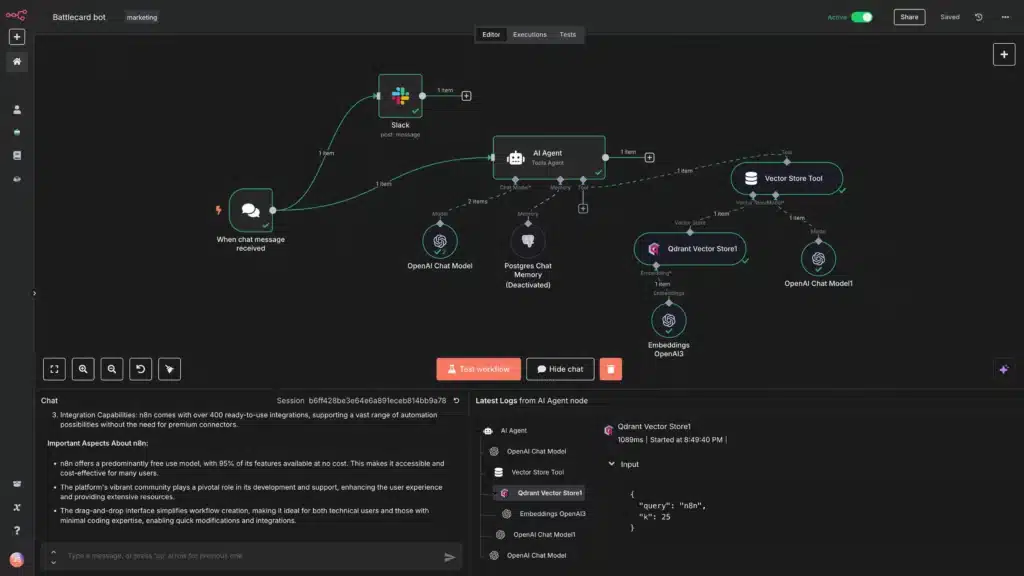
n8n is a workflow automation platform built for users who want greater control, customization, and scalability. Users can connect APIs, write custom code, build AI-powered workflows, and create highly advanced automations that would be difficult or expensive to replicate elsewhere.
Unlike Zapier and Make, n8n offers a self-hosting option, allowing businesses to keep workflows and data on their own infrastructure.
While it has a steeper learning curve, n8n stands out for its flexibility. Users can connect APIs, write custom code, build AI-powered agents, and create highly advanced automations that would be difficult or expensive to replicate elsewhere. This makes n8n a strong choice for developers, technical teams, and businesses building AI-driven workflows.
Key Features
- Self-hosted and cloud-hosted deployment options
- Advanced workflow builder with custom code support
- AI agents and large language model (LLM) integrations
- API-first architecture
- 400+ integrations and thousands more via APIs
Pricing
- Self-hosted Community Edition: Free
- Cloud plans start at $20/month
Pros
- Most flexible platform of the three
- Self-hosting provides greater data control
- Excellent for AI and custom workflows
- Cost-effective for high-volume automation
Cons
- Steeper learning curve
- Requires technical knowledge for advanced use cases
- Smaller native integration library than Zapier
- Setup can be more complex for beginners
Best For
Developers, technical teams, and businesses building advanced automations, AI workflows, or systems that require complete control over data and infrastructure.
Zapier vs Make vs n8n Cost: Pricing Breakdown
| Platform | What gets billed | Monthly units | Approx monthly cost |
| Zapier | 10 tasks per run | 10,000 tasks | ~$73.50 (Advanced plan required) |
| Make | 10 credits per run | 10,000 credits | ~$9 (Core plan) |
| n8n Cloud | 1 execution per run | 1,000 executions | ~$20 (Starter plan) |
| n8n Self-hosted | Unlimited | N/A | ~$5 to $7/month (VPS only) |
Make is consistently 3 to 5 times cheaper than Zapier for equivalent workflows, while n8n self-hosted is the cheapest option at any volume. This financial difference is the single most important factor in the zapier vs make vs n8n debate.
One important caveat: Make’s credit model means complex scenarios with many modules can consume credits faster than they appear. In November 2025, Make also added a 25% surcharge on additional credit packs, so estimate your real credit consumption before committing.
Common Automation Use Cases
Whether you’re a solo entrepreneur or part of a large organization, workflow automation tools can eliminate repetitive tasks and improve efficiency. Here are some of the most common ways businesses use Zapier, Make, and n8n.
1. Lead Generation and CRM Automation
Businesses often use automation to capture leads from forms, landing pages, or social media campaigns and automatically send them to a CRM.
For example, a new form submission can create a contact record, assign a sales representative, and trigger a follow-up email without any manual work. Zapier and Make are particularly popular for these workflows because of their extensive CRM integrations.
2. Marketing and E-commerce Automation
Marketing teams use automation to manage email campaigns, customer segmentation, order processing, and customer notifications.
Make excels in these scenarios thanks to its visual workflow builder and advanced logic tools. Businesses can automate everything from abandoned cart reminders to inventory updates and customer support notifications.
3. AI-Powered Workflows and Agents
AI is becoming a major part of business automation in 2026. Companies are using automation tools to summarize documents, classify support tickets, generate content drafts, and route requests to AI agents.
While Zapier and Make support many AI integrations, n8n offers the greatest flexibility for building advanced AI-powered workflows, making it a popular choice for developers and technical teams.
Which Tool Should You Choose?
| If You Are… | Choose | Why |
| A beginner or non-technical user | Zapier | Fastest setup and easiest learning curve |
| A small business or growing team | Make | Best balance of features, flexibility, and cost |
| A developer or technical team | n8n | Advanced customization and AI capabilities |
| Running high-volume automations | n8n | More cost-effective at scale |
| Managing complex workflows | Make | Strong visual builder and advanced logic |
| Using many SaaS apps | Zapier | Largest integration library available |
| Need self-hosting or data control | n8n | Full control over infrastructure and data |
For most businesses weighing the pros and cons of zapier vs make vs n8n, I think Make offers the strongest overall combination of affordability, flexibility, and ease of use.
But if simplicity is your top priority, Zapier is the best starting point. If you’re building AI-powered workflows or require complete control over your automation stack, n8n is the clear winner for most people.
The Final Verdict: Zapier vs Make vs n8n
There is no universal winner in the Zapier vs Make vs n8n debate because each platform serves a different type of user. I find myself using all of them for different reasons.
Zapier remains the best choice for beginners who prioritize simplicity and broad app compatibility. Make delivers the strongest overall value with powerful workflow automation features at a competitive price. Meanwhile, n8n stands out for developers, technical teams, and organizations looking to build advanced AI workflows or self-host their automations.
If you’re unsure where to start, Make is the safest recommendation for most businesses in 2026. It combines ease of use, flexibility, and affordability better than any other workflow automation tool in this comparison.
FAQs
For technical teams, high-volume workflows, and AI-powered automation, yes. n8n’s execution-based billing model and 70+ AI nodes make it significantly more capable and cost-effective at scale. For non-technical users who need fast setup and broad app coverage, Zapier remains the easier choice.
Yes, significantly. A 10-step workflow running 1,000 times per month costs roughly $73.50 on Zapier versus approximately $9 on Make’s Core plan. Make is consistently 3 to 5 times cheaper per operation than Zapier for equivalent workflows.
It is possible but difficult. n8n’s node-based editor requires comfort with data structures, JSON, and workflow debugging. Without a developer available, Zapier or Make will be more productive starting points.
n8n, by a clear margin. n8n 2.0 introduced 70+ AI nodes, native LangChain support, persistent agent memory, and the ability to run self-hosted LLMs. Make’s Maia AI and Zapier Agents are more accessible for non-technical users but lack n8n’s depth and customization.
It depends on team skill level. Non-technical small teams will get the most value from Zapier for simplicity or Make for better cost-at-scale. Small businesses with a developer should evaluate n8n, especially self-hosted, which removes execution limits at minimal infrastructure cost.
