


Productivity software used to mean one thing: a word processor, a spreadsheet, maybe a calendar app that pinged you five minutes before a meeting you didn’t want to attend. That definition is basically obsolete now.
In 2026, the category includes software that drafts your emails, transcribes your calls, moves data between apps on its own, records your meetings, and answers research questions with citations attached.
In this guide, I’ll break down what productivity software is, the 12 types you’ll run into at work, and where the best AI productivity tools fit into each one.
Key Takeaways
- Productivity software now splits into two eras. Tools that organize your work (calendars, CRMs, docs) and tools that do part of it for you (AI writing, AI research, AI workflow automation).
- The best AI productivity tools cluster around four jobs: writing/reasoning, research, meetings, and cross-app automation. Everything else on this list is either a supporting layer (calendar, time tracking) or a specialized vertical (CRM, design).
- Workplace research in 2026 found productivity gains from AI tools peak at around two to three tools used daily and drop off past that – more AI tools for productivity isn’t automatically better.
What is Productivity Software?
Productivity software is any application designed to help you create, organize, communicate, or complete work faster than doing it manually or on paper. That’s the classic definition – Word, Excel, email.
But the modern version adds a second layer: software that uses AI, automation, or machine learning to remove entire steps from a task rather than just digitizing it.
That second layer is why “productivity software” and “AI productivity tools” increasingly mean the same thing to a lot of buyers. When people search for AI tools for productivity today, they’re usually not looking for a task list. They’re looking for something that drafts, summarizes, transcribes, or automates on their behalf. Both categories are covered below.
Quick Comparison Among The Best AI Productivity Tools
| Type | Tool | Best For | Price |
| AI Writing & Reasoning | Claude | Long documents, nuanced analysis | ~$20/mo |
| AI Writing & Reasoning | ChatGPT | All-round everyday assistant | $8-200/mo |
| AI Research Tools | Perplexity AI | Cited, verifiable research | ~$20/mo |
| Note-Taking & Knowledge Mgmt | Notion AI | Team wikis and docs | ~$20/user/mo |
| AI Meeting & Transcription | Otter.ai | Solo meeting transcription | ~$17/mo |
| AI Meeting & Transcription | Fireflies.ai | Sales call intelligence | ~$10-39/user/mo |
| AI Workflow Automation | Zapier | Cross-app automation | ~$30/mo |
| Project & Task Management | Asana | Multi-workstream teams | ~$13-30/user/mo |
| Team Communication | Slack | Team chat, replacing email | ~$8/user/mo |
| Cloud Office & Docs | Microsoft 365 Copilot | Word/Excel/Outlook AI | $21-30/user/mo (add-on) |
| Time Tracking & Focus | Toggl Track | Billable hours, client reports | $12-20/user/mo |
| CRM & Sales | HubSpot (Breeze AI) | Rep admin, lead scoring | Starts from $20/mo |
| Design & Creative | Canva (Magic Studio) | Non-designer content creation | Starts from $18/mo |
| Calendar & Scheduling | Reclaim AI | Auto-blocked focus time | $10-22/user/mo |
Note: Prices are list prices as of September 2026 and change often.
The 12 Types of Productivity Software
AI Writing and Reasoning Assistants
This is the category most people mean when they say “AI productivity tools” – general-purpose assistants for drafting, editing, analysis, and long-document reasoning.
Claude (Anthropic)
Claude is built for long or complex work: contracts, research papers, technical documents, and multi-step reasoning tasks where other tools lose track of context.
Key features:
- Long-context reasoning across large documents and codebases.
- Claude Code and Claude Cowork for agentic, multi-step work.
- Projects and connectors (Google Drive, Slack, and more) so Claude can work with your existing files.
Pros:
- Output generally needs minimal editing.
- Handles nuanced, multi-part instructions reliably.
- Strong for compliance-sensitive or detail-heavy writing.
Cons:
- No native image generation.
- Can be conservative on edgy creative requests.
- The full agentic feature set has a learning curve for non-technical users.
ChatGPT (OpenAI)
ChatGPT remains the most widely used of the AI productivity tools on this list. As of September 2026, it runs on GPT-5.5, which OpenAI positioned as a hallucination-reduction upgrade over the GPT-5.4 generation, alongside computer-use and native Excel/Drive integrations.
Key features:
- GPT-5.5 with a 1M-token context window and multimodal (text, image, audio) input.
- Custom GPTs and Projects for recurring workflows.
- Broad third-party integrations (Gmail, Notion, Dropbox, Box).
Pros:
- Most versatile of the AI tools for productivity on this list for everyday mixed-use tasks.
- Frequent model updates.
- Strong ecosystem of plugins and connectors.
Cons:
- Free and Go-tier users see ads in chat.
- Output quality depends heavily on prompt specificity.
- Long, structured document work is often cleaner in Claude.
AI Research Tools
Research tools pair a language model with live web search and source citations, which is the main reason to reach for AI tools for research instead of a general chatbot when accuracy matters.
Perplexity AI
Perplexity answers questions directly from the web and links every claim back to a source, which is what makes it one of the more trustworthy AI tools for research on the market.
Key features:
- Real-time web search with cited sources on every answer.
- Deep Research mode for multi-step investigation.
- A model picker (GPT, Claude, and others) for Pro and Max users.
Pros:
- Every answer is traceable, which makes hallucinated facts much harder to hide.
- Fast for research and fact-checking versus manual tab-switching.
- No ads on paid or free tiers.
Cons:
- Not built for creative or long-form generative writing.
- Deep document analysis is still better handled by Claude or ChatGPT.
- The strongest research modes sit behind the $200/month Max tier.
Note-Taking and Knowledge Management Software
This category covers workspaces that store, organize, and now actively generate your notes, docs, and internal knowledge base.
Notion AI
Notion turns a workspace many teams already live in into an AI-assisted knowledge base – summarizing pages, drafting content, and answering questions across your entire workspace in plain language.
Key features:
- AI writing, editing, and auto-summarization built into every doc and database.
- Natural-language Q&A across your whole workspace.
- Integrations with Slack, Google Drive, and Zapier.
Pros:
- No switching cost if your team already works in Notion.
- Consolidates several standalone note tools into one.
- Solid value for small teams.
Cons:
- Steep learning curve for anyone new to Notion’s structure.
- Performance slows in very large, deeply nested workspaces.
- Full AI access now requires a higher-tier plan than before.
AI Meeting and Transcription Software
These tools join your calls, transcribe them in real time, and turn the recording into searchable notes and action items – one of the more mature corners of AI workflow automation because the trigger (a scheduled call) and the output (a summary) are predictable.
Otter.ai
Otter transcribes meetings live and sends a summary before you’ve even closed the call window. Pro runs about $17/month; the free plan covers most individual use cases.
Key features:
- Real-time transcription with automatic speaker ID.
- Voice commands for assigning action items mid-meeting.
- Integrations with Zoom, Google Meet, Teams, and Salesforce.
Pros:
- Strong transcription accuracy in English.
- The free plan is genuinely usable, not just a trial.
- Low-friction way to stop taking manual notes.
Cons:
- Monthly minute caps hit heavy users fast.
- Struggles with heavy accents, jargon, or overlapping speakers.
- Stronger compliance features are Enterprise-only.
Fireflies.ai
Fireflies auto-joins calls and adds topic tracking, sentiment analysis, and CRM sync on top of the transcript, with support for 100-plus languages.
Key features:
- Automatic meeting join and transcription with no manual setup.
- In-meeting AI search powered by Perplexity.
- Native CRM sync with HubSpot and Salesforce.
Pros:
- Strong for sales call review and coaching.
- Smart filters make long recordings searchable.
- Broad language support suits global teams.
Cons:
- The bot’s presence can feel intrusive on sensitive calls.
- The free-tier credit system is confusing.
- It joins every calendar meeting by default unless you turn that off.
AI Workflow Automation Platforms
AI workflow automation connects apps and removes manual data handoffs using triggers, conditional logic, and increasingly, autonomous agents rather than fixed if-this-then-that rules.
Zapier
Zapier connects 8,000-plus apps and builds the automation for you from a plain-English description via its AI Copilot. Professional plans start around $30/month.
Key features:
- 8,000+ app integrations across Gmail, Slack, Notion, and Salesforce.
- AI Copilot that builds automations from natural language, plus Zapier Agents for autonomous multi-step workflows.
- Tables and Interfaces bundled into paid plans.
Pros:
- The largest app ecosystem of any AI workflow automation platform.
- Genuinely no-code and beginner-friendly.
- Agents extend automation beyond simple triggers.
Cons:
- Costs scale quickly as task volume and workflow complexity grow.
- AI steps now carry model-tier-based pricing rather than a flat rate.
- Free plan is capped at single-step Zaps.
Project and Task Management Software
This category tracks who owns what, by when – and now increasingly flags risk and drafts status updates before you ask.
Asana
Asana’s AI layer handles the admin that slows project-heavy teams down: briefs, at-risk task flags, and stakeholder updates generated automatically.
Key features:
- AI-generated project briefs from a single goal description.
- Smart Goals that flag at-risk tasks before deadlines slip.
- AI workload analysis to catch over- or under-assignment.
Pros:
- Cuts project admin time noticeably for multi-workstream teams.
- AI feels integrated rather than bolted on.
- Workable pricing for small and mid-sized teams.
Cons:
- Expensive for solo users without collaboration needs.
- The richer AI features sit behind higher tiers.
- Setup takes real time to configure properly.
Team Communication and Collaboration Software
Chat, channels, and huddles – the connective tissue that most other productivity software plugs into.
Slack
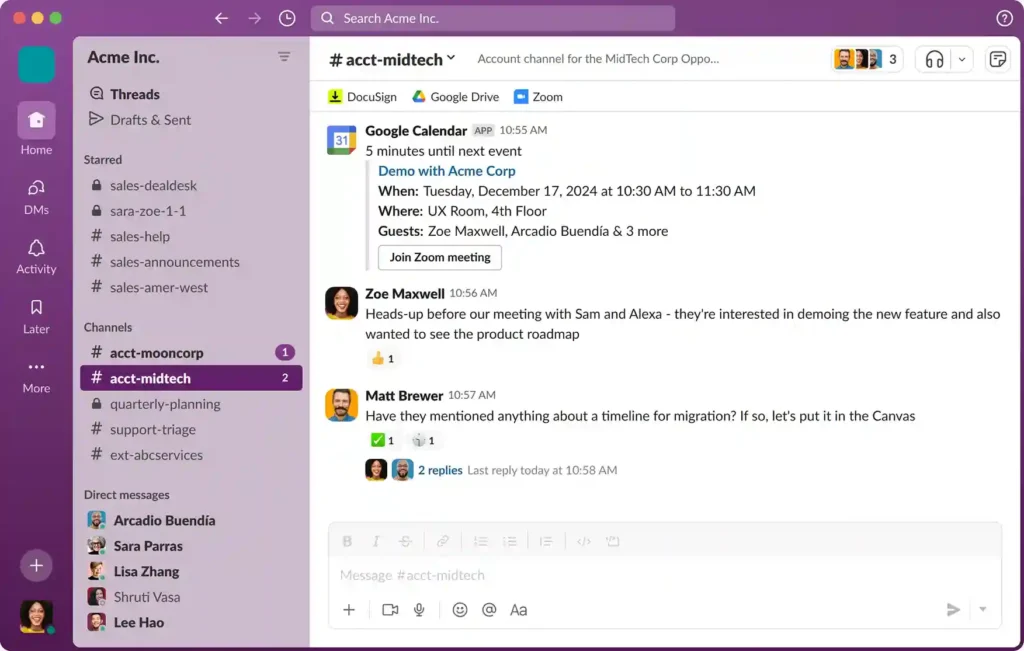
Slack organizes team communication into channels instead of email threads. Pro runs about $8/user/month, and AI features – channel and thread summaries, huddle notes – live in the Business+ plan.
Key features:
- Channel-based messaging with searchable history.
- AI channel, thread, and huddle summaries (Business+ and above).
- Huddles (audio/video) plus deep integrations with the rest of your stack, including Zapier and Asana.
Pros:
- Dramatically cuts internal email volume.
- Searchable history makes onboarding faster.
- The integration ecosystem is enormous.
Cons:
- Notification overload is a real productivity risk without discipline.
- Full AI summarization now requires the Business+ tier specifically, not just any paid plan.
- Large workspaces get noisy fast without channel hygiene.
Cloud Office and Document Suites
The baseline layer of productivity software – documents, spreadsheets, and presentations, now with an AI assistant built in.
Microsoft 365 Copilot
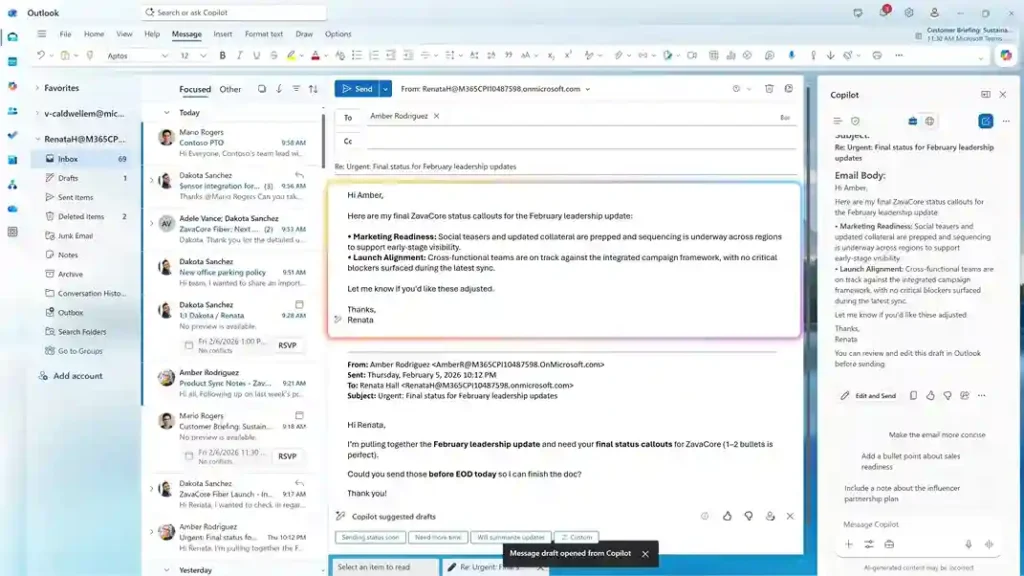
Copilot adds AI drafting, summarization, and data analysis directly inside Word, Excel, and Outlook. It’s basically sold as an add-on.
Key features:
- In-app drafting and rewriting in Word and Outlook.
- Natural-language formula and analysis help in Excel.
- Meeting recap and action items in Teams.
Pros:
- No new interface to learn if your org already runs Microsoft 365.
- Strong for teams heavily invested in Excel-based work.
- Deep integration across the whole Office suite.
Cons:
- It’s an add-on, not a standalone product – you need a qualifying base license first, which pushes the real cost well above the headline price.
- SMB and enterprise tiers have different feature sets.
- Rollout and training take longer than lighter-weight AI productivity tools.
Time Tracking and Focus Software
Software built around one question: where did the hours actually go?
Toggl Track
Toggl Track is a one-click timer that logs work by project and client, then turns the data into reports for billing or workload reviews.
Key features:
- One-click start/stop timers with idle detection.
- Project- and client-level reporting.
- Integrations with Asana, Notion, and calendar apps for automatic time suggestions.
Pros:
- Extremely low friction to start using.
- Free plan covers small teams (up to 5 people) well.
- Reporting is clean enough to hand straight to a client.
Cons:
- Doesn’t automate the work itself, only measures it.
- Team plans add up per seat once you outgrow the free tier.
- Manual entry discipline is still required for accuracy.
CRM and Sales Productivity Software
Software that tracks deals, contacts, and follow-ups – with AI increasingly doing the data entry and drafting for reps.
HubSpot with AI (Breeze)
Source | HubSpot’s Breeze
HubSpot’s Breeze AI tools sit across the CRM, drafting outreach emails, summarizing deal history, and scoring leads automatically. Breeze is bundled into HubSpot’s paid Hubs rather than sold standalone.
Key features:
- AI-drafted emails and follow-up sequences.
- Automatic deal and contact summarization.
- Predictive lead scoring built into the CRM.
Pros:
- Keeps rep admin time low without leaving the CRM.
- Scales from a free CRM tier to full enterprise suites.
- Strong native reporting.
Cons:
- Costs rise quickly once you need marketing and service hubs together.
- The more capable agent features require Professional-tier pricing and up.
- Initial setup and data cleanup take real effort.
Design and Creative Productivity Tools
Tools that turn a rough idea into a finished graphic, deck, or social post without a design background.
Canva with AI (Magic Studio)
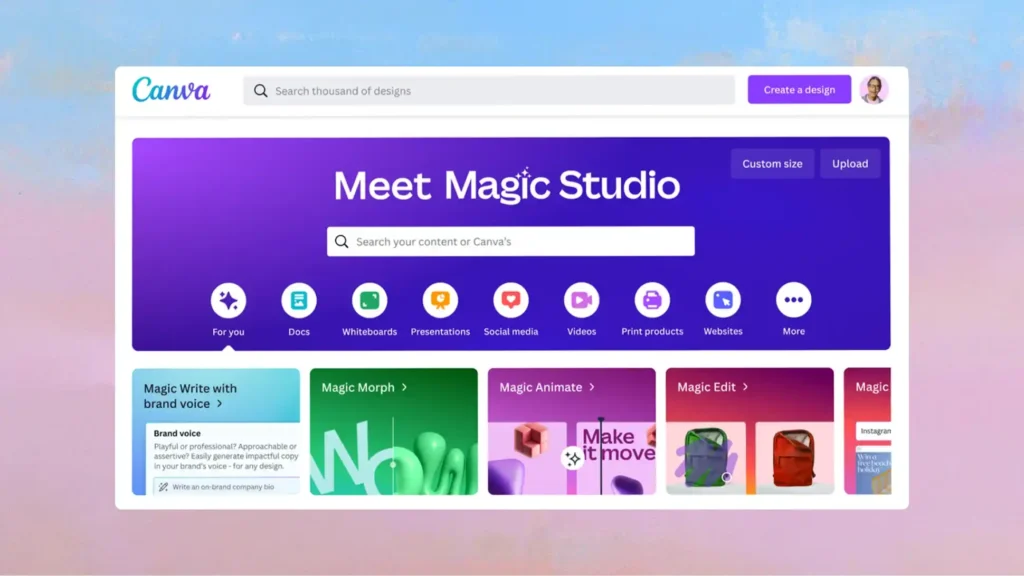
Canva’s Magic Studio bundles AI image generation, background removal, and text-to-design tools directly into its drag-and-drop editor. Pro runs about $18/month for a single user. The Business plan adds team collaboration.
Key features:
- Text-to-image and Magic Design layout generation.
- One-click background removal and photo editing.
- Brand kit tools for consistent team output.
Pros:
- Genuinely usable by non-designers.
- Large template library speeds up routine content.
- Pro plan is affordable for individual freelancers.
Cons:
- Less control than dedicated design software like Photoshop or Figma.
- AI-generated visuals still need human review for brand accuracy.
- Real-time team collaboration requires the pricier Business tier, not Pro.
Calendar and Scheduling Software
The category that decides whether your day is actually plannable or just a string of back-to-back interruptions.
Reclaim AI
Reclaim blocks automatically focus time, reschedules around conflicts, and protects habits (like a workout or lunch) the way a human assistant would.
Key features:
- AI-powered auto-scheduling that defends focus time and habits.
- Smart 1:1 scheduling that finds mutual availability.
- Syncs with Google Calendar and task tools like Asana.
Pros:
- Reduces manual calendar Tetris.
- Free tier is usable for individuals.
- Integrates cleanly with existing calendar tools rather than replacing them.
Cons:
- Full team scheduling features require a paid plan.
- Works best when most of your team also uses it.
- Occasional over-aggressive rescheduling needs manual correction.
How to Choose Between These Types (and Build a Stack)
You don’t need all of the best AI productivity tools. Start with your biggest daily time drain and work outward:
- Writing and analysis bottleneck: Claude or ChatGPT.
- Research and fact-checking bottleneck: Perplexity – still one of the sharpest AI tools for research available.
- Meetings eating your day: Otter.ai or Fireflies.ai.
- Manual cross-app busywork: Zapier, paired with any of the above for AI workflow automation that also drafts and reasons, not just moves data.
- Team coordination: Slack plus Asana, with Notion as the shared knowledge layer.
A useful rule of thumb from workplace research in 2026: productivity gains from AI tools tend to peak around two or three tools used daily and fall off after that.
The Bottomline
Productivity software has quietly split into two eras: tools that organize your work, and tools that do part of it for you. Both still matter – a calendar app and an AI research assistant solve different problems.
The 12 types above cover the full stack, but if you’re only picking one place to start, the best AI productivity tools for writing, research, and AI workflow automation deliver the fastest, most measurable time savings – which is why they dominate most “best of” lists, this one included.
For more info on tech and AI, visit Yaabot.
FAQs
Whichever solves your biggest bottleneck this week – usually writing, research, meetings, or cross-app admin. Most tools listed above have a usable free tier, so testing first is realistic.
Often, yes. General AI productivity tools like Claude and ChatGPT draft and reason well but don’t cite live sources. Dedicated AI tools for research exist for that citation layer.
Generally, yes, on paid plans – Claude, ChatGPT, and Notion AI all offer training opt-outs. Check privacy settings before uploading sensitive files, and use Enterprise tiers for regulated work.
