


Picking network monitoring software looks simple right up until you’re three vendor demos deep and every pricing page says “contact sales.” Network monitoring software is a long-term relationship – you’re going to be staring at this thing’s dashboard for years – so it’s good to know more before you commit.
In this post, I’ll discuss five of the most-searched names in this space and learn about what each one does, what it costs, and who it’s built for.
Also read: Smart Home Security: How Hackers Exploit Your Devices & How to Stop Them
Key Takeaways
- The best network monitoring software for you depends heavily on budget and network size. A 15-device home lab and a 300-device small business network need very different tools.
- Zabbix is free and open-source, which makes it a strong fit if you don’t mind a technical setup process.
- Auvik and WhatsUp Gold lean toward small-to-midsize business use, with automated discovery and topology mapping baked in.
- SolarWinds has folded its network monitoring into a per-node Observability platform. Its depth goes well beyond what most home users need.
- PRTG no longer offers perpetual licensing. As of July 2024, Paessler moved to subscription-only pricing, tiered by sensor count from PRTG 500 up to PRTG 10000. That change matters if you’re comparing quotes from older sources.
- No single tool wins on every front – this is why a comparison of network monitoring software features matters more than a single “best pick” headline.
What is Network Monitoring Software?
Network monitoring software is a tool that keeps a constant eye on your routers, switches, servers, access points, and anything else with an IP address.
Here’s what network monitoring software does:
- Polls your devices at intervals: Usually via SNMP (Simple Network Management Protocol), checking things like CPU load, interface status, and memory.
- Runs agent-based or agentless checks: Some tools install a small agent on devices; others check remotely via SSH, WMI, or HTTP.
- Collects flow data: Tools with NetFlow, sFlow, or IPFIX support show you which devices are talking to each other and how much bandwidth they’re using.
- Builds dashboards and topology maps: Turning raw numbers into a visual picture of your network, so you can see the blast radius of a problem instantly.
- Sends alerts: Through email, SMS, Slack, or webhooks, the moment a threshold is crossed, or a device drops offline
Monitoring software doesn’t block or defend anything on its own. Its whole job is visibility – which is why picking a good network monitoring software for your situation matters.
A quick word on SNMP versions:
Most of these tools support SNMP v1, v2c, and v3, but they are not interchangeable. SNMP v1 and v2c send community strings – effectively a shared password – in plain text, which means anyone sniffing your local network traffic can read them. SNMP v3 adds authentication and encryption, and it’s the version you should be using on anything beyond a fully isolated home lab.
How I Chose the Best Network Monitoring Software
Here’s what I weighed when ranking these five:
- Setup and learning curve: How much time before you get useful data, especially for people running this on a home network in their spare time.
- Protocol depth: Whether the tool supports SNMP v1/v2c/v3, agent-based monitoring, and (where relevant) flow analysis like NetFlow or sFlow.
- Pricing structure: Flat rate vs. per-sensor vs. per-device vs. per-node vs. custom quotes, and how each scales as your network grows.
- Alerting and automation: How flexible the notification rules are, and whether it can auto-discover new devices.
- Topology and visualization: Does it just give you numbers, or does it actually map your network so you can see what’s connected to what?
- Real-world fit for home / small business: I’ve called out where a tool feels like an overkill or underpowered for smaller setups.
What Are The Best Network Monitoring Software?
Take a look at this table for a quick comparison.
| Software | Best For | Pricing Model | Free Tier | Standout Feature |
| Zabbix | Technical users, budget-conscious setups | Free (self-hosted); paid support optional | Yes, fully free | 300+ vendor templates |
| Auvik | MSPs and small IT teams | Custom quote, per-device | No | Real-time network mapping |
| SolarWinds NPM | Larger businesses, dedicated IT teams | Per-node (Observability Self-Hosted) | Free trial only | NetPath hop-by-hop analysis |
| WhatsUp Gold | SMBs wanting strong topology views | Per-device, edition-based | No (trial only) | Layer 2/3 topology maps |
| PRTG Network Monitor | Home networks, small offices | Per-sensor (perpetual or subscription) | Yes (100 sensors) | All-in-one sensor model |
Zabbix
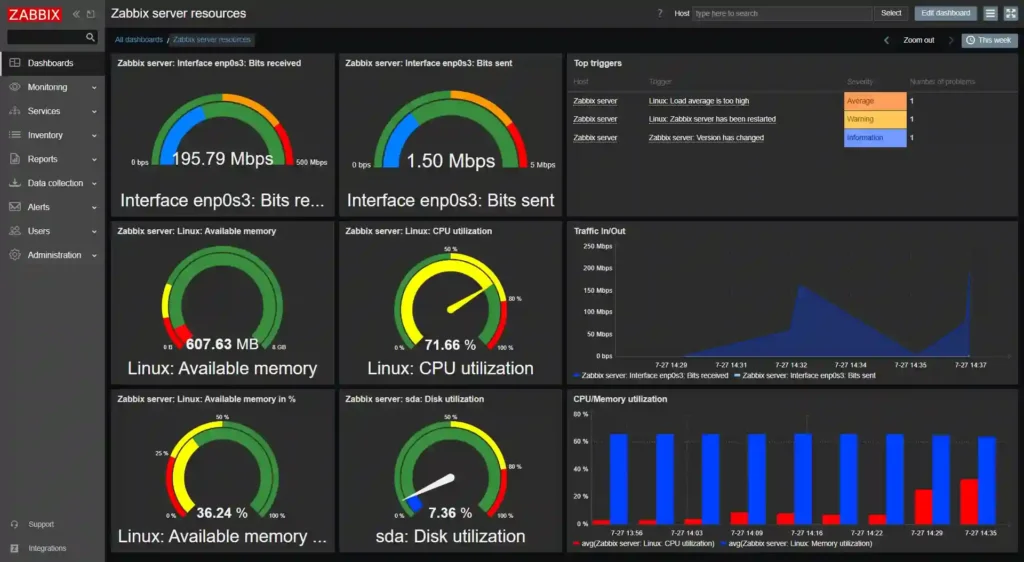
Zabbix has been around for a long time. It’s open-source, self-hosted, and genuinely capable once it’s configured. But the catch is that the “once it’s configured” part takes real effort.
If you’re comfortable with a bit of a learning curve, Zabbix gives you enterprise-grade depth for zero licensing cost.
Key features
- SNMP and agentless monitoring: Supports SNMP v1, v2c, and v3, plus agentless checks over IPMI, JMX, HTTP, and SSH.
- 300+ pre-built templates: Vendor-specific templates auto-populate monitoring items, triggers, and discovery rules, which saves a lot of manual setup for common network hardware.
- Automatic device discovery: Scans your network ranges, finds new devices, and can auto-assign templates and host groups – handy for networks that change often.
What the free part actually costs you: Zabbix’s license is free, but you’re still paying in infrastructure and time. You need a server to host it (a small VM or a Raspberry Pi 4 can technically run it for a home network, though a proper small-business deployment wants dedicated compute and a MySQL or PostgreSQL backend). You’re responsible for backups, updates, and troubleshooting when something breaks at 11 pm.
Auvik
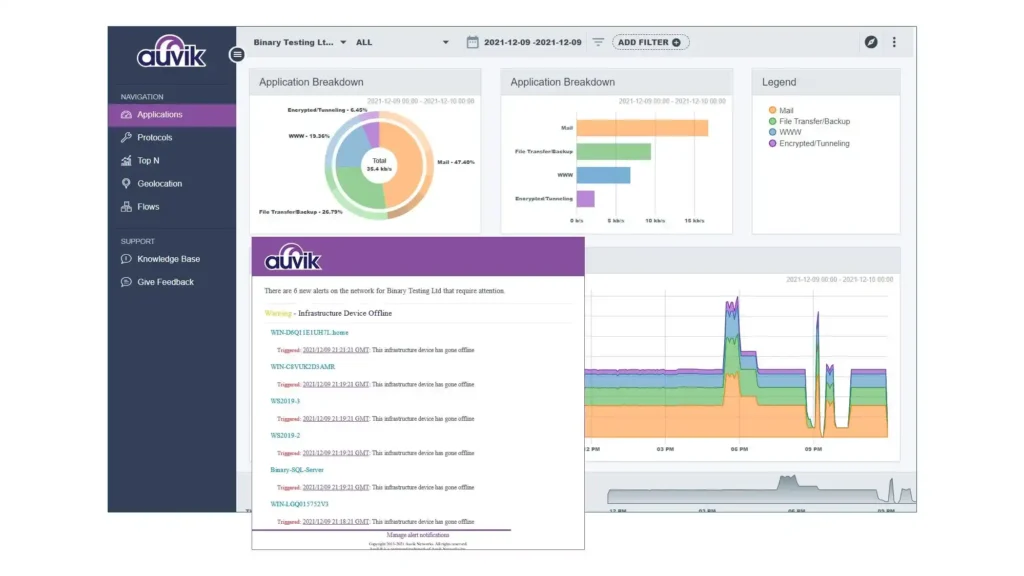
Auvik is a cloud-based software built for managed service providers or small IT teams who manage multiple client networks. If you want to stop manually documenting your network topology every time something changes, this is the one that made me stop and pay attention.
Key features
- Real-time network mapping: Builds and updates a live topology map as your network changes.
- Configuration backup and versioning: Automatically backs up device configs and tracks changes over time.
- TrafficInsights bandwidth monitoring: Gives you visibility into what’s actually consuming your bandwidth, down to the application level in many cases.
Worth knowing: Auvik doesn’t publish public pricing. It provides custom quotes only, and there’s no free tier, which pushes it more toward small business use.
Why Auvik hides its pricing when most of its competitors on this list don’t: Auvik’s per-device pricing model scales with network size in a way that’s harder to quote generically than PRTG’s sensor tiers or SolarWinds’ per-node bands. And since Auvik’s device discovery counts everything with an IP – printers, VoIP phones, IoT devices.
Auvik’s built to reflect the true device count on a network rather than what an admin remembers to add.
If you’re evaluating it, ask for a device count estimate based on a network scan before you get a quote.
SolarWinds Network Performance Monitor (NPM)

SolarWinds NPM is not really “home and small business” software, even though it gets recommended in every roundup. It’s also not really sold as a standalone product anymore; SolarWinds has folded NPM into its broader Observability Self-Hosted platform. So what you’re actually buying is a per-node bundle that includes network monitoring alongside server monitoring, log analysis, and IP address management.
Key features
- NetPath hop-by-hop analysis: Visualizes the entire path a connection takes, on-prem to cloud, so you can pinpoint exactly where latency or packet loss is happening.
- PerfStack correlation: Lets you drag and drop different metrics onto a single timeline to correlate events.
- Automated discovery and mapping: Finds and maps every device on your network, with dependency-aware alerts that reduce noise when one failure triggers a dozen downstream alarms.
WhatsUp Gold
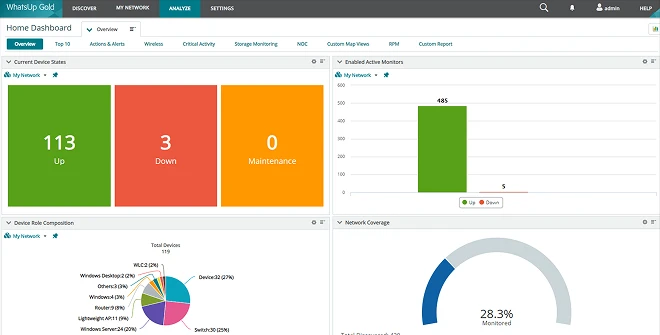
Progress WhatsUp Gold sits in an interesting middle ground – it’s more approachable than SolarWinds but still clearly aimed at small-to-midsize businesses rather than a single home network. Its biggest strength, in my opinion, is how clean its topology maps are compared to some of the more dated interfaces in this space.
Key features
- Interactive Layer 2/3 topology maps: Automatically updating maps that make it easy to see device relationships at a glance, which a lot of NOC teams genuinely rely on.
- Broad flow support: Handles NetFlow, IPFIX, sFlow, jFlow, and NetStream, giving you real traffic analysis without needing a separate tool bolted on.
- Unified monitoring: Covers network devices, servers, VMs, and applications in one dashboard, so you’re not juggling three different tools for different infrastructure layers.
PRTG Network Monitor
Paessler’s PRTG is probably the most “install it today, get value today” option on this list, and it comes with a free tier (the Freeware Edition, capped at 100 sensors).
But the pricing structure has changed since a lot of the articles still circulating about PRTG were written: Paessler ended perpetual licensing entirely on July 1, 2024. PRTG is now subscription-only, billed annually, and tiered by sensor count – PRTG 500 through PRTG 10000.
Reported 2026 rates run roughly $200-$1,642 per month across those tiers, though third-party sources vary somewhat depending on contract length and whether they’re quoting list price or discounted terms – get a current quote directly from Paessler rather than trusting a cached number, including the ones in this article.
Key features
- All-in-one sensor model: Covers SNMP, WMI, NetFlow, packet sniffing, and HTTP checks – you’re not buying separate modules for separate protocols.
- Auto-discovery with pre-configured sensors: Speeds up onboarding significantly compared to tools that need everything set up manually.
- Flexible alerting: Notifications via email, push, SMS, and more, with customizable thresholds per sensor.
The catch: pricing is per-sensor, and one server alone can easily burn 10-30 sensors depending on how much you monitor on it (ping, CPU, memory, each disk, each network interface, each service check all count separately), so a small network’s sensor count adds up faster than people expect. A 30-server small business deployment with basic monitoring on each can land at 200+ sensors before you’ve added a single switch.
Key Considerations Before You Choose
- Match the tool to your actual network size: Don’t buy SolarWinds-level depth for a 10-device home network, and don’t try to stretch PRTG’s free tier across 500 sensors’ worth of infrastructure.
- Factor in your technical comfort level: Zabbix rewards you with zero licensing cost but demands real setup time; PRTG and WhatsUp Gold trade some of that flexibility for faster time-to-value.
- Understand how the pricing model scales: Per-sensor (PRTG), per-device (Auvik, WhatsUp Gold), and per-node (SolarWinds) models all grow differently as your network grows, so model your cost at 2x your current device count, not just today’s count.
- Check what’s bundled vs. sold separately: Flow analysis and config management are included in some tools and paid add-ons in others, so read the tier breakdown, not just the headline price.
- Get current pricing straight from the vendor: Third-party trackers and marketplace listings for these tools often disagree or lag behind actual vendor pricing pages, especially after a product restructuring like SolarWinds’ shift to Observability Self-Hosted or PRTG’s July 2024 move away from perpetual licenses.
- Think about support and community: Open-source tools like Zabbix lean on community forums and paid support tiers, while commercial tools like WhatsUp Gold and SolarWinds include vendor support in the license.
- Plan for growth, not just today: If you’re a small business expecting to scale, it’s worth picking software that won’t force a painful migration in two years.
Final Thoughts
If I had to boil this down: there isn’t one single best network monitoring software for everyone, and anyone telling you otherwise is oversimplifying.
What matters most is being honest about your network’s actual size and complexity before you pick – because the best network monitoring software on paper isn’t the best network monitoring software for you if it’s built for a scale you’re not at.
For more info on tech and AI, visit Yaabot.
FAQs
Network monitoring software continuously tracks the health, performance, and availability of your network devices – routers, switches, servers, access points – and alerts you when something goes wrong, before it becomes a bigger outage.
Yes. Zabbix is fully open-source and free to self-host, and PRTG offers a free Freeware Edition capped at 100 sensors, both solid entry points if you’re not ready to commit to a paid tool.
It varies by pricing model. PRTG’s sensor-tiered subscription runs roughly $200-$1,642/month depending on tier since Paessler moved off perpetual licensing in 2024. SolarWinds Observability Self-Hosted starts around $7–8/node/month on multi-year contracts. Auvik and WhatsUp Gold are quoted per-device and generally require a direct sales conversation to price accurately.
Yes – Zabbix (self-hosted, fully free) and PRTG’s free 100-sensor tier are both realistic options for a home setup without a monthly bill.
