


My Delta flight landed in Mumbai, but my luggage was somewhere else. All I could do was refresh the airline app that had no idea where my bag was. And then I remembered that I dropped a Bluetooth tag into the side pocket before leaving the hotel. Thirty seconds later, I was staring at a blinking dot that was just a terminal away. That’s what Google Find Hub did for me.
Google Find Hub is the renamed, rebuilt version of Find My Device, and it now does a lot more than just locate a missing phone. It tracks phones, earbuds, watches, Bluetooth tags, and, as of a recent update, shares live luggage location with airlines directly.
Here’s how all three work.
Key Takeaways
- Google Find Hub replaced Find My Device after Google announced the rename in May 2025.
- It runs on a crowdsourced network of more than a billion Android devices that anonymously relay location pings, which is how it finds phones that are offline or switched off.
- Find Hub now supports third-party Bluetooth tags from brands like Chipolo, Motorola, and Pebblebee working alongside Google’s own devices.
- A March 2026 update lets you share a tag’s live location directly with participating airlines through a one-time link that expires after seven days.
- Location data is end-to-end encrypted, and the app will flag unknown trackers that may be following you without consent.
What Is Google Find Hub?
Google Find Hub is Android’s built-in device and item tracking service, owned and operated directly by Google. It locates phones, tablets, earbuds, watches, and compatible Bluetooth tags using a mix of GPS, Bluetooth, and a crowdsourced network of nearby Android devices.

Where it came from:
- It replaced Find My Device, which had been around since 2013 but worked mostly as a phone-finder.
- The modern network version launched in the US and Canada in April 2024, built on top of over a billion participating Android devices.
- That scale is what makes the whole thing work: a tracker is only as good as the number of nearby devices that can detect it, and a billion-device network beats almost anything a single accessory brand could build alone.
- The rebrand to Find Hub followed a year later, bundling phone-finding, tag support, and family location sharing into one app instead of three separate tools.
Google Find Hub vs. Google Find My Device: What Actually Changed
Find Hub is just the renamed version of Find My Device, with a cleaner interface and a wider job description. Google confirmed the switch in May 2025.
If you had Find My Device set up, you don’t need to do anything. Your phone, your saved tags, and your sharing settings all get shifted automatically.
| Find My Device (old) | Find Hub (new) | |
| Launched | 2013, network upgrade in 2024 | May 2025 |
| Primary job | Locate your own phone | Locate phones, tags, earbuds, and shared items |
| Luggage sharing | Not available | Yes, added March 2026 |
| Tag ecosystem | Limited | 60+ supported brands |
| Setup for existing users | N/A | None, auto-migrated |
Google’s billion-device network was untouched. But what expanded is the scope, a wider tag ecosystem, UWB precision finding, and the airline luggage integration covered below.
How Google Find Hub Works for Device Tracking
Find Hub uses two types of systems. For your own signed-in devices with a connection, it relies on GPS and Wi-Fi. But for anything without power or signal, like a dead phone or a Bluetooth tag, it relies on its device network.
It works like this:
- A lost device or tag broadcasts a quiet, encrypted Bluetooth signal.
- Any nearby Android phone (not yours, someone else’s) detects that signal in the background.
- That stranger’s phone reports the item’s rough location to Google’s servers, anonymously and without either party knowing the other was involved.
- You open Find Hub and see the last reported location on a map.
Finding devices that are offline
Find Hub can locate a dead phone, but only on supported hardware. Devices like Pixel 8 and 8 Pro models can be found even after shutting down, since a low-power chip keeps broadcasting briefly before the battery fully dies.
Older or non-Pixel phones generally need to be on and connected to be located. Offline Bluetooth tags work regardless of phone state.
Bluetooth and ultra-wideband (UWB) precision
Standard Bluetooth gets you a neighborhood-level location that ranges usually within 30 to 100 meters depending on the signal strength and obstacles. UWB is a different radio technology that gives you distance and direction, down to a few feet, with an on-screen arrow pointing you to the item.
How to Use Google Find Hub to Find a Lost Phone
If your phone’s missing right now, do this:
- Go to android.com/find in any browser, or open the Find Hub app on another Android device.
- Sign in with the Google account linked to the missing phone.
- Select the device from your list on the left.
- Choose Play Sound if it’s nearby but buried under a couch cushion.
- Choose Secure Device to lock it remotely and display a message or callback number on the screen.
- Choose Erase Device only as a last resort, since this wipes local data and you lose the ability to track it further afterward.
If the phone shows as offline, don’t panic. That usually means it has lost its Wi-Fi or mobile data connection for the moment. It updates the moment your phone reconnects, or a nearby Android device picks up its Bluetooth signal.
Smart Trackers and Tags That Work With Google Find Hub
Find Hub has stopped being just a phone-finder once Google opened the network to third-party Bluetooth tags. You can now clip a tiny tracker onto your keys, a wallet, a backpack, or a bike, and find it the same way you’d find a lost phone.
Google has listed more than 60 supported brands. Here are a few of the recognizable options:
| Brand | Example Models | UWB Support |
| Chipolo | ONE Point, CARD Point | Yes, on Point models |
| Motorola | Moto Tag, Moto Tag 2 | Yes |
| Pebblebee | Clip 5, Card 5, Halo | Yes, on select models |
| UGREEN | FineTrack G, FineTrack Slim G | Varies by model |
Earbuds count too. Pixel Buds Pro 2 and Sony’s LinkBuds S and WH-1000XM6 both show up in the Find Hub network individually, so you can locate a single lost earbud instead of just the case.
How Find Hub Helps You Track Lost Luggage
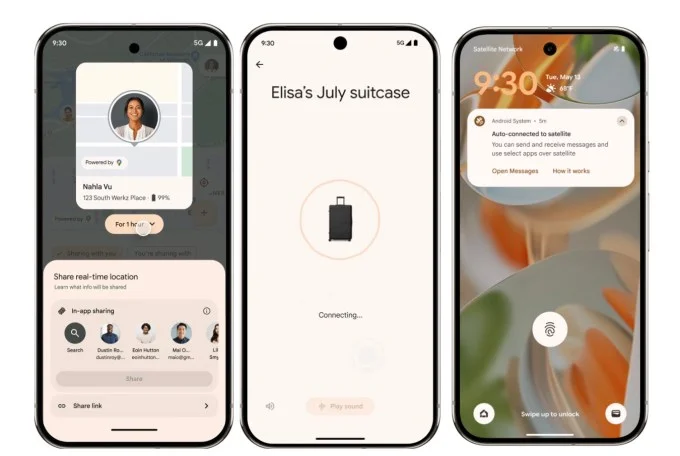
This is the newest addition to the ecosystem, and the one that solves a real travel headache. Now you can drop a Find Hub-compatible tag into a checked bag and, if it goes missing, generate a live tracking link straight from the app.
Here’s how it works:
- You tap the missing bag’s tag in Find Hub and select “share item location.”
- The app generates a one-time, encrypted URL showing the bag’s real-time position.
- All you’ve to do is hand that link to airline baggage staff, who feed it into tracking systems like WorldTracer or NetTracer through Google’s partnerships with SITA and Reunitus.
- The link expires automatically after 7 days, or sooner if your phone detects the tag has made its way back to you.
The feature launched with more than 10 airlines, including Air India, Lufthansa, Turkish Airlines, Scandinavian Airlines, and China Airlines, with Qantas expected to join later. Google is also working with Samsonite to build Find Hub tracking directly into suitcases, which would remove the need for a separate tag altogether.
What Can Google Find Hub Track? (Full List)
Find Hub can track any device signed into your Google account plus any paired Bluetooth tag:
- Android phones and tablets.
- Wear OS and Samsung smartwatches.
- Compatible wireless earbuds, tracked individually.
- Bluetooth tracker tags from 60+ supported brands.
- Smart luggage with embedded tracking (early Samsonite integration).
- Shared family members’ locations, with their consent.
- Chromebooks, on supported models.
But it can’t track an iPhone, an Apple Watch, or any device running iOS, since Find Hub is built entirely on Android’s network and Apple’s Find My network doesn’t interoperate with it.
Is Google Find Hub Safe and Private?
Yes, with meaningful safeguards, though no tracking system is risk-free.
- Location data moving through Find Hub is end-to-end encrypted, using the same approach Google applies to Google Password Manager. So, technically, Google itself can’t read your device’s location history.
- Unknown tracker alerts tackle the bigger real-world worry. Like someone planting a tag on you without consent. If an unrecognized Bluetooth tag is detected traveling with you for an extended period, your phone notifies you and shows you how to locate and disable it.
- Those alerts run on a cross-platform standard called Detecting Unwanted Location Trackers, which Google and Apple both adopted.
- Family and friend location sharing is opt-in and time-limited by default. You choose how long someone can see your location, and that access expires automatically unless renewed.

These safeguards cut down on misuse, but they don’t close it off entirely. Someone with physical access to your phone could still disable the alerts.
Google Find Hub vs. Apple Find My
Both systems rely on a crowdsourced device network to locate things, but each stays locked to its own platform.
| Google Find Hub | Apple Find My | |
| Network base | 1 billion-plus Android devices | Built on Apple’s 2.35 billion active devices |
| Offline finding | Yes, select Pixel models | Yes, broader iPhone support |
| UWB precision | Select tags and phones | iPhone 11 and later, AirTag |
| Third-party tags | 60+ brands | AirTag plus “Works with Apple Find My” badge |
| Cross-platform alerts | Yes, via DULT standard | Yes, via DULT standard |
| Cross-platform tracking | No | No |
Apple’s device base is larger, which theoretically means denser coverage in iPhone-heavy regions. Android’s advantage is openness. So, if your household uses both iPhones and Android devices, you can expect gaps either way.
Final Thoughts
Find Hub earns its keep the moment you lose something, which is a strange thing to say about a utility app. Frequent travelers and chronic key-losers will get the most out of it, especially now that luggage sharing closes a gap airlines never solved on their own.
The honest limitation is density. The network works only as well as the number of nearby Android devices, so a tag lost in a rural area or an iPhone-heavy office sits invisible longer than one lost in an Android-dense city. That gap should shrink as tag adoption grows, but it has not closed yet.
For more information on AI, tech, Science, Futurism, and more, check Yaabot.
FAQs
Yes. In May of 2025, Google rebranded Find My Device as Find Hub and enhanced its functionality. No need to reinstall or reconfigure for existing users.
Yes, for a brief period of time after the Pixel rests on certain Pixel devices. On other Android phones, the device must be turned on, but it can still be located, even if the phone is off.
Yes. Find Hub is a free, built-in Android service. You only pay if you buy a compatible third-party tracker tag, which typically costs between $15 and $35.
No. Find Hub only works within Android’s device network. iPhones use Apple’s separate Find My network, and the two systems do not interoperate.
Over 60 brands are supported, including Chipolo, Motorola’s Moto Tag, Pebblebee, and UGREEN. The full compatibility list is on Google’s official page.
Find Hub includes unknown tracker alerts that notify you if an unfamiliar Bluetooth tag is traveling with you for an extended period, a safeguard built on the same cross-platform standard Apple uses for AirTags.
