

Turns out “free” was never going to stay free forever, not even for a chatbot.
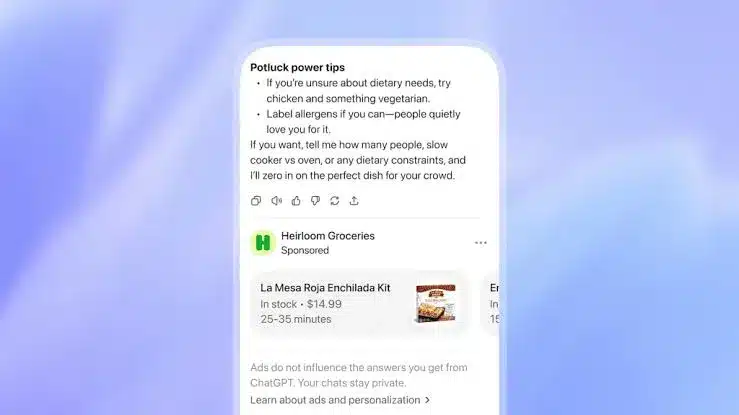
Since February 9, 2026, some ChatGPT users have been getting a small “Sponsored” card tucked under their answers, the ad break nobody asked for, but almost everyone saw coming. It’s not showing up everywhere yet, so don’t panic if your own chats still look untouched.
In this post, I’ll cover what ChatGPT ads are, how they appear, who sees them, and what you can control.
Key Takeaways
- ChatGPT ads began rolling out in the US on February 9, 2026, and are now testing in nine countries through Ads Manager.
- Ads appear below a ChatGPT response, labeled “Sponsored” and visually separated from the answer, according to OpenAI’s own help article.
- Plus, Pro, Business, Enterprise, and Edu users never see ads in ChatGPT. Neither do accounts flagged as belonging to anyone under 18.
- You can manage ads in ChatGPT through Settings, including turning off personalization, hiding an ad, or reporting one.
- A US senator formally questioned OpenAI about deceptive ads and youth safety just weeks after the rollout was announced.
What Are ChatGPT Ads?
ChatGPT ads are paid placements from advertisers that show up inside a conversation, as a small card tied to what you were just asking about. OpenAI started testing them for adult Free and Go users in the US in early 2026.
A few basics worth knowing about ChatGPT ads:
- They only appear when OpenAI judges an ad is relevant to your conversation, not on every message.
- The ad content comes from the advertiser. OpenAI says advertisers cannot shape ChatGPT’s actual answers.
- Temporary Chats do not show ads at all.
I feel like this bit needs a re-emphasis. A ChatGPT advertising is not ChatGPT recommending something. It’s a paid card sitting next to the real answer, kept visually separate on purpose.
Also read: GPT-6 Explained: What Changed in ChatGPT’s New Interactive Answers?
Why OpenAI Added Ads to ChatGPT
OpenAI resisted advertising for years, arguing it clashed with the subscription model that funded ChatGPT’s early growth. That changed once the free user base grew far larger than the paying one.
Ads in ChatGPT are OpenAI’s way of making the free tier sustainable without putting it fully behind a paywall. The company has been fairly open that this is still an experiment, not a finished product, and that the rules keep shifting month to month as it tests what works.
It’s also a pretty normal move for a consumer tech product at this stage.
Search engines, social platforms, and email services all went through some version of the same shift once free usage scaled past what subscriptions alone could support. ChatGPT ads follow that same playbook, just applied to a conversational product instead of a feed or an inbox.
Also read: ChatGPT Has a Phone Number: OpenAI Announces 1-800-CHATGPT
Do ChatGPT Ads Affect What ChatGPT Tells You?
This is probably the most common worry.
OpenAI’s position is that advertisers pay for placement, not influence over the model’s actual response. The answer you get is generated the same way whether or not an ad ends up attached underneath it.
That said, I think it’s also fair to stay a little skeptical here.
The separation is a policy choice OpenAI has made and documented, not something baked into the architecture in a way outsiders can independently verify. Ads in ChatGPT are new enough that there isn’t a long track record to point to yet, just the company’s own stated rules and whatever enforcement happens behind the scenes.
A Quick Timeline of ChatGPT Ads So Far
- January 2026: OpenAI announces it is testing ads inside ChatGPT, drawing immediate attention from lawmakers.
- February 9, 2026: Ads in ChatGPT go live for eligible Free and Go users in the US.
- February 12, 2026: Deadline for OpenAI’s response to Senator Markey’s letter on ad safety and youth protections.
- Through 2026: The Ads Manager beta expands to nine countries, and OpenAI keeps adjusting ad controls and formats.
That’s a fast timeline for a feature this sensitive, which is part of why ChatGPT advertisements have drawn more scrutiny than a typical product launch.
How ChatGPT Ads Appear
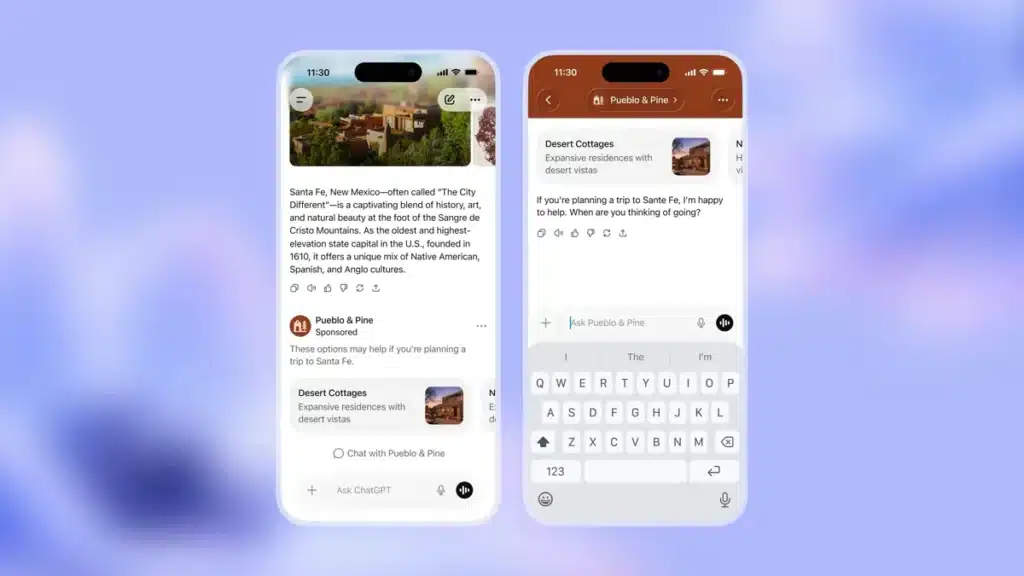
A ChatGPT advertisement looks fairly simple in practice, based on OpenAI’s own description of the format:
- Placement: Below the end of ChatGPT’s response, never inside the answer text.
- Label: Marked “Sponsored” so it isn’t mistaken for ChatGPT’s own suggestion.
- Elements: Advertiser name, favicon, headline, short description, an image, and a link to the landing page.
- Product-feed ads: Some campaigns pull from a retailer’s catalog, showing real titles, images, and prices instead of one static ad.
Ad selection leans on the conversation’s context, the advertiser’s targeting choices, and, only if personalization is on, broader signals from how you use ChatGPT elsewhere.
ChatGPT Ads vs Google and Social Media Ads
| Ad Format | When It Shows Up | What You’re Doing at That Moment |
| Google Search ad | Right after you type a query | Reading results for the first time |
| Social media ad | Mid-scroll | Scrolling a feed for unrelated reasons |
| ChatGPT advertisement | After you already have an answer | Deciding what to do next, book, buy, pick a tool |
The timing difference is probably why advertisers are interested in ChatGPT ads, and why critics are watching the format so closely, it sits at a decision point rather than a browsing moment.
Who Sees ChatGPT Ads, and Who Doesn’t
Not every ChatGPT user sees ads in ChatGPT. The split is pretty clean:
- Paid plans are ad-free. Plus, Pro, Business, Enterprise, and Edu accounts don’t see ads at all.
- Minors are excluded. OpenAI uses account age and, where available, age prediction to keep ads away from anyone under 18.
- Free and Go users are the test group, in the US plus eight other countries in beta: Australia, Brazil, Canada, Japan, Korea, Mexico, New Zealand, and the UK.
- Temporary Chats stay ad-free, regardless of plan or region.
I think the country list matters more than it looks, it tells you this is a controlled test, not a global default, and OpenAI can pull a market in or out without changing anything for anyone else.
What Users Can Control
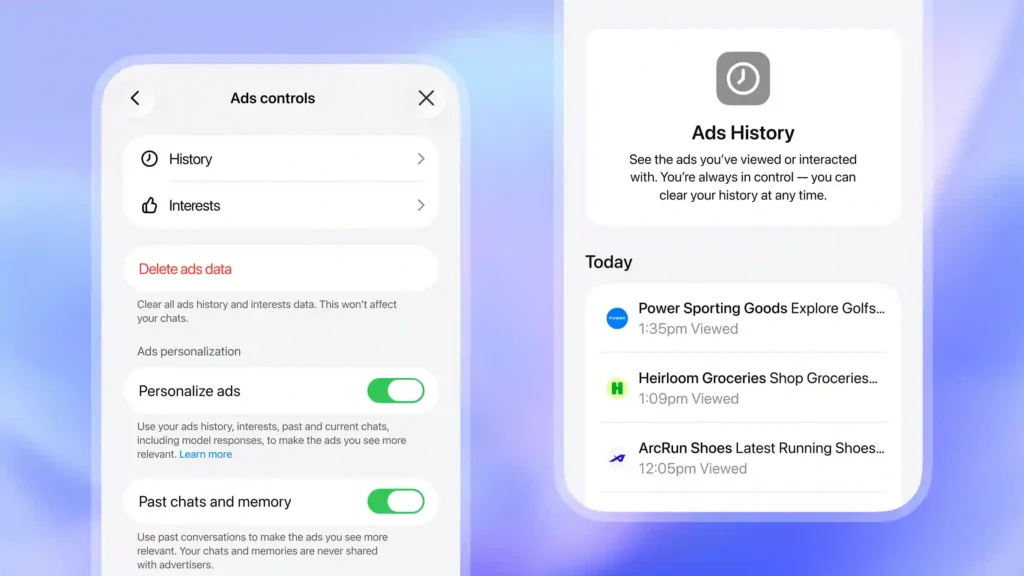
- Settings and then Ad Controls: Where you manage ads in ChatGPT directly, with options that vary a bit by account and region.
- Personalization toggle: Stops ChatGPT from using signals outside the current chat to pick your ads. It doesn’t remove ads entirely.
- The three-dot menu on any ad: Lets you “Ask ChatGPT” about it, “Hide” it, or “Report” it if it looks misleading.
- An ad-free option for Free and Go users: Some accounts can skip ads in exchange for lower usage limits, but that’s not exactly a free lunch.
Honestly, the Hide and Report options are a small thing, but they’re pretty important. Knowing the controls exist changes how an ad feels, even if you rarely click them.
A Few Extra Privacy Details Worth Knowing
Personalized ads are off by default in the EU and Switzerland, in line with regional consent rules that predate ChatGPT ads entirely. And deleted ad interaction data isn’t deleted instantly: OpenAI says it can retain certain ads-related data for up to 30 days after you ask for it to be removed.
Small print, but worth knowing if you’re trying to clean up your account in a hurry. Plus, it’s a good reminder that “turning off” something in a Settings menu doesn’t always mean the underlying data disappears right away, that gap between a toggle and the actual backend cleanup is common across most apps, not just ChatGPT.
What Advertisers Can and Can’t See About You
The common question once people learn ads in ChatGPT exist: do advertisers see what you’ve actually typed? As per OpenAI’s documentation, not directly.
- Can’t access: Your raw chat history, exact location or IP address, or anything flagged as sensitive, health, finances, and similar categories.
- Can access: Broad interest categories and the advertiser’s own geography and audience targeting settings.
- Only with personalization on: Some cross-session behavior signals from elsewhere in your ChatGPT use.
How to Advertise in ChatGPT: Getting Started
The advertising process runs through ads.openai.com, OpenAI’s advertiser platform, closer to setting up a Google or Meta ad account than anything exotic.
Eligibility first: an advertiser needs a regular OpenAI account, can run up to 10 ad accounts per organization, and the account’s country, currency, and timezone lock in at setup and can’t be changed later.
Here’s a quick walk-through on how to advertise in ChatGPT:
- Sign up or log in at ads.openai.com with an OpenAI account.
- Enter your website URL to auto-generate a starter ad, or build a campaign manually in Ads Manager.
- Set your advertiser name, which fills your Account, Brand, and Legal Name fields, each editable later.
- Add billing details. Campaigns can’t go live until billing is set up.
- Submit for review. Every ad is checked against OpenAI’s ad policies before it can appear in ChatGPT.
ChatGPT Ad Pricing and Targeting
- Campaign goals: Views, Clicks, or Conversions, chosen upfront per campaign.
- Bidding: CPM for reach, CPC for clicks. OpenAI suggests starting CPC bids around $3 to $5, though real costs move with audience competition.
- Auction type: Relevance-weighted, second-price, not a flat rate card.
- Brand safety: A Negative Phrases list keeps a ChatGPT advertisement away from topics a brand doesn’t want near it, think crisis news or sensitive health questions.
- Reporting: Ads Manager, still labeled a beta, tracks impressions, clicks, spend, CTR, CPC, CPM, and conversions, with UTM support for tracing a campaign into a site’s own analytics.
For anyone used to search ads, the adjustment is that you’re bidding on relevance to a conversation, not on fixed keywords.
Should Your Business Advertise in ChatGPT Right Now?
If you’re weighing whether to figure out how to advertise in ChatGPT this early, here’s a quick sense of the trade-offs:
- Reasons to try it: You reach people at a genuine decision point, not mid-scroll. Competition for a ChatGPT advertisement slot is still fairly low since the program is new. Early access to Ads Manager data can help you learn the format before it gets crowded.
- Reasons to wait: The user base seeing ads is still just Free and Go accounts in nine countries, so reach is limited compared to established platforms. Formats, pricing, and policies are all still changing, so campaigns built today may need rework later.
My take is that it depends on how much your audience overlaps with ChatGPT’s free-tier users in those specific markets. For some businesses that’s a strong fit already, for others it’s still too early to matter.
Privacy and Safety Concerns Around ChatGPT Ads
Of course, not everyone is comfortable with ChatGPT ads, and the pushback started almost immediately. In January 2026, Senator Ed Markey sent formal letters to OpenAI and six other companies, raising specific worries:
- Ads could blend into ChatGPT’s normal responses, making a paid placement hard to tell apart from genuine advice.
- Chatbots get used during emotionally vulnerable moments, raising the stakes compared to a regular search engine.
- Sensitive topics like health or family issues could end up shaping which ads a person sees afterward.
The letter asked for answers to five questions, including how test users are chosen and what data advertisers can access, with a response deadline of February 12, 2026.
What “Beta” Means for Ads Manager
OpenAI still labels Ads Manager a beta product, and that label carries real weight here. It means features can change without much notice, reporting metrics might get added or renamed, and support for advertisers is still being built out rather than fully mature.
For anyone running a live campaign, it’s worth checking Ads Manager’s own changelog or notes periodically rather than assuming the setup you built last month still works exactly the same way today. Ads in ChatGPT are moving fast enough that last quarter’s screenshot of the dashboard may not match what you see now.
OpenAI’s Response, and What’s Still Unanswered
OpenAI points to the safeguards already built in: ads kept visually separate from answers, no targeting for under-18 accounts, and a personalization toggle users can switch off.
Whether that’s enough is still being debated.
Some of the letter’s sharper questions, like how conversation data could shape future ad products beyond what’s disclosed today, haven’t been fully answered in public yet.
I think this gap between what OpenAI says the system does and what outsiders can actually verify is the story here.
Wrapping Up
ChatGPT ads are live for Free and Go users in a growing list of countries, clearly labeled, and kept separate from ChatGPT’s actual answers, at least as OpenAI describes it. You’re not stuck with whatever shows up either: Settings gives you a personalization switch and a way to hide or report individual ads.
If you’re building campaigns instead of scrolling past them, advertising in ChatGPT comes down to a fairly standard sign-up, billing, and review flow.
My guess is the bigger question, whether labeling and toggles are enough once an assistant this personal starts carrying paid messages, will keep shifting as the rollout reaches more countries and plan tiers.
For more info on AI and tech, visit Yaabot.
FAQs
Chatgpt ads are paid cards from advertisers shown below a ChatGPT response, labeled “Sponsored,” using conversation context plus optional personalization signals.
Below the AI’s answer, never inside it, showing an advertiser name, logo, headline, description, image, and a link.
Plus, Pro, Business, Enterprise, and Edu users, plus any account identified as belonging to someone under 18.
You can turn off ad personalization and hide individual ads in Settings. Some Free and Go accounts can choose a limited ad-free option.
Sign up at ads.openai.com, set up billing, build a campaign with CPC or CPM bidding, and submit it for OpenAI’s ad review.
Yes. Every ad is checked against OpenAI’s advertising policies before it goes live and can be reported afterward, too.
