



Apple convinced millions of people to buy a tablet for productivity. Now it’s asking them to reconsider.
The MacBook Neo, Apple’s (the trillion-dollar tech company behind the iPhone, Mac, and iPad) most affordable laptop ever, lands at a price that directly challenges the iPad in a way no MacBook has before. Starting at approx $599 in the US, it’s no longer a no-brainer to pick an iPad when a full Mac laptop costs just as much.
I’ve reviewed Apple’s spec documentation, cross-referenced independent benchmarks from iFixit, Basic Apple Guy, and Low End Mac, and tested comparable workflows across both platforms. Here is what the data and real-world use actually show.
This MacBook neo vs iPad comparison also reflects the bigger iPad vs laptop debate, where buyers are now choosing between full desktop power and portable touchscreen convenience.
Key Takeaways
- The MacBook Neo starts at around $599 ($499 for students) and runs full macOS, the same OS as a MacBook Pro.
- The iPad (11th Gen, A16) starts at around $349 and is the better pick if you want a touchscreen, digital stylus, or a lightweight carry.
- For most students, the MacBook Neo wins on raw productivity. For creators who sketch, annotate, or draw, the iPad still holds the edge.
- Adding a keyboard and accessories to an iPad pushes the total cost close to, or past, the MacBook Neo’s price.
- The MacBook Neo does not have a touchscreen.
What is the MacBook Neo?
The MacBook Neo is Apple’s most affordable laptop, released in March 2026. The first Mac to use an A-series chip (the A18 Pro, the same chip found in the iPhone 16 Pro) rather than an M-series chip. It runs full macOS Tahoe, starts at $599 (or $499 with the Apple Education Store discount), and is positioned as an entry-level Mac for students and everyday users. It sits below the MacBook Air and MacBook Pro in Apple’s laptop lineup.
MacBook Neo vs iPad: Specs Comparison
In any iPad vs laptop comparison, specs only tell part of the story, but they’re a good place to start. Below is the specs comparison ofMacBook neo vs iPad.
| Feature | MacBook Neo (2026) | iPad 11th Gen (A16) |
| Chip | Apple A18 Pro | Apple A16 |
| RAM | 8GB | ~6GB* |
| Storage | 256GB / 512GB | 128GB / 256GB |
| Display | 13-inch Liquid Retina | 11-inch Liquid Retina |
| Touchscreen | No | Yes |
| Apple Pencil | No | Yes |
| Battery | Up to 16 hours | Up to 10 hours |
| OS | macOS Tahoe (full) | iPadOS 26 |
| Apple Intelligence | Yes | No |
| Keyboard | Built-in | Sold separately |
| Starting Price (US) | $599 | $349 |
| Student Price (US) | $499 | $349 |
*Apple does not officially disclose iPad RAM. The 6GB figure is based on third-party teardown reports and may vary.
What Makes the MacBook Neo Different
The MacBook Neo is Apple’s first laptop to use an A-series chip, the same family that powers iPhones, instead of the M-series chips found in the MacBook Air and Pro. That’s not a downgrade. It’s how Apple made a Mac laptop dramatically more affordable without gutting the experience.
The Chip
The A18 Pro powering the Neo has:
- A 6-core CPU and 5-core GPU.
- A dedicated Neural Engine built for AI workloads.
- Support for Apple Intelligence (AI writing tools, smart summaries, on-device processing).
- Performance Apple claims runs AI tasks up to 3x faster than comparable Windows laptops.
Performance in Real Use
The MacBook Neo handles everyday and creative tasks without breaking a sweat. Reviewers confirm it manages:
- Adobe Photoshop editing and filters.
- Video calls, web browsing, and multitasking.
- GarageBand, note-taking apps, and spreadsheets.
- Light video exports and photo editing.
Where it hits a ceiling: heavy AI model training, STEM-level development, and tasks needing more than 8GB of memory. For those, you’d want the MacBook Air M5 or MacBook Pro.
macOS vs iPadOS: The Ecosystem Difference

This is the heart of the MacBook neo vs iPad debate. It’s not just about apps. It’s about how you work.
macOS gives you:
- A proper file system you can actually navigate.
- Multiple windows open side by side.
- Full desktop versions of every browser and professional app.
- Terminal, dev tools, and coding environments.
- Deep Apple ecosystem integration is where macOS stands out : AirDrop, iPhone Mirroring, Apple Watch unlock, iCloud.
This level of Apple ecosystem continuity is a major reason why many users prefer a Mac over an iPad.
iPadOS is great for touch, but limited for:
- File management (still sandboxed and app-dependent).
- Running multiple windows of the same app.
- Certain professional web tools and workflows.
- Coding and development environments.
MacBook Neo vs iPad: What Each Does Better
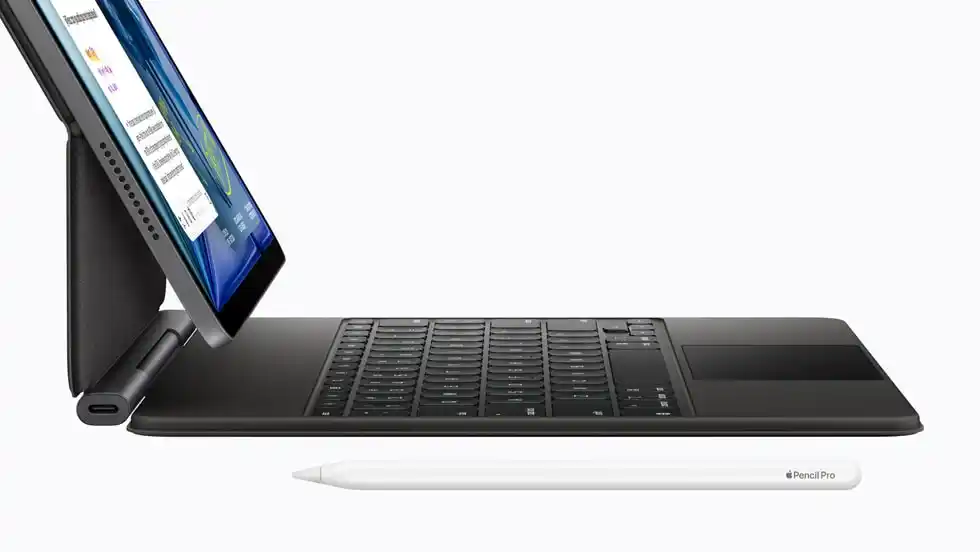
When looking at MacBook neo vs iPad in real-world use, the differences become clearer.
Where iPad Wins
The iPad 11th Gen isn’t the wrong choice. It’s the right choice for specific people.
- Touchscreen: Natural for annotating PDFs, reading, and consuming content.
- Apple Pencil support: If you draw, sketch, or take handwritten notes, this is a feature the MacBook Neo simply cannot offer.
- Portability: At roughly 0.47 kg vs 1.23 kg, the iPad is far easier to carry around campus or on a commute.
- Price: At $349, it’s significantly cheaper than the Neo before accessories.
- Camera: The iPad’s 12MP rear camera is significantly more useful for scanning documents and quick shoots.
Where MacBook Neo Wins
For iPad vs laptop productivity, the MacBook Neo has the stronger hand:
- Full macOS: Every Mac app, every dev tool, every workflow with no restrictions.
- Built-in keyboard and trackpad: Ready to use, no extra cost, no extra bag space.
- Apple Intelligence: The A18 Pro supports it. The iPad’s A16 chip does not qualify.
- Battery life: 16 hours vs 10 hours, a real gap on a long school or work day.
- Better for writing and coding: Multi-window workflows, real desktop browsers, and a file system that doesn’t fight you.
Accessories and Total Costs
This is where the iPad vs laptop math gets honest. The growing cost of iPad accessories is one of the biggest reasons why the iPad vs laptop comparison is shifting in favor of laptops.
iPad Accessories: What You Actually Need and What It Costs
The iPad’s base price looks competitive until you factor in what it takes to make it work like a laptop. Here is a breakdown of the most common additions, what each one does, and whether it is worth it for your use case.
If you buy the iPad and want a keyboard experience close to a laptop, you’ll need the Magic Keyboard Folio, which costs $249 separately. Add an Apple Pencil ($79 to $129) and you’re at, or past, the price of the MacBook Neo. The right iPad accessories can make the iPad more productive, but they add up fast.
| Setup | Approx. US Cost |
| iPad 11th Gen (Wi-Fi, 128GB) | $349 |
| iPad + Magic Keyboard Folio | ~$578 |
| iPad + Keyboard + Apple Pencil | ~$657 to $707 |
| MacBook Neo (base) | $599 |
| MacBook Neo (student price) | $499 |
The cost of iPad accessories is the silent variable most buyers forget. Once you factor it in, the MacBook Neo becomes significantly more competitive in terms of value.
MacBook Neo vs iPad: Best Apple Device for Students in 2026

The best apple device for students’ questions usually comes down to two things: what does your course need, and how long does the battery last?
The choice mainly depends on your course needs and battery life.
- If your course requires full desktop tools (Python IDEs, CAD, research databases, Microsoft Office), go for a MacBook Neo.macOS runs these natively, while iPadOS may require limited web versions or workarounds.
- If your coursework is mostly reading, annotating, and attending lectures, an iPad is sufficient. iPad works especially well for arts, design, and humanities students.
Also, Apple Pencil enhances note-taking and annotation, and the iPad is generally the more affordable option.
Understanding what iOS 26 actually brings to the table helps set the right expectations.
Battery Life in Real Use
The MacBook Neo’s 16-hour claimed battery holds up well in real-world reviews. You can realistically get through morning classes, afternoon labs, and an evening study session without hunting for a charger.
The iPad’s 10 hours is still solid. But it’s harder to stretch across a full, long day with heavy use.
Pricing and Availability
Here is how MacBook Neo pricing breaks down globally:
- Standard price: $599 (256GB) | $699 (512GB with Touch ID)
- Student price: $499 via the Apple Education Store (available to students, teachers, and education staff)
The iPad 11th Gen starts at $349 (Wi-Fi, 128GB) and $499 (Wi-Fi + Cellular, 128GB) from Apple and major retailers worldwide. Pricing varies by region, so check Apple’s local storefront or Education Store for current pricing in your country.
For most users comparing iPad vs laptop for college, the MacBook Neo is still the more practical long-term choice.
MacBook Neo vs iPad for Creators

For creators, the answer genuinely depends on what you create.
Go with the iPad if you:
- Illustrate, sketch, or do visual art (Apple Pencil is genuinely irreplaceable here).
- If you want to annotate, mark up references, or take visual notes.
- Prefer a lighter device for on-the-go photography or content capture.
- Produce content where a touchscreen adds to your workflow.
Go with the MacBook Neo if you:
- Edit videos in DaVinci Resolve or Final Cut Pro.
- Produce music in GarageBand or Logic Pro.
- Design in Figma or Adobe XD with multi-window support.
- Code, build websites, or manage large file libraries.
- Need Apple Intelligence for AI-assisted writing and editing.
The best apple laptop 2026 for creators who need a full desktop OS is the MacBook Neo. In fact, for many workflows, it easily qualifies as the best apple laptop 2026 in its price range.
It has more flexibility at this price than any iPad, and macOS gives you far more control over your workflow than iPadOS does.
Which Apple Device Should You Buy?
The MacBook neo vs iPad decision comes down to one question: do you need to create and produce, or do you primarily consume and annotate?
Who Should Buy The MacBook Neo (Approx. $599, $499 for students)
- Your day involves typing, coding, editing video or audio, designing in desktop apps, or managing files.
- It runs full macOS, supports Apple Intelligence, and its battery outlasts almost any comparable laptop at this price.
Via the Apple Education Store, the student price makes it one of the best value Macs ever made.
Who Should Buy The iPad ($349)
- You draw, sketch, and take handwritten notes.
- Or want a lighter device for reading and consuming content.
- It’s also a smart second device if you already own a laptop and want something more touch-native for specific tasks.
Buy the iPad + keyboard if:
- You want the flexibility of a tablet and the typing experience of a laptop.
- You’re okay spending close to MacBook Neo prices in total.
- A touchscreen and Apple Pencil matter more than macOS access.
If you’re still deciding between iPad vs laptop, your workflow matters more than the form factor.
Before buying either device, it’s worth knowing that macOS and iPadOS handle security quite differently. macOS has a longer track record for running sensitive work securely, which matters if you handle research, financial, or professional data regularly.
MacBook Neo vs iPad: Pricing and Availability
- MacBook Neo: $599 (256GB) | $699 (512GB with Touch ID) | $499 for students via the Apple Education Store.
- iPad 11th Gen: $349 (Wi-Fi, 128GB) | $499 (Wi-Fi + Cellular, 128GB).
- Both are available globally through Apple and major retailers. Pricing varies by region; check Apple’s local store for exact figures in your country.
Quick Verdict on MacBook Neo vs iPad
| Buyer type | Best pick |
| Students needing a workhorse | MacBook Neo ($499 student price) |
| Artists and note-takers | iPad 11th Gen + Apple Pencil |
| Creators editing video or audio | MacBook Neo |
| Light users wanting portability | iPad 11th Gen |
| Budget-conscious first-time Mac buyers | MacBook Neo |
Conclusion
The MacBook neo vs iPad comparison is closer in 2026 than it’s ever been, and it perfectly captures the evolving iPad vs laptop decision most buyers face today. The Neo is the most surprising Mac in years: a proper laptop with a proper OS at an entry-level price.
For most students and creators who need a workhorse device, the MacBook Neo is the smarter long-term investment. The iPad remains a brilliant device, but it works best as a complement to a Mac, not a replacement.
At $499 with the student discount, the MacBook Neo is one of the most compelling Apple purchases you can make right now, no matter where you are in the world.
Want to stay ahead of where money and technology are heading? At Yaabot, we cover the latest in AI, fintech, machine learning, and the tech developments reshaping how you work, spend, and invest.
Frequently Asked Question (FAQ)
Yes, especially with the student discount. At $499 via Apple’s Education Store, it’s the most affordable Mac ever made. It comes with full macOS, Apple Intelligence, and a 16-hour battery. It can be one of the best Apple devices for students for daily use.
The iPad Air (M4) starts at around $599 and runs iPadOS with near-Pro performance. The MacBook Neo also starts at around $599 and gives you full macOS. If you need laptop functionality, the Neo wins on value. If you prefer a tablet with a touchscreen and Apple Pencil, the iPad Air M4 is the right call.
For productivity, yes, for tasks specific to touch and Apple Pencil such as sketching, handwritten notes, and drawing, no. The MacBook Neo cannot replace an iPad if those touch-based features matter to you, since it has no touchscreen.
For most students and everyday users, yes. 8GB of unified memory handles browsing, writing, video calls, light photo editing, and multitasking without issue. Where it shows limits is in heavy multitasking with large files, professional video exports, or running memory-intensive apps simultaneously. If your workflow regularly involves those tasks, consider stepping up to the MacBook Air M5, which starts with more headroom.
