



Cross-platform chats between iPhone and Android now support end-to-end encryption (E2EE), though specific software and carrier requirements apply. Most people assume their texts are private. They are not. A regular SMS between an iPhone and an Android phone travels across carrier infrastructure as plaintext. Anyone sitting in the right place on that network can read it. And until very recently, no amount of software updates could fix that because Apple and Google were not using the same encryption standard.
But that changed in May 2026. With iOS 26.5 and a parallel update to Google Messages, RCS encryption now works on both operating systems. If you’re on an iPhone texting an Android user, and both devices are on the right software and supported carriers, your messages are now end-to-end encrypted. That is the actual news. Here is what it means, what it doesn’t mean, and whether you should care.
What Is RCS Messaging and How Does It Work?
RCS, or Rich Communication Services, is a GSMA-developed upgrade to SMS. Think of it as SMS, but with a brain. Google has had RCS for years. RCS support was added in iOS 18. And that was done due to pressure from EU regulators and the competitive weight of watching iMessage exclusivity become harder to defend.
RCS messaging is not an app. It runs on the same infrastructure as SMS, meaning your carrier handles delivery. That carrier dependency matters a lot when it comes to encryption, which is broken down below.
How RCS Chat Differs from SMS and iMessage
Here is where RCS sits in the messaging landscape as of mid-2026:
| Feature | SMS | RCS (pre-iOS 26.5) | RCS (post-iOS 26.5) | iMessage |
| Encryption | None | E2EE (Android-to-Android only) | E2EE cross-platform (beta) | E2EE (Apple-to-Apple) |
| Media quality | Compressed | High quality | High quality | High quality |
| Read receipts | No | Yes | Yes | Yes |
| Typing indicators | No | Yes | Yes | Yes |
| Cross-platform | Yes | Partial | Yes (carrier-dependent) | No |
| File size limit | ~1MB | ~100MB | ~100MB | ~100MB |
That RCS chat row before iOS 26.5 deserves a note: Google Messages had E2EE between two Android users, but the moment an iPhone entered the conversation, encryption dropped. The chat kept the RCS features, not the security.
The blue bubble vs. green bubble problem, explained
If you use an iPhone, you know the green bubble. You have seen group chats degrade when one Android user joins. You might have heard about teenagers being bullied for having Android phones because of it. The green bubble is Apple’s visual shorthand for you are not using iMessage, and by extension, in certain social circles, you are the problem.“
The privacy angle makes this more than just a social friction. A blue bubble iMessage is encrypted. A green bubble conversation, even over RCS messaging, was not encrypted end-to-end if one person was on iPhone.
Why Apple resisted RCS for so long
The reason Apple resisted RCS for so long wasn’t that the standard was technically weak. As Matt Birchler puts it, the resistance argument effectively amounted to saying that texting Android users should just be a worse experience. iMessage lock-in kept iPhone users in the Apple ecosystem in a way that was genuinely hard to replicate. Switching to Android meant losing iMessage, which meant green bubbles for everyone you texted who stayed on iPhone. For a certain demographic, that social cost was real.
What broke the stalemate was a combination of EU Digital Markets Act pressure and Google’s increasingly loud public campaign to shame Apple into adopting RCS. Apple added RCS with iOS 18. Encryption followed with iOS 26.5 in May 2026.
What Is RCS Encryption?
RCS encryption refers to the protection of RCS messages so that only the sender and recipient can read them, with no intermediary able to access the content. Whether that protection is active depends on three scenarios. Person-to-person messaging, business-to-person messaging, and the specific software versions in use all change the answer.
There are two types of encryption in the RCS ecosystem, and they are not the same thing.
Is RCS End-to-End Encrypted?
Yes, personal person-to-person (P2P) RCS messages are end-to-end encrypted between iPhone and Android as of the iOS 26.5 update, provided both users are on supported carriers.
- Android to Android via Google Messages: Yes. Google introduced E2EE for person-to-person RCS chats before iOS 26.5 existed.
- iPhone to Android (iOS 26.5 beta and later versions): Yes, in beta versions, when both users are on supported software and supported carriers.
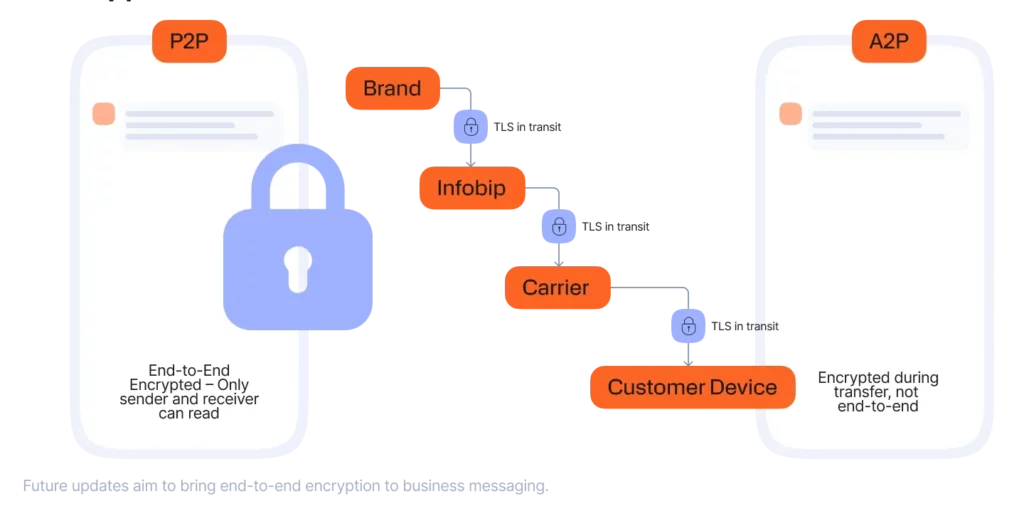
- A2P messages (bank alerts, OTPs, delivery notifications): No, these kinds of messages use TLS in transit only, not E2EE.
The difference between those last two scenarios isn’t a minor technical footnote. It means that the OTP your bank sends you is not E2EE, and it probably will not be for a while.
P2P vs. A2P Encryption: Why They Are Not the Same
Person-to-person (P2P) messaging is where E2EE works. Application-to-person (A2P) messaging, which covers business messages, delivery or bank verification codes, can’t currently achieve full E2EE for structural reasons.
The infrastructure A2P messaging runs on requires readable metadata. Delivery analytics, verified sender systems, volume routing, and compliance logging all need to inspect or log message data at points along the way. You can’t run an enterprise-scale notification system while encrypting every message end-to-end, at least not with the current architecture.
Infobip’s technical breakdown of RCS encryption notes that GSMA and Google are actively working toward A2P E2EE in future RCS profile updates. But for now, when you get a text from your bank, it is TLS in transit, protected from passive network eavesdropping, not protected from the platform or carrier.
How iOS 26.5 brought RCS encryption to iPhone and Android chats
Apple and Google rolled out end-to-end encrypted RCS chats in beta for iPhone and Android users starting in May 2026. The mechanism that makes cross-platform E2EE possible is a shared standard. Both Apple and Google adopted GSMA RCS Universal Profile 3.0, which implements the Messaging Layer Security (MLS) protocol.
MLS is what the cryptographic community has been pushing for in group messaging contexts. It handles key exchange and rotation in a way that scales across platforms without requiring Apple or Google to trust each other’s servers. The keys live on devices, not in the cloud.
How RCS Encryption Works
Here’s the basic workflow of RCS encryption. Your device generates an encryption key. So, when you send a message, it’s encrypted even before it leaves your device. The encrypted text travels through carrier infrastructure and server routing. Only the recipient’s device holds the key to decrypt it.
Neither Apple nor Google nor your carrier can read that message while E2EE is active. Carrier infrastructure has historically been one of the weaker links in mobile messaging security. Encrypted texting via RCS closes that gap for P2P conversations.

What the GSMA RCS universal profile 3.0 means for users
GSMA Universal Profile 3.0 is the industry specification both Apple and Google agreed to implement. It defines the technical requirements for cross-platform RCS features, including the MLS-based encryption layer. Without both sides adopting the same profile, cross-platform E2EE is impossible regardless of how good each company’s internal encryption is.
For you as a user, Profile 3.0 means the encryption in your iPhone-to-Android conversation is not Apple’s implementation or Google’s implementation. It is a shared open standard, which is actually how you want this to work.
The metadata caveat: What RCS encryption still does not protect
To be honest, end-to-end encryption on message content doesn’t mean your communication is fully private.
Even with E2EE active, your carrier and the platform can still see:
- Who you are messaging.
- How often you message them.
- When you send and receive messages.
- Approximate message length.
- Your device identifiers.
The EFF’s position, as outlined in their May 2026 writeup on the RCS E2EE rollout, is that this is a genuine victory while also noting that metadata exposure remains a real concern.
There is also the backup issue. If you back up your iPhone to iCloud without enabling Advanced Data Protection, your messages may be stored unencrypted in Apple’s cloud. For Android, Google Messages E2EE covers message text in backups, but media is a different story. Encrypted texting between devices does not automatically extend to how those messages are stored.
RCS Encryption vs. Other Secure Messaging Apps
If you are evaluating secure messaging apps for the first time, here is how the landscape looks post-iOS 26.5:
| Feature | RCS (iOS 26.5+) | iMessage | Signal | SMS | |
| E2EE by default | Yes (beta, conditions apply) | Yes (Apple-to-Apple) | Yes | Yes | No |
| Metadata protection | No | No | No | Yes | No |
| Cross-platform | Yes | No | Yes | Yes | Yes |
| Open protocol | Yes (GSMA) | No | No | Yes | No |
| Cloud backup encrypted | Conditional | Conditional | Conditional | Local only | N/A |
| Verified sender (A2P) | Yes | No | Partial | No | Partial |
Signal is the strongest option if you are handling sensitive conversations because it protects both message content and metadata. WhatsApp encrypts content but funnels metadata to Meta. RCS messaging post-iOS 26.5 is a real and meaningful upgrade over SMS, but it sits below Signal in the security hierarchy, and that gap is mostly about metadata and the carrier dependency built into the RCS architecture.
For everyday use: RCS encryption is good enough. For journalists, activists, or anyone whose contact list is itself sensitive information, Signal is still the right answer.
What Apple RCS Support Means for iPhone Users
The Apple RCS story has two phases.
Phase one, iOS 18 in 2024: Apple added RCS. Your green bubble texts to Android users suddenly got better media quality, read receipts, and typing indicators. But those messages were not E2EE.
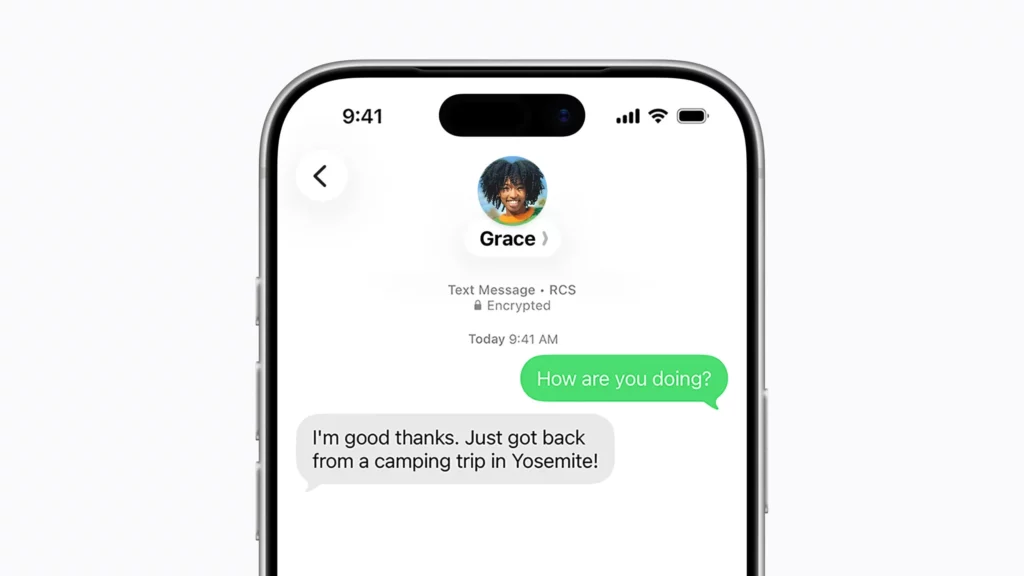
Phase two, iOS 26.5 in May 2026: Apple completed the picture by adding cross-platform E2EE in beta. This is what the EFF called a victory. The caveat is that encryption only activates when both conditions are met: both users are on compatible software versions, and both are on carriers that support the new RCS encrypted profile.
Not every carrier has rolled out support yet. T-Mobile, Verizon, and AT&T are the early movers in the US, but smaller MVNOs and international carriers are on varying timelines.
How to know if your RCS chat is encrypted on iPhone
Look for a lock icon at the top of the conversation thread, along with the word “Encrypted.” If you see it, E2EE is active.
If you do not see it, one of the following is likely true:
- You or the person you are texting is not on iOS 26.5 or a comparable Google Messages update.
- One of your carriers does not yet support the encrypted RCS profile.
- The conversation is falling back to standard RCS or SMS.
Note that the lock icon already appeared in iMessage threads (blue bubbles) and in Google Messages P2P threads between Android users. What is new is seeing it in a cross-platform green bubble thread.
To check: go to Settings > Apps > Messages on iPhone and verify RCS is enabled and listed as active with your carrier.
How to Enable RCS Encryption on Android Messages
If you are on Android and using Google Messages, P2P E2EE with other Android users has been available for a while. The May 2026 update extends that to iPhone users when conditions are met.
To verify your setup:
- Open Google Messages
- Tap your profile icon in the top right
- Go to Messages settings
- Select RCS chats
- Confirm the toggle is on and shows your carrier as active
When you open a conversation with an iPhone user on iOS 26.5, you will see a lock icon in the conversation header if cross-platform E2EE is active. The behavior is consistent with how P2P encryption already worked in Android Messages between two Android users.
Is RCS Encryption Secure Enough for Sensitive Conversations?
It depends on your threat model.
For most people: Yes. Cross-platform E2EE via RCS messaging is a genuine improvement over unencrypted SMS. If your concern is a data breach at your carrier, or someone intercepting your texts in transit, RCS encryption with MLS protocol addresses that.
For high-sensitivity use cases: RCS isn’t enough on its own. Journalists, healthcare workers, legal professionals, activists, etc., whose contact list is itself sensitive information, should still use Signal. And the reason is metadata. RCS encryption doesn’t hide who you are talking to, how often, or when, and that pattern data can be as revealing as the message content.
For businesses using A2P messaging: TLS in transit, combined with verified sender identity, is what the current standard offers. That is appropriate for most compliance frameworks (HIPAA, GDPR, PCI-DSS) as long as sensitive data is not transmitted in message content itself. Full A2P E2EE is on the GSMA roadmap but not yet available.
Final Thoughts
The May 2026 cross-platform E2EE rollout for RCS messaging is genuinely good news. The EFF called it a victory, and that word holds up. And for the first time, an iPhone user and an Android user can have an end-to-end encrypted conversation without both being on the same third-party app.
But the honest version of this story has a few asterisks. It’s still in its beta version. Carrier support is uneven. Metadata remains exposed. Business messaging is not E2EE and will not be for some time. Cloud backup encryption depends on settings most users never touch.
The green bubble stigma is fading faster than the underlying privacy gaps are closing. GSMA is roadmapping full E2EE for A2P messaging. Apple and Google have committed to Universal Profile 3.0. The trajectory is right. The present is better than it was six months ago. But “better than SMS” and “fully private” are not the same thing, and it is worth knowing the difference.
FAQs About RCS Encryption
RCS encryption is the protection of RCS messages so only the sender and recipient can read them. Since iOS 26.5 and the updated Google Messages, this includes cross-platform E2EE between iPhone and Android using the MLS protocol.
For person-to-person chats between two users on supported software and supported carriers, yes. Business messages and A2P notifications use TLS in transit only, not E2EE.
Yes. SMS has no encryption at the protocol level. RCS messaging adds TLS in transit for all messages and E2EE for qualifying P2P conversations. That is a significant improvement.
Starting with iOS 26.5 beta, Apple RCS supports cross-platform E2EE with Android users via GSMA Universal Profile 3.0 and the MLS protocol. iOS 18 added RCS but without cross-platform encryption.
On iPhone, look for a lock icon and the word “Encrypted” at the top of the conversation. On Android Messages, a lock icon in the conversation header indicates active E2EE. Both require compatible software versions and supported carriers.
For message content, they are roughly comparable since both use E2EE by default in personal chats. WhatsApp routes metadata through Meta’s servers. RCS metadata goes through your carrier. Neither protects metadata. Signal protects both.
iMessage is Apple’s proprietary protocol and only works between Apple devices. RCS chat is an open GSMA standard that works across iPhone and Android. iMessage has had E2EE since launch. RCS got cross-platform E2EE in May 2026.
When E2EE is active, no. The message is encrypted on your device and can only be decrypted by the recipient’s device. However, carriers can still see metadata: who you messaged, when, and how often.
