



Somewhere on your company network right now, a valid password is probably being typed by someone who shouldn’t have it. That’s not a plot from a horror story. It’s the default condition of most corporate systems, because the old security model assumed that anyone who got past the front door belonged there.
That assumption is what’s failing. The global average cost of a data breach has hit $4.44 million in 2025. And in the U.S it reached a record $10.22 million. And most of those didn’t start with a Hollywood-style hack. They started with a stolen credential walking through the front door that trusted it by default.
So, here’s the real problem this piece solves for you. Your network still hands out trust based on the location. And attackers fake location better than anything else. Zero Trust Architecture is the response to that gap, and this is how it works and where it helps.
Key Takeaways
- Zero Trust Architecture assumes a breach by default. Nothing is trusted without verification.
- NIST formalized the model in SP 800-207 in 2020. CISA’s Zero Trust Maturity Model is the adoption roadmap most of the US agencies follow.
- Stolen or compromised credentials remain one of the costliest breach categories, averaging $4.67 million per incident and taking 246 days to identify.
- Multi-factor authentication alone blocks over 99.2% of automated account compromise attempts, but it’s one layer, not the whole strategy.
- Implementation works best as a sequence: identity first, then access control, then segmentation and monitoring.
What Is Zero Trust Architecture?
Zero Trust Architecture (ZTA) is a security model that removes implicit trust from a network and requires every user and device to be authenticated, authorized, and continuously validated before accessing any resource, no matter where the request comes from.
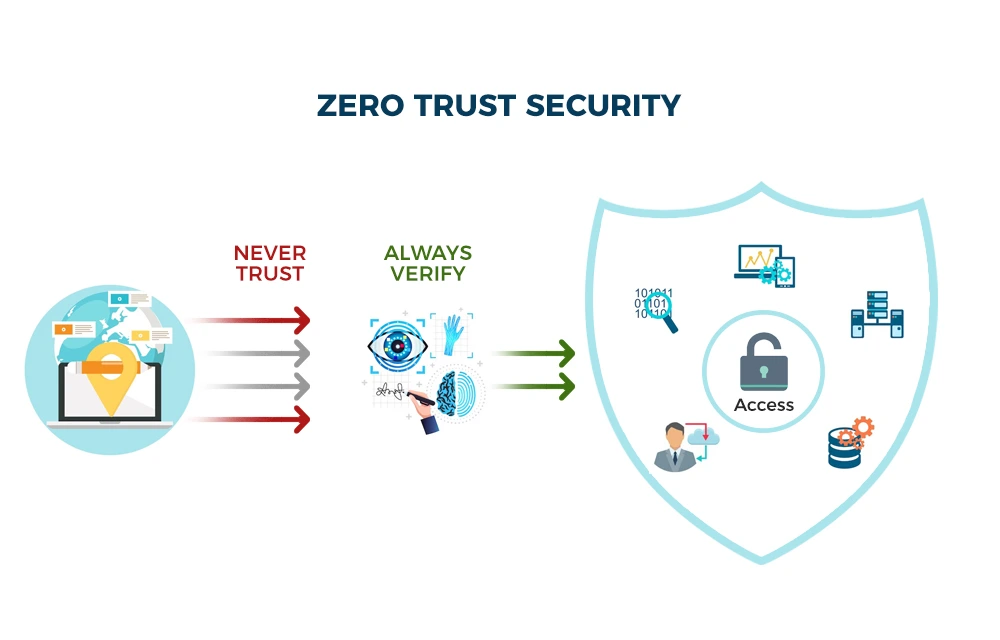
The word “architecture” is important in this case. Zero Trust Architecture isn’t a product you buy from the supermarket and switch on. It is a design approach that reshapes how identity, devices, applications, and data connect. You can also buy tools that support it, but the architecture is the set of rules and checkpoints you wire around your resources.
A few things Zero Trust Architecture is not:
- ZTA isn’t a firewall or a VPN, though it often replaces the job a VPN used to do.
- Not a single login step. Verification keeps happening after you’re in.
- Not block everything. It’s verify everything, then grant the least access that gets the job done.
The formal reference standard is NIST Special Publication 800-207, which most serious implementations align to.
Why “Never Trust, Always Verify” Replaced Perimeter-Based Security
Security used to work like a castle. Build a strong wall, put your defenses at the edge, and trust everything that’s made inside the castle.
But it doesn’t hold up anymore. Employees log in from their home wifi. Contractors get temporary access to the firm’s internal tools. And the data lives across a dozen SaaS platforms.
The cost of pretending otherwise shows up in the numbers. The global average cost of a data breach reached $4.44 million in 2025. And the breaches in the U.S. averaged at $10.22 million. Breaches that start with compromised credentials, the exact failure mode zero trust targets, cost an average of $4.67 million and took nearly eight months to identify.
Zero Trust Architecture doesn’t assume your network is safer because someone’s already inside it. It assumes the opposite. It considers that a breach has already happened, or will, and builds every control around limiting what that breach can reach.
This isn’t a hypothetical shift. Ransomware groups and credential thieves already exploit the perimeter model’s core weakness. An attacker with valid credentials looks like a legitimate employee to any system; so, all he has to do is just get past the front door.
The Core Principles of a Zero Trust Security Framework
Strip away the vendor marketing and Zero Trust Architecture comes down to three operating principles, laid out clearly in Microsoft’s own security framework:
| Principle | What It Actually Means |
| Verify explicitly | Every access request is authenticated using all available signals: identity, device health, location, behavior. Not just once, continuously. |
| Least privilege access | Users and workloads get only the access they need, for only as long as they need it. Nothing standing, nothing permanent. |
| Assume breach | Controls are designed as if an attacker is already inside. The goal shifts from keeping attackers out to limiting what they can reach. |
The third principle is the hardest for most security teams to accept culturally, because it means admitting the perimeter already failed somewhere and building around that reality instead of denying it.

That shift is important because most real breaches don’t happen through a dramatic technical exploit. They happen through one compromised account that then moves laterally unchecked.
Core Components: Identity Management and Access Control in Zero Trust
If the perimeter’s gone, something has to replace it as the control point. And in zero trust, that’s identity.
Every access decision runs through identity management and access control systems that check the identity, what device they’re using, and whether that combination looks normal. CISA’s Zero Trust Maturity Model organizes this into five pillars,
- Identity
- Devices
- Networks
- Applications
- Workloads and data
And each pillar moves through the same maturity stages. Starting from Traditional (static, perimeter-based) to Optimal (fully automated, continuously verified), and identity usually comes first in a rollout because every other pillar’s access decisions depend on it.
Cohesity frames the data side of this similarly, breaking zero trust data security into three operational stages; resilient data (encrypted, immutable copies), controlled data access (MFA and role-based access controls), and continuous detection and analytics.
In practice, this means combining a few specific tools:
- IAM systems that centralize authentication instead of scattering it across individual applications.
- Policy engines that evaluate context (device, location, behavior) in real time before granting access.
- Device posture checks that confirm a laptop or phone meets security requirements before it gets near sensitive data.
None of these tools work in isolation. A policy engine is only as good as the identity signal feeding it.
Where multi-factor authentication fits into zero trust
Multi-factor authentication is the piece of Zero Trust Architecture most people have already used, even without knowing it was part of a bigger security framework. It requires a second proof of identity; could be a code, a push notification, or even a hardware key, on top of a password.
And as per Microsoft, enforcing MFA blocks more than 99.2% of account compromise attempts, even when the attacker already has a valid password. A stolen password alone stops being useful.
MFA isn’t zero trust on its own, though. It’s one input into a larger access decision. A mature zero trust setup goes further, using adaptive or continuous authentication that re-checks risk signals throughout a session, not just at login. If MFA is the only piece of your zero trust rollout that’s actually in place, you’ve built one wall of a five-wall structure.
How Zero Trust Architecture Works: The Verification Process
Here’s what actually happens when the Zero Trust Architecture processes an access request:
- A user or device requests access to a specific resource, an application, a file, a database.
- A policy engine evaluates the request against real-time signals, like identity, device health, location, time of day, and behavioral history.
- Access is granted at the minimum scope required, often for a single session rather than a standing permission.
- The session is continuously re-evaluated. If risk signals change mid-session, access can be revoked immediately.
This process centers on what’s sometimes called a “protect surface,” the specific set of data, applications, and services that actually matter, rather than an ever-expanding attack surface at the network edge. That’s a meaningfully different problem to solve. An attack surface grows every time you add a new cloud tool or remote employee. A protect surface stays defined and small, because it’s built around what needs protecting, not around where your network happens to end.
Zero Trust Architecture vs. Traditional Perimeter Security: Key Differences
The differences aren’t subtle once they’re lined up side by side.
| Aspect | Traditional Perimeter Model | Zero Trust Model |
| Trust assumption | Trusted once inside the network | Never trusted, verified continuously |
| Access scope | Broad, often standing access | Minimum necessary, often session-based |
| Network segmentation | Flat internal network | Microsegmented, isolated zones |
| Breach containment | Attacker moves freely once inside | Lateral movement blocked by design |
| Remote work handling | Requires VPN, trusts the tunnel | Same verification on or off network |
The remote work row is where most organizations feel this hardest. A VPN gets you “inside” the perimeter and then largely trusts you from there. Zero trust network access applies the same verification whether you’re in the office or on a coffee shop’s wifi, because physical location was never actually a reliable security signal to begin with.

Business Benefits of Adopting a Zero Trust Model
The case for Zero Trust Architecture isn’t just theoretical. It shows up in three concrete places.
- Smaller breach blast radius: Because access is scoped and segmented, a single compromised account can’t move freely across the network. Containment happens by design, not by luck.
- Real support for hybrid work: Employees, contractors, and 3rd party vendors get consistent, verified access regardless of location, without relying on a VPN network as the trust boundary.
- Regulatory alignment: Security frameworks like HIPAA and PCI DSS increasingly expect the access logging, encryption, and least-privilege controls zero trust builds in by default.
- Better visibility into normal behavior: Continuous monitoring generates a baseline of what normal access looks like for each user and device, which makes genuinely anomalous activity easier to flag instead of getting lost in general network security noise.
There’s a cost-avoidance angle too. Organizations with extensive security automation, much of which overlaps with zero trust tooling, save an average of $1.9 million per breach. And that number’s compared to companies relying on manual detection.
Common Challenges When Implementing Zero Trust
None of this comes free, and skipping the downsides wouldn’t be straight with you.
- Legacy systems weren’t built for this: Older applications often can’t support modern authentication protocols or granular access policies without significant rework.
- Users notice the friction: Continuous verification means more prompts and more re-authentication. Poorly implemented zero trust makes employees look for workarounds.
- It’s expensive to do properly: Identity infrastructure, policy engines, and monitoring tools all cost money, and the return is only visible in the long run.
- Cross-team coordination gets messy: Identity, network, application, and data teams often report to different managers with different priorities, and zero trust requires all of them to agree on shared policy, not just their own slice of the stack.
- It’s not a product you buy once: Vendors sell “zero trust solutions,” but zero trust is an architecture and a set of principles, not a single deployment. Treating one tool purchase as the finish line is the most common way organizations stall out here.
That last point is worth sitting with. No vendor is going to volunteer that their platform alone won’t get you to zero trust. It won’t, regardless of which vendor it is.
Zero Trust Architecture Standards and Frameworks: NIST SP 800-207 and Beyond
If you read one primary source on this topic, make it NIST Special Publication 800-207, published in August 2020 by Scott Rose, Oliver Borchert, Stu Mitchell, and Sean Connelly. It’s the document that formally defined zero trust architecture for US federal use, and nearly every vendor framework builds on its logic.
For organizations further along in adoption, CISA’s Zero Trust Maturity Model translates NIST’s principles into a practical roadmap. It scores an organization across the same five pillars at four maturity stages. Traditional, Initial, Advanced, and Optimal.
Neither document tells you which products to buy. That’s deliberate. Zero Trust Architecture is meant to be architecture-agnostic, which is exactly why it’s held up as a standard for years while specific vendor products have come and gone.
How to Start Implementing Zero Trust: A Practical Roadmap
Most zero trust failures come from trying to do everything at once. A phased approach works better.
Phase 1 – Define what you’re actually protecting: Fortinet calls this identifying your “protected surface,” the specific data, applications, assets, and services, sometimes shortened to DAAS, that matter most. Don’t start with the entire network. Start with the systems that would hurt most if compromised.
Phase 2 – Make identity the control point: Before segmenting anything, get identity and the access management right. Every later decision depends on knowing who’s requesting the access.
Phase 3 – Apply least privilege incrementally: Start revoking standing access and replacing it with scoped, time-limited permissions.
Phase 4 – Segment and monitor: Build microsegmented zones around your protected surface, then layer in continuous monitoring so unusual behavior gets flagged in real time.
Build access policies around six questions for every resource; who, what, when, where, why, and how. It’s a simple checklist. And it works because it forces specificity instead of everyone getting an easy pass.
The most common first-phase mistake is buying a segmentation tool before identity is solid. Segmentation without reliable identity adds complexity without adding security.
Final Thought
Zero Trust Architecture used to be something only well-resourced enterprises and federal agencies bothered with. That’s no longer true. The eBay breach that opened this article happened in 2014, using nothing more advanced than three stolen passwords, and the attack patterns behind most modern breaches haven’t gotten more sophisticated so much as more automated.
The perimeter isn’t coming back. Employees will keep working from home and the data will keep living across cloud platforms no single team fully controls. And attackers will keep going after the credentials because credentials keep working. Zero trust isn’t a trend to adopt eventually. It’s the baseline assumption security teams should’ve been operating under for years.
FAQs
No. A VPN provides wide-ranging network access upon a single sign-on. Zero trust validates each request to each resource, both on and off the VPN, separately and continually.
A mid-sized enterprise (MSE) with most of the phased rollout takes 12 to 24 months to reach deployment of the identity-first phase and achieve full microsegmentation. Cloud-native organizations tend to be more agile.
Not immediately. In most organizations, during a transition, there is a parallel running zero trust network security and the legacy network firewalls and VPNs, but these are gradually shifted to trust decisions based on identity.
Cost is dependent on the scope. It’s not just one license fee; it’s identity infrastructure, the policy engines, and people time. The incremental cost is reduced by using existing IAM tooling.
According to Executive Order 14028, it is required by U.S. federal agencies. It is not officially required at the moment in other areas, but there is increasing pressure for compliance in finance, healthcare, and defense contractors through frameworks such as CMMC.
There is little sense in going to an enterprise level of zero trust for a five-person company. The initial startup costs for multi-factor authentication, least privilege, and no standing admin access are small and scale down fine.
